redhat-developer / redhat-developer/vscode-java
hot code replace set to auto causes endless "appyling code changes" notifications
Nobody has claimed this yet.
- Dominant language
- TypeScript
- Stars
- 2.3k
- Forks
- 546
- Avg merge
- 20h 1m
- Merged PRs (30d)
- 11
Description
Usually I use the "hode code replace" feature set to auto, so whenever I save the code is automatically injected into the running process. Since a few days this is not working as expected any more.
As soon as I save, the functionality kicks in and the java LSP process goes crazy. It goes up to 200-300% CPU and never comes back.
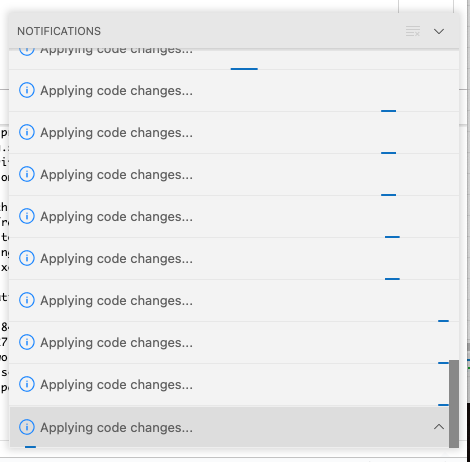
The problem seems to be that the "Applying code changes ..." functionality is repeatedly started over and over again, but seems to never stop.
It does not recover on its own, I have to restart vscode.
Environment
- Operating System: macOS 11.6.2 (20G314)
- JDK version:openjdk 17.0.1 2021-10-19
- Visual Studio Code version: 1.65.1
- Java extension version: v0.22.0
Steps To Reproduce
- Set "Hot code replace" to
auto - Halt on breakpoint
- Change code and save a few times in a row
After a few times it looks like this:
The log contains proprietary code, so I cannot easily share it here. But it seems fine, no repeating (error) messages of any kind. Just the change detection seems to kick in repeatedly and invoke the "hot code replace" every time (which never returns).
Current Result
"Applying code changes" goes crazy.
Expected Result
Apply codes changes. Java LSP process should permanently consume 200-300% CPU after it.
Additional Informations
If I use the manual "hot code replace" (the lightning symbol), I can't reproduce the issue.
Contributor guide
First steps
- Read the whole issue, then the project's contributing guide.
- Comment on the issue to say you are picking it up — it saves two people doing the same work.
- Fork the repository and make your change on a branch.
- Open a pull request that references the issue number.
Research direction
Start by reproducing the issue with automatic hot code replace, a breakpoint, and several saves, then inspect the Java LSP hot-code-replace and change-detection entry points. Compare this with the manual lightning-button flow. Done means repeated saves apply changes once without endless notifications or sustained 200–300% CPU usage.
Written by the indexing model from the issue text.
Assessment
- Tech stack
- java, typescript, vscode
- Domain
- developer-experience, tooling
- Issue type
- Bug
- Difficulty
- 4/5
- Estimated time
- 3-5 days
- Activity status
- Stale
- Clarity
- Mostly clear
- Newbie friendliness
- 35/100