redhat-developer / redhat-developer/vscode-java
hot code replace set to auto causes endless "appyling code changes" notifications
Dieses Issue hat noch niemand übernommen.
- Vorherrschende Sprache
- TypeScript
- Sterne
- 2.3k
- Forks
- 546
- Ø Merge
- 20 Std. 1 Min.
- Gemergte PRs (30 T.)
- 11
Beschreibung
Usually I use the "hode code replace" feature set to auto, so whenever I save the code is automatically injected into the running process. Since a few days this is not working as expected any more.
As soon as I save, the functionality kicks in and the java LSP process goes crazy. It goes up to 200-300% CPU and never comes back.
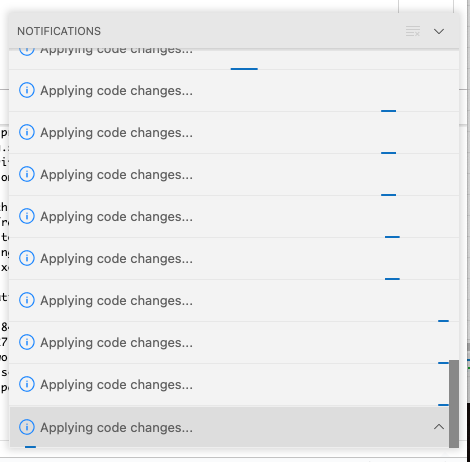
The problem seems to be that the "Applying code changes ..." functionality is repeatedly started over and over again, but seems to never stop.
It does not recover on its own, I have to restart vscode.
Environment
- Operating System: macOS 11.6.2 (20G314)
- JDK version:openjdk 17.0.1 2021-10-19
- Visual Studio Code version: 1.65.1
- Java extension version: v0.22.0
Steps To Reproduce
- Set "Hot code replace" to
auto - Halt on breakpoint
- Change code and save a few times in a row
After a few times it looks like this:
The log contains proprietary code, so I cannot easily share it here. But it seems fine, no repeating (error) messages of any kind. Just the change detection seems to kick in repeatedly and invoke the "hot code replace" every time (which never returns).
Current Result
"Applying code changes" goes crazy.
Expected Result
Apply codes changes. Java LSP process should permanently consume 200-300% CPU after it.
Additional Informations
If I use the manual "hot code replace" (the lightning symbol), I can't reproduce the issue.
Beitragsleitfaden
Erste Schritte
- Lies das ganze Issue und danach den Beitragsleitfaden des Projekts.
- Schreib ins Issue, dass du es übernimmst — das erspart doppelte Arbeit.
- Forke das Repository und arbeite in einem Branch.
- Öffne einen Pull Request, der die Issue-Nummer nennt.
Rechercherichtung
Beginne damit, das Problem mit automatic hot code replace, einem Haltepunkt und mehreren Speichervorgängen zu reproduzieren, und untersuche anschließend die Java LSP hot-code-replace- und Änderungserkennungseinstiegspunkte. Vergleiche dies mit dem manuellen lightning-button-Ablauf. Erledigt ist die Aufgabe, wenn wiederholte Speichervorgänge Änderungen einmalig anwenden, ohne endlose Benachrichtigungen oder eine anhaltende CPU-Auslastung von 200–300 %.
Vom Indexierungsmodell aus dem Issue-Text verfasst.
Bewertung
- Tech-Stack
- java, typescript, vscode
- Bereich
- developer-experience, tooling
- Issue-Typ
- Bug
- Schwierigkeit
- 4/5
- Geschätzter Aufwand
- 3-5 Tage
- Aktivitätsstatus
- Veraltet
- Klarheit
- Größtenteils klar
- Anfängerfreundlichkeit
- 35/100