redhat-developer / redhat-developer/vscode-java
Comment formatting not consistent with Eclipse with same xml profile
オープン
まだ誰も着手していません。
bug
formatter
- 主要言語
- TypeScript
- スター
- 2.3k
- フォーク
- 546
- 平均マージ
- 20時間 1分
- マージ済み PR(30日)
- 11
説明
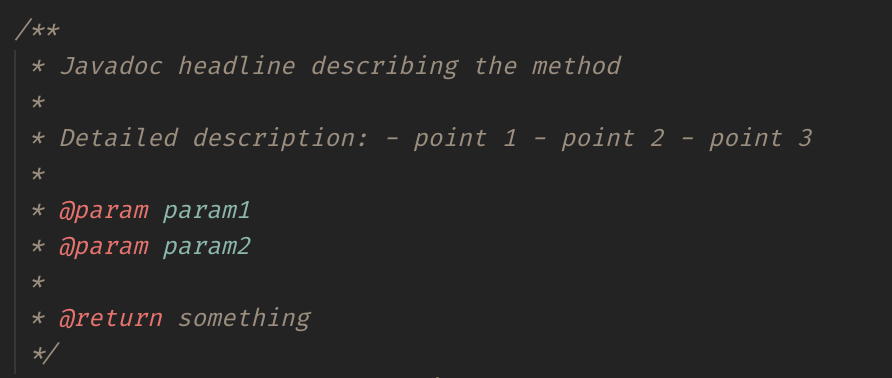
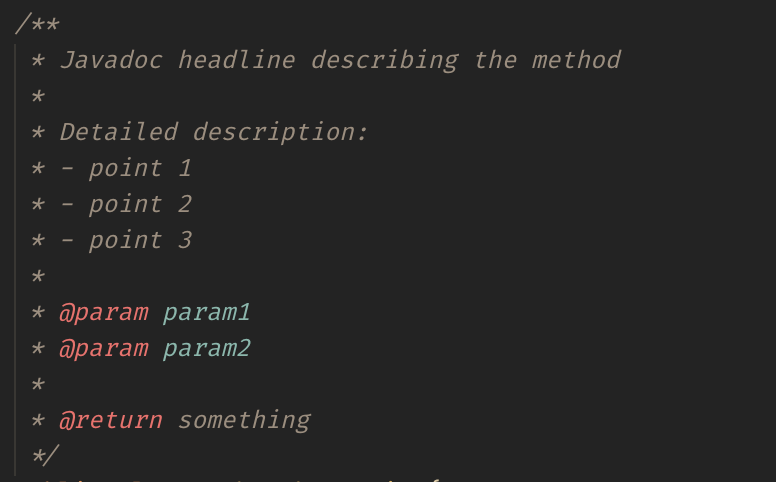
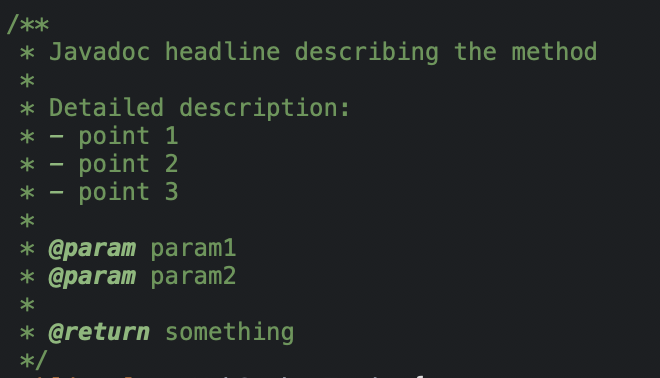
I'm using an Eclipse format XML profile to indent/format my java code in VS Code. For comments, the same profile is generating different results.
Environment
- Operating System: macOS Catalina 10.15.4
- JDK version: OpenJDK Runtime Environment (AdoptOpenJDK)(build 1.8.0_252-b09)
- Visual Studio Code version: 1.44.2
- Java extension version: 0.60.0 (April 16, 2020)
Steps To Reproduce
Settings for Java format:

Eclipse formatting profile from the settings above (unzip to get the XML profile):
eclipse-java-formatter.xml.zip
- Paste the following code snippet in a Java file.
/**
 * Javadoc headline describing the method
 *
 * Detailed description:
 * - point 1
 * - point 2
 * - point 3
 *
 * @param param1
 * @param param2
 *
 * @return something
 */
- Select the code snippet and run
Format Selectionfrom the command palette.
Current Result
Expected Result
Eclipse output with the same profile:
Additional Informations
コントリビューションガイド
はじめの一歩
- issue を最後まで読み、次にプロジェクトのコントリビューションガイドを読みます。
- 着手することを issue にコメントします — 二人が同じ作業をするのを防げます。
- リポジトリをフォークし、ブランチを切って変更します。
- issue 番号を参照したプルリクエストを送ります。
調査の方向性
まず、提供されたEclipse XMLプロファイルとJavadocスニペットを使い、Format SelectionでVS CodeにおけるJavaコメントのフォーマット差を再現します。現在の結果を期待される結果およびEclipseのスクリーンショットと比較します。このプロファイルでフォーマットされたコメントがEclipseの出力と一致すれば完了です。
索引モデルが issue の本文から書いたものです。
評価
- 技術スタック
- java
- 領域
- tooling
- issue の種類
- バグ
- 難易度
- 3/5
- 見積もり時間
- 1〜2日
- 活発さ
- 停滞
- 明瞭さ
- おおむね明確
- 初心者へのやさしさ
- 35/100