redhat-developer / redhat-developer/vscode-java
Comment formatting not consistent with Eclipse with same xml profile
未关闭
还没有人认领这个 Issue。
bug
formatter
- 主要语言
- TypeScript
- 星标
- 2.3k
- 派生
- 546
- 平均合并
- 20 小时 1 分钟
- 30 天内合并 PR
- 11
描述
I'm using an Eclipse format XML profile to indent/format my java code in VS Code. For comments, the same profile is generating different results.
Environment
- Operating System: macOS Catalina 10.15.4
- JDK version: OpenJDK Runtime Environment (AdoptOpenJDK)(build 1.8.0_252-b09)
- Visual Studio Code version: 1.44.2
- Java extension version: 0.60.0 (April 16, 2020)
Steps To Reproduce
Settings for Java format:

Eclipse formatting profile from the settings above (unzip to get the XML profile):
eclipse-java-formatter.xml.zip
- Paste the following code snippet in a Java file.
/**
 * Javadoc headline describing the method
 *
 * Detailed description:
 * - point 1
 * - point 2
 * - point 3
 *
 * @param param1
 * @param param2
 *
 * @return something
 */
- Select the code snippet and run
Format Selectionfrom the command palette.
Current Result
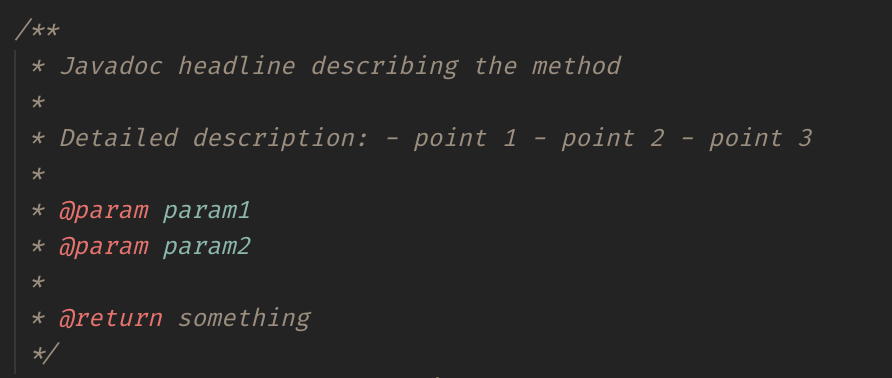
Expected Result
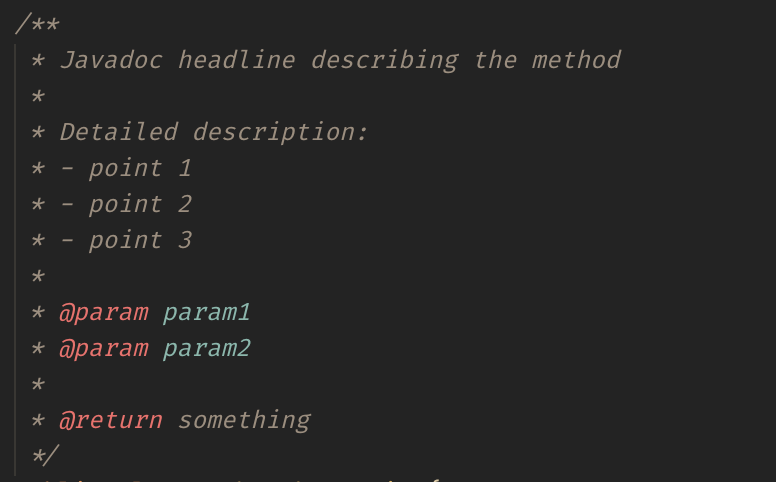
Eclipse output with the same profile:
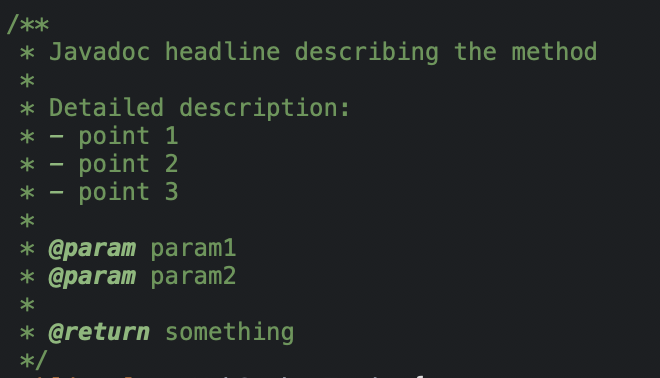
Additional Informations
贡献指南
从这里开始
- 先读完整个 Issue,再读项目的贡献指南。
- 在 Issue 下留言说明你要接手 —— 这能避免两个人做同样的事。
- Fork 仓库,在一个分支上完成修改。
- 提交 Pull Request,并在描述里引用这个 Issue 编号。
调研方向
首先,使用提供的 Eclipse XML 配置文件和 Javadoc 代码片段,通过 Format Selection 在 VS Code 中重现 Java 注释格式化差异。将当前结果与预期结果以及 Eclipse 截图进行比较;当格式化后的注释与此配置文件的 Eclipse 输出一致时,即表示完成。
由索引模型根据 Issue 内容生成。
评估
- 技术栈
- java
- 领域
- tooling
- Issue 类型
- 缺陷
- 难度
- 3/5
- 预计耗时
- 1-2 天
- 活跃度
- 停滞
- 描述清晰度
- 基本清楚
- 新手友好度
- 35/100