plotly / plotly/react-plotly.js
Graph content cropped after legend update
まだ誰も着手していません。
- 主要言語
- JavaScript
- スター
- 1.1k
- フォーク
- 138
- 平均マージ
- 3日 2時間
- マージ済み PR(30日)
- 4
説明
Hi,
It seems that when I update the data in a Plot object, it often occurs that the content of the new graph is clipped at the position where the legend used to be before the update (bars are missing on the right). The clipPath elements (highlighted in second image) with class "axesclip" seem to have something to do with it.

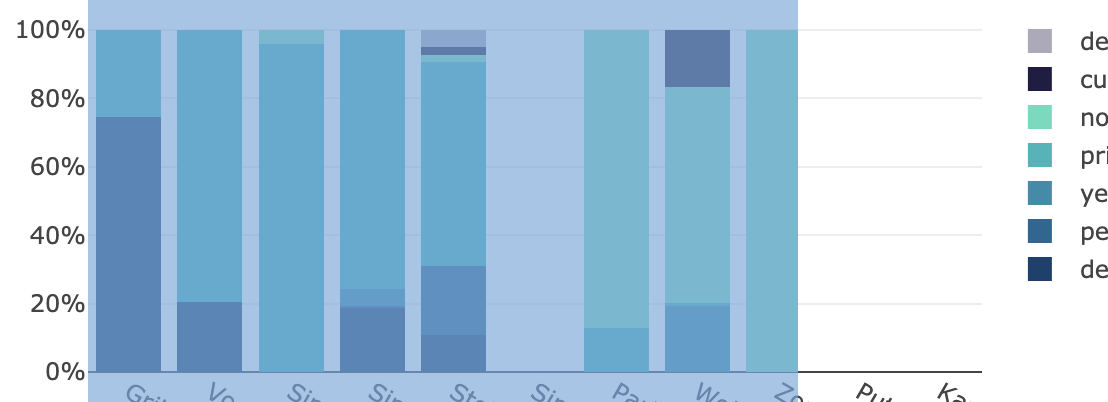
Does anyone have an idea how this could be resolved?
Does a manual trigger to redraw the entire plot exist in react?
Thank you.
Kind regards,
Timo
コントリビューションガイド
このリポジトリのコントリビューションガイドは索引されていません
はじめの一歩
- issue を最後まで読み、次にプロジェクトのコントリビューションガイドを読みます。
- 着手することを issue にコメントします — 二人が同じ作業をするのを防げます。
- リポジトリをフォークし、ブランチを切って変更します。
- issue 番号を参照したプルリクエストを送ります。
調査の方向性
まず、報告されたグラフの更新を Plot オブジェクトで再現し、凡例の変更前後で axesclip clipPath 要素を調べます。React の更新経路を追跡し、更新されたクリッピング領域でグラフが再描画されるかどうかを確認します。凡例の変更後に更新されたコンテンツが切り取られなくなれば完了です。
索引モデルが issue の本文から書いたものです。
評価
- 技術スタック
- javascript, react
- 領域
- data-visualization, frontend
- issue の種類
- バグ
- 難易度
- 3/5
- 見積もり時間
- 1〜2日
- 活発さ
- 停滞
- 明瞭さ
- 説明が足りない
- 初心者へのやさしさ
- 35/100