plotly / plotly/react-plotly.js
Graph content cropped after legend update
未關閉
還沒有人認領這個 Issue。
- 主要語言
- JavaScript
- 星號
- 1.1k
- 分支
- 138
- 平均合併
- 3 天 2 小時
- 30 天內合併 PR
- 4
描述
Hi,
It seems that when I update the data in a Plot object, it often occurs that the content of the new graph is clipped at the position where the legend used to be before the update (bars are missing on the right). The clipPath elements (highlighted in second image) with class "axesclip" seem to have something to do with it.

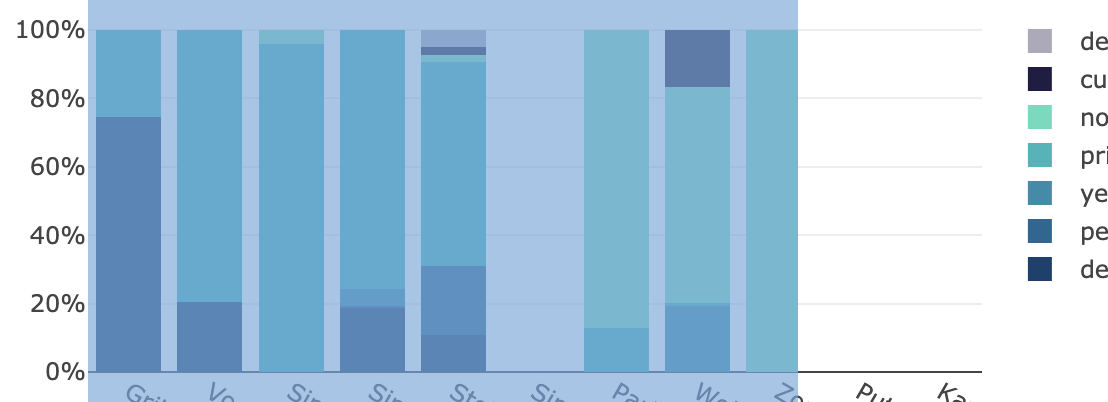
Does anyone have an idea how this could be resolved?
Does a manual trigger to redraw the entire plot exist in react?
Thank you.
Kind regards,
Timo
貢獻指南
這個儲存庫沒有索引到貢獻指南
從這裡開始
- 先讀完整個 Issue,再讀專案的貢獻指南。
- 在 Issue 下留言說明你要接手 —— 這能避免兩個人做同樣的事。
- Fork 儲存庫,在一個分支上完成修改。
- 送出 Pull Request,並在描述裡引用這個 Issue 編號。
研究方向
首先,在 Plot 物件中重現回報的圖形更新,並檢查圖例變更前後的 axesclip clipPath 元素。追蹤 React 更新路徑,並判斷圖形是否會使用更新後的裁剪區域重新繪製;完成的標準是圖例變更後,更新的內容不再被裁剪。
由索引模型根據 Issue 內容生成。
評估
- 技術堆疊
- javascript, react
- 領域
- data-visualization, frontend
- Issue 類型
- 缺陷
- 難度
- 3/5
- 預估耗時
- 1-2 天
- 活躍度
- 停滯
- 描述清晰度
- 需要釐清
- 新手友好度
- 35/100