plotly / plotly/react-plotly.js
Coordinates of a shape don't work
Dieses Issue hat noch niemand übernommen.
- Vorherrschende Sprache
- JavaScript
- Sterne
- 1.1k
- Forks
- 138
- Ø Merge
- 3 T. 2 Std.
- Gemergte PRs (30 T.)
- 4
Beschreibung
Probably it is something very stupid, but it is driving me crazy. I hope someone can help me.
I have been trying using shapes following the instructions... whichever X0, Y0, X1, Y1, I set, the shapes don't change position.
Here following I put a very simple component showing the problem. I would expect an horizontal line at Y = 14, but this is not the case. Whichever are the values in X0, Y0, X1, Y1 and the xref/yref settings the the output is always the same as shown in the attached image
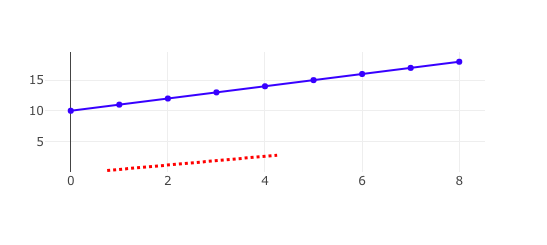
.
import React, { Component } from 'react';
import Plot from 'react-plotly.js';
class App extends Component {
render() {
const data = [{
x: [0,1,2,3,4,5,6,7,8],
y: [10,11,12,13,14,15,16,17,18],
type: 'scatter',
mode: 'lines+points',
marker: { color: 'blue'}
}];
  const layout = {
    width: 600,
    height: 300,
    showlegend: false,
    shapes: [
      {
        type: 'line',
        line: {
          color: 'red',
          width: 3,
          dash: 'dot',
        },
        X0: 0,
        Y0: 14,
        X1: 8,
        Y1: 14
      }
    ]
  };

  return (
    <Plot data={ data } layout={ layout}/>
  )
}
}
export default App;
Beitragsleitfaden
Für dieses Repository ist kein Beitragsleitfaden indexiert
Erste Schritte
- Lies das ganze Issue und danach den Beitragsleitfaden des Projekts.
- Schreib ins Issue, dass du es übernimmst — das erspart doppelte Arbeit.
- Forke das Repository und arbeite in einem Branch.
- Öffne einen Pull Request, der die Issue-Nummer nennt.
Rechercherichtung
Beginne mit der bereitgestellten App-Komponente und untersuche die layout.shapes-Konfiguration, insbesondere die für die Linie verwendeten Namen der Koordinateneigenschaften. Bestätige, dass das Beispiel eine horizontale rote Linie bei Y = 14 rendert, wenn die Koordinatenfelder erkannt werden.
Vom Indexierungsmodell aus dem Issue-Text verfasst.
Bewertung
- Tech-Stack
- javascript, react
- Bereich
- data-visualization, frontend
- Issue-Typ
- Bug
- Schwierigkeit
- 1/5
- Geschätzter Aufwand
- Unter einer Stunde
- Aktivitätsstatus
- Veraltet
- Klarheit
- Klar beschrieben
- Anfängerfreundlichkeit
- 50/100