Line break for text is not working in Scattergl()
オープン
まだ誰も着手していません。
bug
P3
- 主要言語
- Python
- スター
- 18.8k
- フォーク
- 2.8k
- 平均マージ
- 16時間 26分
- マージ済み PR(30日)
- 21
説明
Python: 3.9
Plotly: 2.4.2+
from plotly.subplots import make_subplots
import plotly.graph_objects as go

fig = make_subplots(rows=1, cols=2, subplot_titles=("Using go.Scattergl()", "Using go.Scatter()"))

fig.add_trace(
    go.Scattergl(x=[1, 2, 3], y=[4, 5, 6], text="This is a<br>line break.", mode='markers+text+lines'),
    row=1, col=1
)

fig.add_trace(
    go.Scatter(x=[20, 30, 40], y=[50, 60, 70], text="This is a<br>line break.", mode='markers+text+lines'),
    row=1, col=2
)

fig.update_layout(height=600, width=800)
fig.write_html("test_gl_linebreak.html")
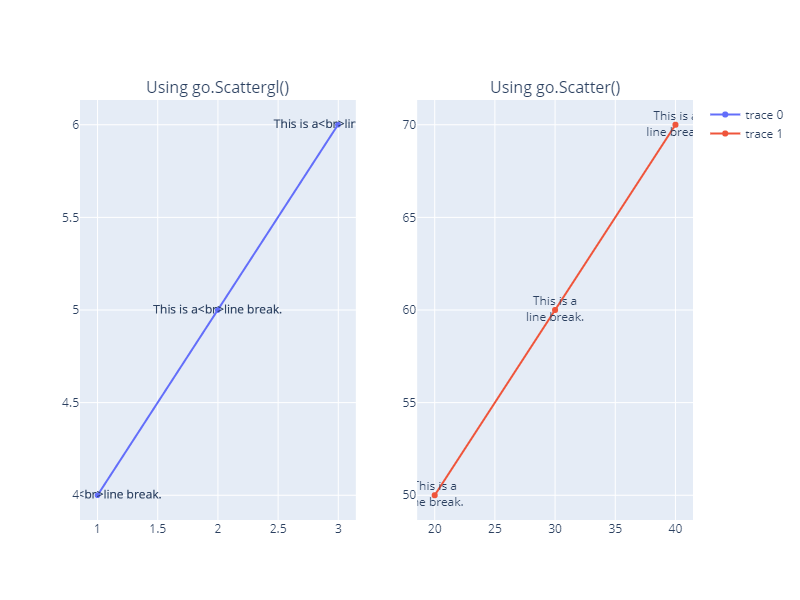
)
コントリビューションガイド
はじめの一歩
- issue を最後まで読み、次にプロジェクトのコントリビューションガイドを読みます。
- 着手することを issue にコメントします — 二人が同じ作業をするのを防げます。
- リポジトリをフォークし、ブランチを切って変更します。
- issue 番号を参照したプルリクエストを送ります。
調査の方向性
まず、提供されている Python の再現コードを実行し、test_gl_linebreak.html に書き込まれた 2 つのトレース、Scattergl() と Scatter() を比較します。Scatter() で同じテキストに改行が表示されることを確認した後、Scattergl のテキストレンダリングパスを調査します。Scattergl のテキストで改行が一貫してレンダリングされ、通常の Scatter のケースにリグレッションが発生しなければ完了です。
索引モデルが issue の本文から書いたものです。
評価
- 技術スタック
- python
- 領域
- data-visualization
- issue の種類
- バグ
- 難易度
- 3/5
- 見積もり時間
- 1〜2日
- 活発さ
- 活発
- 明瞭さ
- おおむね明確
- 初心者へのやさしさ
- 65/100