Line break for text is not working in Scattergl()
未关闭
还没有人认领这个 Issue。
bug
P3
- 主要语言
- Python
- 星标
- 18.8k
- 派生
- 2.8k
- 平均合并
- 16 小时 26 分钟
- 30 天内合并 PR
- 21
描述
Python: 3.9
Plotly: 2.4.2+
from plotly.subplots import make_subplots
import plotly.graph_objects as go

fig = make_subplots(rows=1, cols=2, subplot_titles=("Using go.Scattergl()", "Using go.Scatter()"))

fig.add_trace(
    go.Scattergl(x=[1, 2, 3], y=[4, 5, 6], text="This is a<br>line break.", mode='markers+text+lines'),
    row=1, col=1
)

fig.add_trace(
    go.Scatter(x=[20, 30, 40], y=[50, 60, 70], text="This is a<br>line break.", mode='markers+text+lines'),
    row=1, col=2
)

fig.update_layout(height=600, width=800)
fig.write_html("test_gl_linebreak.html")
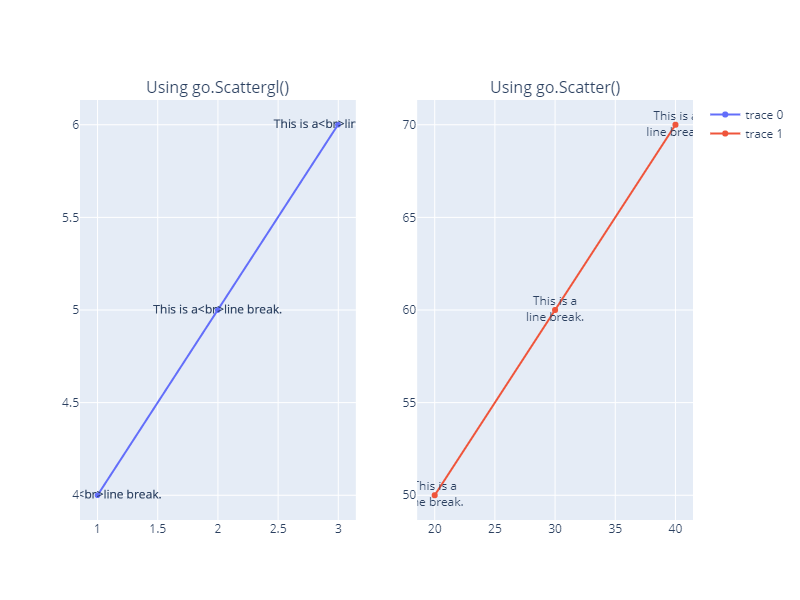
)
贡献指南
从这里开始
- 先读完整个 Issue,再读项目的贡献指南。
- 在 Issue 下留言说明你要接手 —— 这能避免两个人做同样的事。
- Fork 仓库,在一个分支上完成修改。
- 提交 Pull Request,并在描述里引用这个 Issue 编号。
调研方向
首先运行提供的 Python 复现代码,并比较写入 test_gl_linebreak.html 的两条 trace:Scattergl() 和 Scatter()。确认相同文本在 Scatter() 中会显示换行后,检查 Scattergl 的文本渲染路径。对于 Scattergl 文本,换行能够一致地渲染,且不会导致常规 Scatter 情况出现回归,即视为完成。
由索引模型根据 Issue 内容生成。
评估
- 技术栈
- python
- 领域
- data-visualization
- Issue 类型
- 缺陷
- 难度
- 3/5
- 预计耗时
- 1-2 天
- 活跃度
- 活跃
- 描述清晰度
- 基本清楚
- 新手友好度
- 65/100