Text scaling bugs when using dynamic CSS transform and content-editable after clicking on the plot
まだ誰も着手していません。
- 主要言語
- JavaScript
- スター
- 18.3k
- フォーク
- 2k
- 平均マージ
- 2日 12時間
- マージ済み PR(30日)
- 28
説明
Hi, this is a reproducible bug that we have run into in our charts. Unfortunately, this only happens on Chrome browsers which the majority of our users are using.
When using a dynamic zoom level control for scaling, there is unexplainable sizing issues with the annotations on the plot. For whatever reason, this occurs after clicking on the chart.
I have attached a minimal reproducible example with steps:
https://codepen.io/woon2222/pen/XWxRKjN
I am not sure why this occurs when the content-editable element is present.
Here is a video of what happens:
5440e09e-1b8e-4148-9183-0546966f0f62.webm
And some screenshots:
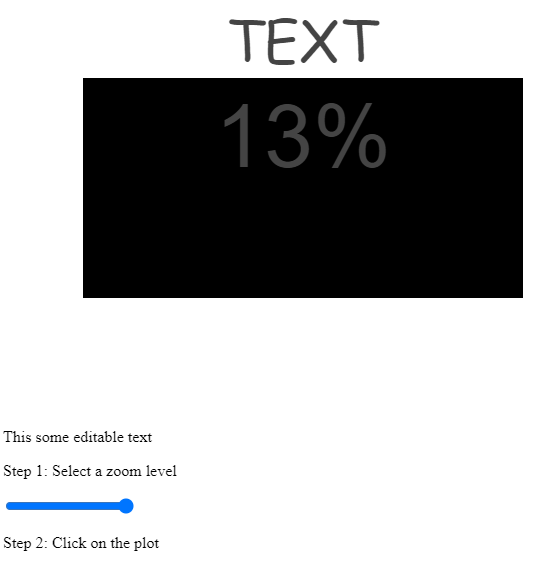

Perhaps someone could shed some light on this or has a workaround that we could use.
コントリビューションガイド
はじめの一歩
- issue を最後まで読み、次にプロジェクトのコントリビューションガイドを読みます。
- 着手することを issue にコメントします — 二人が同じ作業をするのを防げます。
- リポジトリをフォークし、ブランチを切って変更します。
- issue 番号を参照したプルリクエストを送ります。
調査の方向性
まず、リンク先の CodePen の問題を Chrome で再現し、動的ズーム、chart のクリック、CSS transform、content-editable の操作を順に確認します。クリック後に chart が annotation のサイズをどのように更新するかを追跡し、content-editable 要素がある場合とない場合の動作を比較します。plot をクリックした後も annotation が期待されるサイズを維持すれば完了です。
索引モデルが issue の本文から書いたものです。
評価
- 技術スタック
- css, javascript
- 領域
- data-visualization, frontend
- issue の種類
- バグ
- 難易度
- 4/5
- 見積もり時間
- 3〜5日
- 活発さ
- 停滞
- 明瞭さ
- 説明が足りない
- 初心者へのやさしさ
- 25/100