microsoft / microsoft/vscode-java-debug
highlight project class in stacktrace
まだ誰も着手していません。
- 主要言語
- TypeScript
- スター
- 591
- フォーク
- 429
- 平均マージ
- 1日 9時間
- マージ済み PR(30日)
- 19
説明
Environment
- Electron: 11.3.0
- Chrome: 87.0.4280.141
- Node.js: 12.18.3
- V8: 8.7.220.31-electron.0
- OS: Windows_NT x64 6.1.7601(WIN7 SP1)
- JDK version: openjdk version "11.0.7" 2020-04-14 OpenJDK Runtime Environment AdoptOpenJDK (build 11.0.7+10) OpenJDK 64-Bit Server VM AdoptOpenJDK (build 11.0.7+10, mixed mode)
- Visual Studio Code version: 1.54.1 f30a9b73e8ffc278e71575118b6bf568f04587c8
- Java extension version: v0.12.1
- Java Debugger extension version: v0.31.0
i've set the debuger console like this:
"java.debug.settings.console": "internalConsole"
but all classes just display within stacktrace in same way when error happens

i wonder is it possible to highlight class which is in my own project but not in dependencies, just like idea does
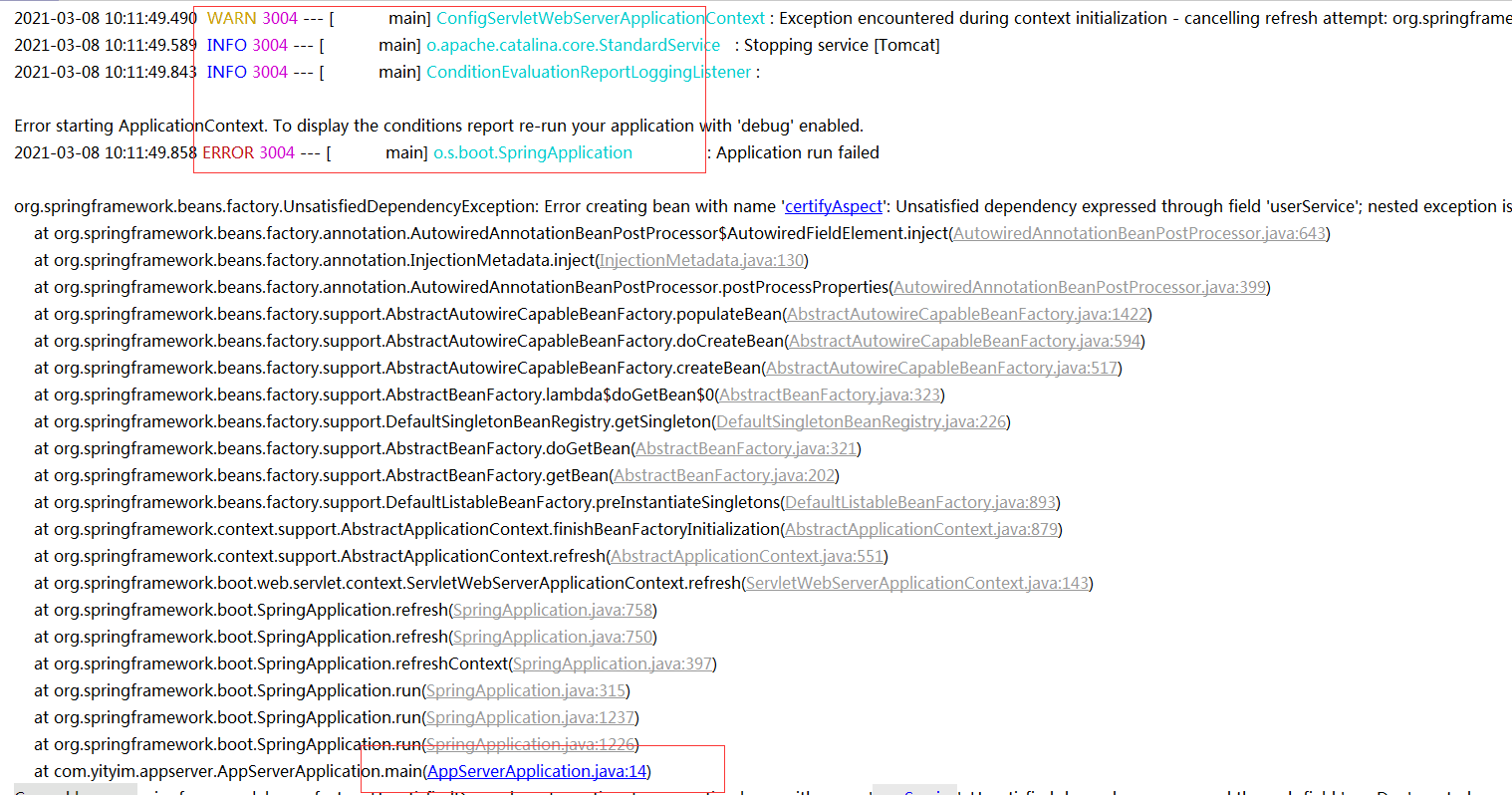
by the way,the colorized log setting of a springboot project failed in VSC,but work normaly in idea,this is "logback.xml" setting
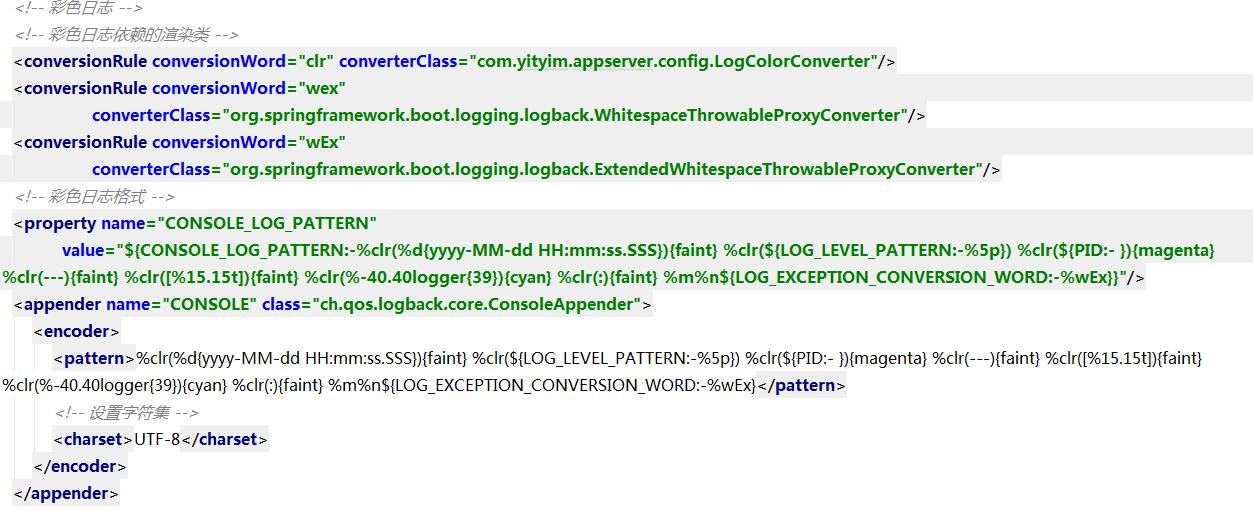
`
public class LogColorConverter extends CompositeConverter {
private static final Map<String, AnsiElement> ELEMENTS;
static {
	Map<String, AnsiElement> ansiElements = new HashMap<>();
	ansiElements.put("faint", AnsiStyle.FAINT);
	ansiElements.put("red", AnsiColor.RED);
	ansiElements.put("green", AnsiColor.GREEN);
	ansiElements.put("yellow", AnsiColor.YELLOW);
	ansiElements.put("blue", AnsiColor.BLUE);
	ansiElements.put("magenta", AnsiColor.MAGENTA);
	ansiElements.put("cyan", AnsiColor.CYAN);
	ELEMENTS = Collections.unmodifiableMap(ansiElements);
}

private static final Map<Integer, AnsiElement> LEVELS;

static {
	Map<Integer, AnsiElement> ansiLevels = new HashMap<>();
	ansiLevels.put(Level.ERROR_INTEGER, AnsiColor.RED);
	ansiLevels.put(Level.WARN_INTEGER, AnsiColor.YELLOW);
	ansiLevels.put(Level.INFO_INTEGER, AnsiColor.BLUE);
	ansiLevels.put(Level.DEBUG_INTEGER, AnsiColor.GREEN);
	LEVELS = Collections.unmodifiableMap(ansiLevels);
}

@Override
protected String transform(ILoggingEvent event, String in) {
	AnsiElement element = ELEMENTS.get(getFirstOption());
	if (element == null) {
		// Assume highlighting
		element = LEVELS.get(event.getLevel().toInteger());
		element = (element != null) ? element : AnsiColor.BLACK;
	}
	return toAnsiString(in, element);
}

protected String toAnsiString(String in, AnsiElement element) {
	return AnsiOutput.toString(element, in);
}
}
`
コントリビューションガイド
はじめの一歩
- issue を最後まで読み、次にプロジェクトのコントリビューションガイドを読みます。
- 着手することを issue にコメントします — 二人が同じ作業をするのを防げます。
- リポジトリをフォークし、ブランチを切って変更します。
- issue 番号を参照したプルリクエストを送ります。
調査の方向性
ソースファイル、テスト、エントリポイントは指定されていません。"java.debug.settings.console" を "internalConsole" に設定して Java デバッグセッションを再現し、スタックトレースと Spring Boot ANSI ログがどのように表示されるかを調査し、依存関係のフレームやログ出力を壊すことなくプロジェクトのクラスが視覚的に区別されることを完了条件として定義します。
索引モデルが issue の本文から書いたものです。
評価
- 技術スタック
- electron, java, typescript, vscode
- 領域
- devtools
- issue の種類
- 機能追加
- 難易度
- 4/5
- 見積もり時間
- 3〜5日
- 活発さ
- 停滞
- 明瞭さ
- 説明が足りない
- 初心者へのやさしさ
- 25/100