microsoft / microsoft/vscode-java-debug
highlight project class in stacktrace
还没有人认领这个 Issue。
- 主要语言
- TypeScript
- 星标
- 591
- 派生
- 429
- 平均合并
- 1 天 9 小时
- 30 天内合并 PR
- 19
描述
Environment
- Electron: 11.3.0
- Chrome: 87.0.4280.141
- Node.js: 12.18.3
- V8: 8.7.220.31-electron.0
- OS: Windows_NT x64 6.1.7601(WIN7 SP1)
- JDK version: openjdk version "11.0.7" 2020-04-14 OpenJDK Runtime Environment AdoptOpenJDK (build 11.0.7+10) OpenJDK 64-Bit Server VM AdoptOpenJDK (build 11.0.7+10, mixed mode)
- Visual Studio Code version: 1.54.1 f30a9b73e8ffc278e71575118b6bf568f04587c8
- Java extension version: v0.12.1
- Java Debugger extension version: v0.31.0
i've set the debuger console like this:
"java.debug.settings.console": "internalConsole"
but all classes just display within stacktrace in same way when error happens

i wonder is it possible to highlight class which is in my own project but not in dependencies, just like idea does
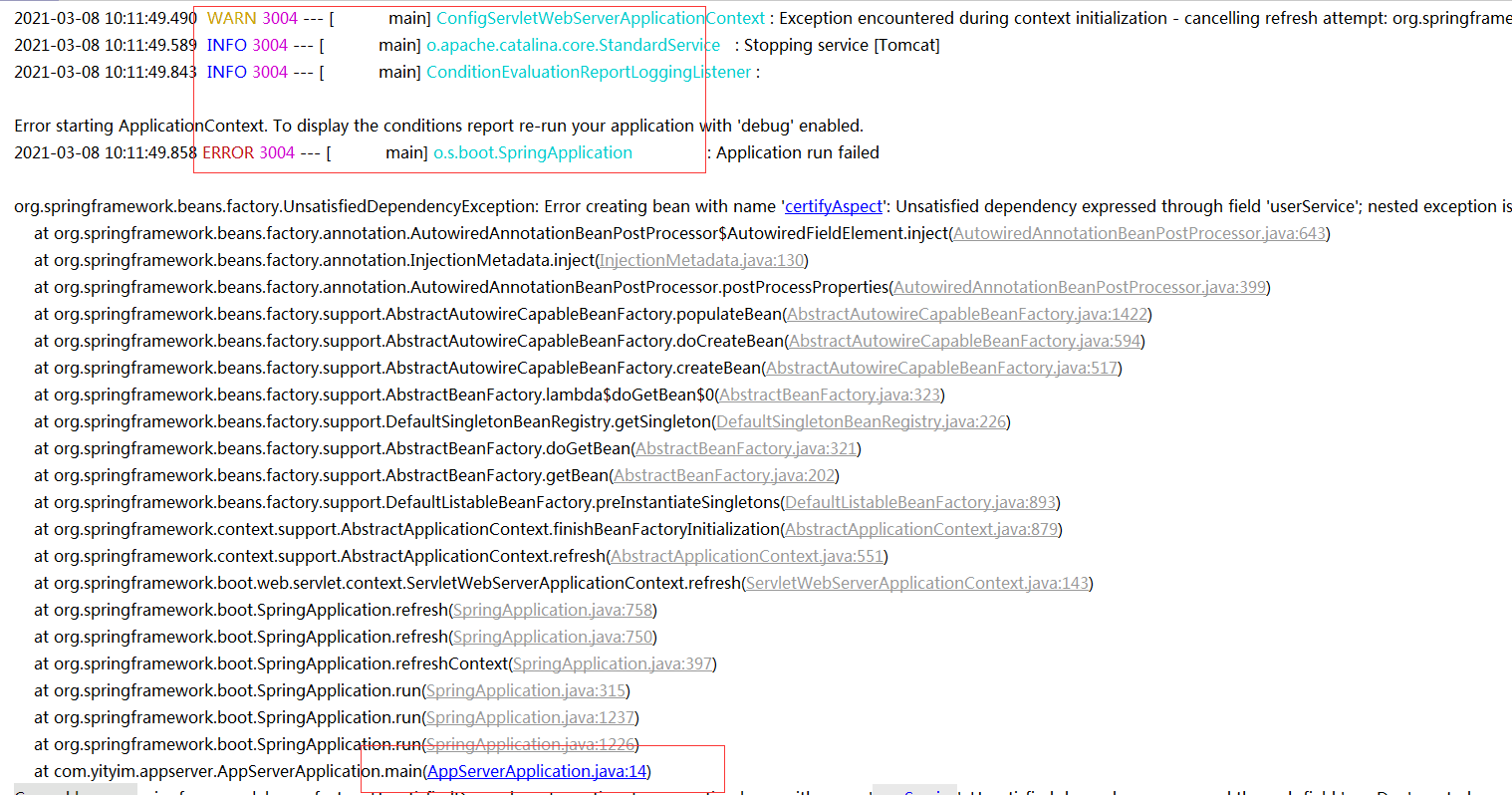
by the way,the colorized log setting of a springboot project failed in VSC,but work normaly in idea,this is "logback.xml" setting
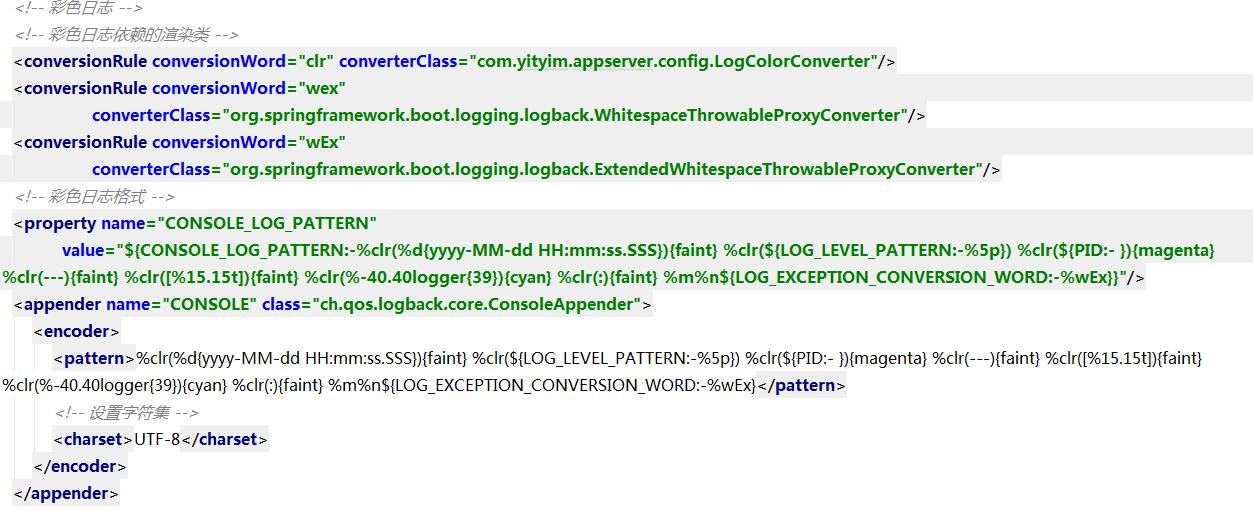
`
public class LogColorConverter extends CompositeConverter {
private static final Map<String, AnsiElement> ELEMENTS;
static {
	Map<String, AnsiElement> ansiElements = new HashMap<>();
	ansiElements.put("faint", AnsiStyle.FAINT);
	ansiElements.put("red", AnsiColor.RED);
	ansiElements.put("green", AnsiColor.GREEN);
	ansiElements.put("yellow", AnsiColor.YELLOW);
	ansiElements.put("blue", AnsiColor.BLUE);
	ansiElements.put("magenta", AnsiColor.MAGENTA);
	ansiElements.put("cyan", AnsiColor.CYAN);
	ELEMENTS = Collections.unmodifiableMap(ansiElements);
}

private static final Map<Integer, AnsiElement> LEVELS;

static {
	Map<Integer, AnsiElement> ansiLevels = new HashMap<>();
	ansiLevels.put(Level.ERROR_INTEGER, AnsiColor.RED);
	ansiLevels.put(Level.WARN_INTEGER, AnsiColor.YELLOW);
	ansiLevels.put(Level.INFO_INTEGER, AnsiColor.BLUE);
	ansiLevels.put(Level.DEBUG_INTEGER, AnsiColor.GREEN);
	LEVELS = Collections.unmodifiableMap(ansiLevels);
}

@Override
protected String transform(ILoggingEvent event, String in) {
	AnsiElement element = ELEMENTS.get(getFirstOption());
	if (element == null) {
		// Assume highlighting
		element = LEVELS.get(event.getLevel().toInteger());
		element = (element != null) ? element : AnsiColor.BLACK;
	}
	return toAnsiString(in, element);
}

protected String toAnsiString(String in, AnsiElement element) {
	return AnsiOutput.toString(element, in);
}
}
`
贡献指南
从这里开始
- 先读完整个 Issue,再读项目的贡献指南。
- 在 Issue 下留言说明你要接手 —— 这能避免两个人做同样的事。
- Fork 仓库,在一个分支上完成修改。
- 提交 Pull Request,并在描述里引用这个 Issue 编号。
调研方向
未指定源文件、测试或入口点。使用将 "java.debug.settings.console" 设置为 "internalConsole" 的配置重现 Java 调试会话,检查堆栈跟踪和 Spring Boot ANSI 日志的呈现方式,并将完成标准定义为:项目类能够在视觉上加以区分,同时不破坏依赖项帧或日志输出。
由索引模型根据 Issue 内容生成。
评估
- 技术栈
- electron, java, typescript, vscode
- 领域
- devtools
- Issue 类型
- 功能
- 难度
- 4/5
- 预计耗时
- 3-5 天
- 活跃度
- 停滞
- 描述清晰度
- 需要澄清
- 新手友好度
- 25/100