mapbox / mapbox/MapboxGeocoder.swift
focalLocation not returning expected results
Chưa có ai nhận issue này.
- Ngôn ngữ chính
- Swift
- Star
- 133
- Fork
- 46
- Chỉ số merge pull request
- Không có pull request nào được merge trong 30 ngày
Mô tả
Using the example code, plus adding a bit to show placemarks returned from ForwardGeocodeOptions, I came up with this testing code:
func mapView(_ mapView: MGLMapView, regionDidChangeAnimated animated: Bool) {
        geocodingDataTask?.cancel()
         self.outputText.text = ""
// Variables.userLat and Variables.userLng are set through locationManager
        let options = ReverseGeocodeOptions(coordinate: CLLocationCoordinate2D(latitude: Variables.userLat, longitude: Variables.userLng))
        geocodingDataTask = geocoder.geocode(options) { [unowned self] (placemarks, attribution, error) in
            if let error = error {
                NSLog("%@", error)
            } else if let placemarks = placemarks, !placemarks.isEmpty {
                self.resultsLabel.text = placemarks[0].qualifiedName
                let foptions = ForwardGeocodeOptions(query: self.inputText.text!)
                // To refine the search, you can set various properties on the options object.
                foptions.allowedISOCountryCodes = ["US"]
                foptions.focalLocation = CLLocation(latitude: Variables.userLat, longitude: Variables.userLng)
                let neLat = Variables.userLat + 1.0
                let neLng = Variables.userLng + 1.0
                foptions.allowedRegion?.northEast = CLLocationCoordinate2D(latitude: neLat, longitude: neLng)
                let swLat = Variables.userLat - 1.0
                let swLng = Variables.userLng - 1.0
                foptions.allowedRegion?.southWest = CLLocationCoordinate2D(latitude: swLat, longitude: swLng)
                foptions.allowedScopes = [.address, .pointOfInterest]
                let _ = geocoder.geocode(foptions) { (placemarks, attribution, error) in
                    guard let placemark = placemarks?.first else {
                        return
                    }
                    let coordinate = placemark.location.coordinate
                    print("\(coordinate.latitude), \(coordinate.longitude)")
                    self.inputLat.text = coordinate.latitude.description
                    self.inputLng.text = coordinate.longitude.description
                    var string = ""
                    for mark in placemarks! {
                        if string != "" {
                            string += "\n"
                        }
                        string += mark.qualifiedName
                    }
                    self.outputText.text = string
                }

            } else {
                self.resultsLabel.text = "No results"
            }
        }
    }
That gives me a mini-app to test out the data that is returned when I change locations in the Xcode Simulator.
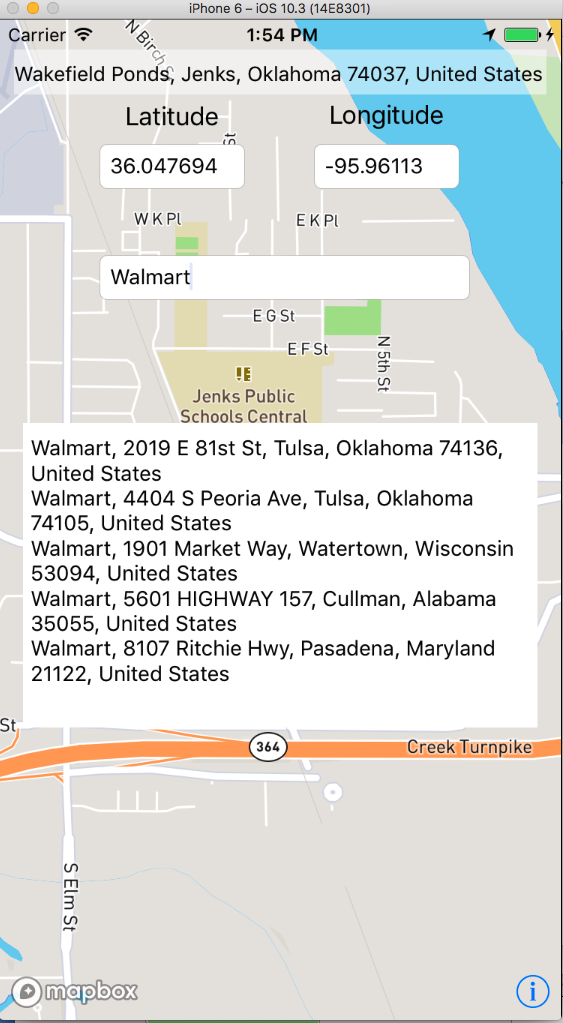
As you can see from this shot, I have centered the map in Jenks, OK (a small town just outside of Tulsa, OK - sort of a 'central US' location.)
When searching for a common place in that area ("Walmart" - which is based in nearby Arkansas, so there are plenty of them around), you can see that only 2 'local' Walmart's come back in the search.
Now, let's move to Bentonville, AR - the home of Walmart......
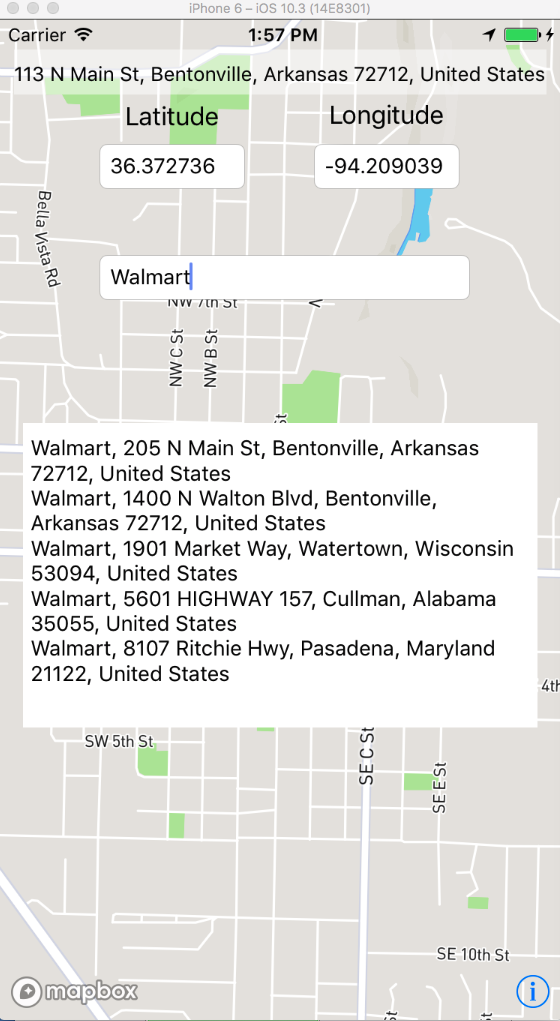
And, we get two top new results, but the others are the same (and much farther away than Tulsa, OK.....)
We found that if we add the town to the first of the search, the results are much better:
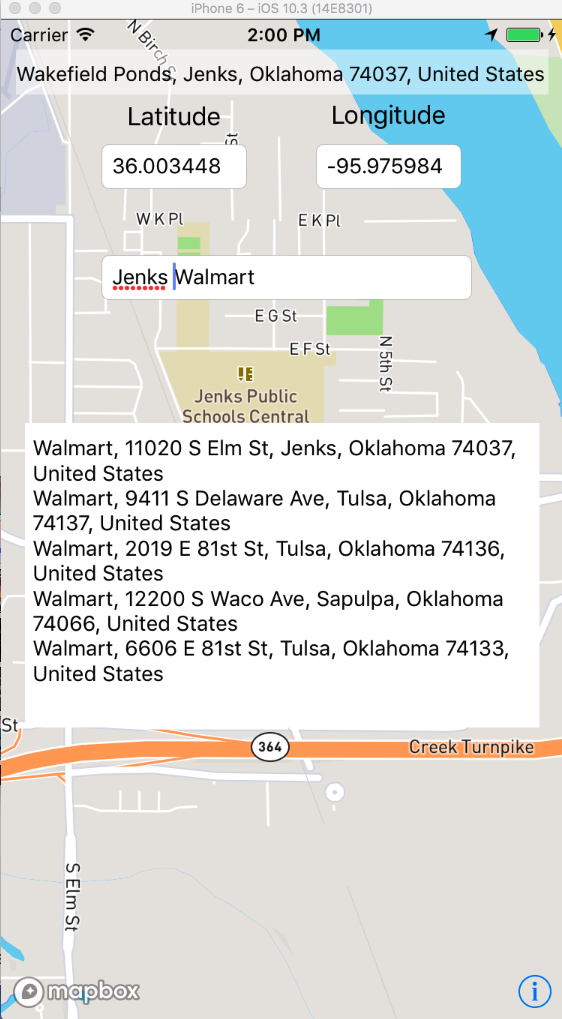
(similar results are true for every search we did - various cities around the US and with other 'common places' like Quiznos (similar results as Walmart when in their home town of Denver, CO...)
As you can see from my code, I tried using the allowedRegion?.northEast and southWest (as I understand it, those should set the search area to about 100 miles around the location, though I'm not sure I set that up right), though no difference was found from this setup (i.e., with/without I get the same results).
The only 'better' results were by putting in the town name along with the 'common' one (though, oddly, different results were returned if the town name was before or after the common one - I didn't check exactly, though I think they are 'best' (i.e., locations are all pretty near) from putting the town name after the common one)
What can I do to get better results without having to tell the user to enter the town name (not a very desirable plan! :)
Thank you in advance for tips - the lookup is a part of my first app (not the test stuff shown in the pictures! ) and one of the key features the users expect is to pull up 'nearby' common places, so it is an important thing for us that this work much more reliably than we are seeing now.
Hướng dẫn đóng góp
Bắt đầu từ đâu
- Đọc hết issue, rồi đọc hướng dẫn đóng góp của dự án.
- Bình luận trên issue rằng bạn sẽ nhận — tránh hai người làm cùng một việc.
- Fork repository và làm thay đổi trên một nhánh.
- Mở pull request có tham chiếu số hiệu của issue.
Hướng nghiên cứu
Bắt đầu với ví dụ ForwardGeocodeOptions trong issue và tái hiện các tìm kiếm Walmart trong khi thay đổi focalLocation và allowedRegion. So sánh các placemark được trả về cho Jenks, Bentonville và những địa điểm khác được mô tả; công việc được xem là hoàn tất khi xác định được liệu hành vi quan sát thấy về thứ hạng hoặc khu vực tìm kiếm có phải là một bug hay không và xác định được một thay đổi cụ thể.
Do mô hình lập chỉ mục viết ra từ nội dung của issue.
Đánh giá
- Công nghệ
- ios, swift
- Lĩnh vực
- mobile-dev, search
- Loại issue
- Lỗi
- Độ khó
- 5/5
- Thời gian dự kiến
- Hơn một tuần
- Mức độ hoạt động
- Đình trệ
- Độ rõ ràng
- Cần làm rõ
- Mức phù hợp với người mới
- 25/100