mapbox / mapbox/MapboxGeocoder.swift
focalLocation not returning expected results
还没有人认领这个 Issue。
- 主要语言
- Swift
- 星标
- 133
- 派生
- 46
- PR 合并指标
- 30 天内没有已合并 PR
描述
Using the example code, plus adding a bit to show placemarks returned from ForwardGeocodeOptions, I came up with this testing code:
func mapView(_ mapView: MGLMapView, regionDidChangeAnimated animated: Bool) {
        geocodingDataTask?.cancel()
         self.outputText.text = ""
// Variables.userLat and Variables.userLng are set through locationManager
        let options = ReverseGeocodeOptions(coordinate: CLLocationCoordinate2D(latitude: Variables.userLat, longitude: Variables.userLng))
        geocodingDataTask = geocoder.geocode(options) { [unowned self] (placemarks, attribution, error) in
            if let error = error {
                NSLog("%@", error)
            } else if let placemarks = placemarks, !placemarks.isEmpty {
                self.resultsLabel.text = placemarks[0].qualifiedName
                let foptions = ForwardGeocodeOptions(query: self.inputText.text!)
                // To refine the search, you can set various properties on the options object.
                foptions.allowedISOCountryCodes = ["US"]
                foptions.focalLocation = CLLocation(latitude: Variables.userLat, longitude: Variables.userLng)
                let neLat = Variables.userLat + 1.0
                let neLng = Variables.userLng + 1.0
                foptions.allowedRegion?.northEast = CLLocationCoordinate2D(latitude: neLat, longitude: neLng)
                let swLat = Variables.userLat - 1.0
                let swLng = Variables.userLng - 1.0
                foptions.allowedRegion?.southWest = CLLocationCoordinate2D(latitude: swLat, longitude: swLng)
                foptions.allowedScopes = [.address, .pointOfInterest]
                let _ = geocoder.geocode(foptions) { (placemarks, attribution, error) in
                    guard let placemark = placemarks?.first else {
                        return
                    }
                    let coordinate = placemark.location.coordinate
                    print("\(coordinate.latitude), \(coordinate.longitude)")
                    self.inputLat.text = coordinate.latitude.description
                    self.inputLng.text = coordinate.longitude.description
                    var string = ""
                    for mark in placemarks! {
                        if string != "" {
                            string += "\n"
                        }
                        string += mark.qualifiedName
                    }
                    self.outputText.text = string
                }

            } else {
                self.resultsLabel.text = "No results"
            }
        }
    }
That gives me a mini-app to test out the data that is returned when I change locations in the Xcode Simulator.
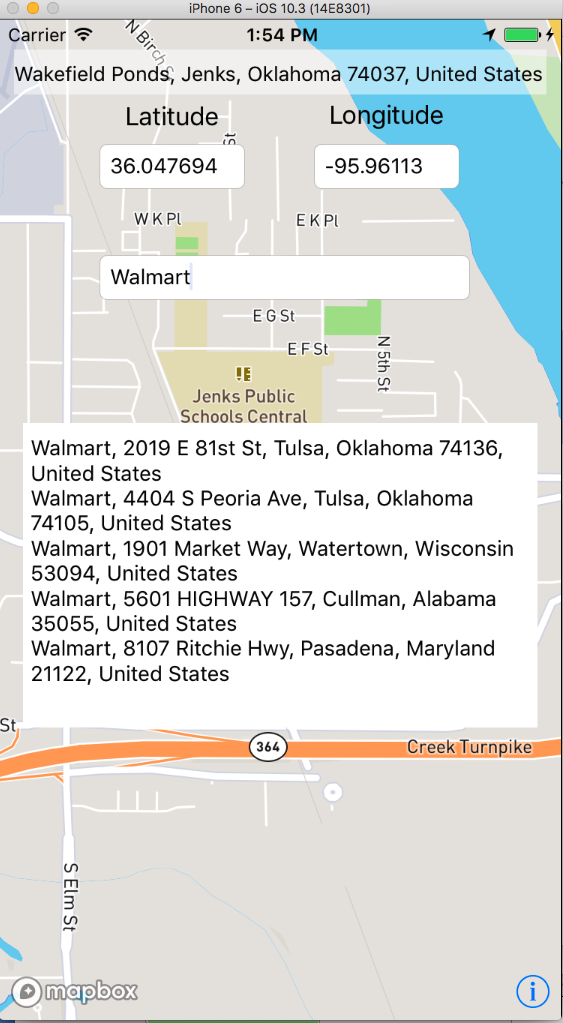
As you can see from this shot, I have centered the map in Jenks, OK (a small town just outside of Tulsa, OK - sort of a 'central US' location.)
When searching for a common place in that area ("Walmart" - which is based in nearby Arkansas, so there are plenty of them around), you can see that only 2 'local' Walmart's come back in the search.
Now, let's move to Bentonville, AR - the home of Walmart......
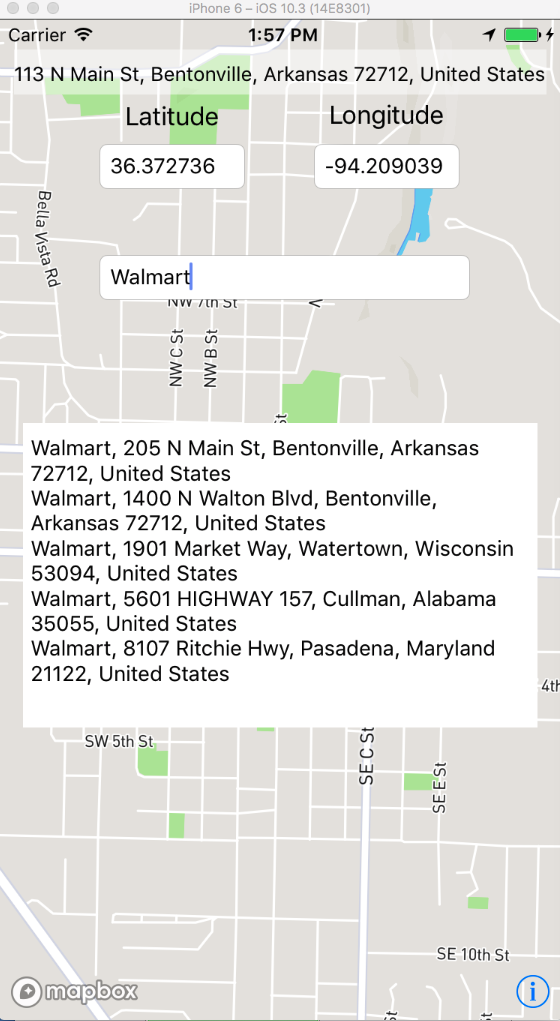
And, we get two top new results, but the others are the same (and much farther away than Tulsa, OK.....)
We found that if we add the town to the first of the search, the results are much better:
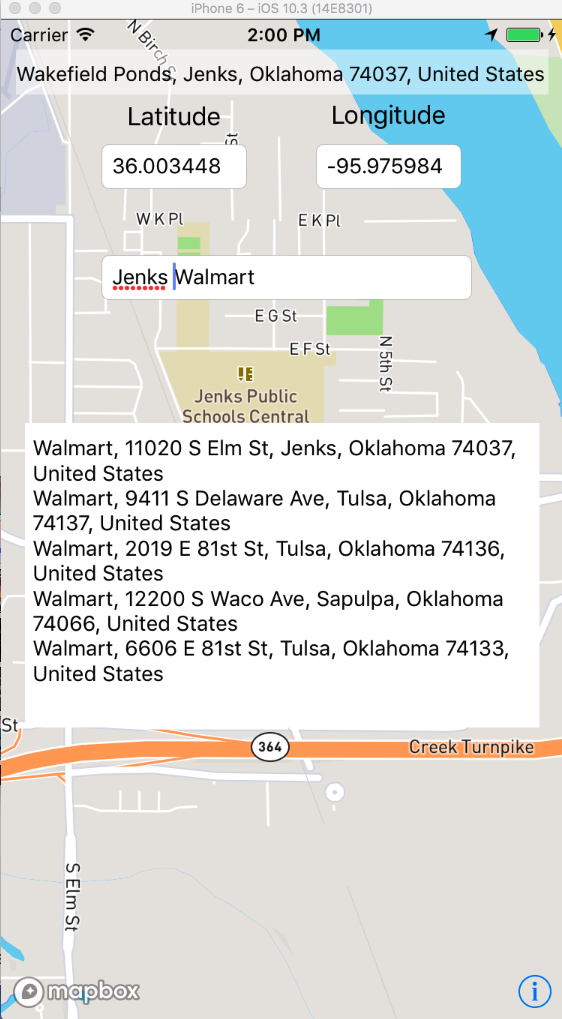
(similar results are true for every search we did - various cities around the US and with other 'common places' like Quiznos (similar results as Walmart when in their home town of Denver, CO...)
As you can see from my code, I tried using the allowedRegion?.northEast and southWest (as I understand it, those should set the search area to about 100 miles around the location, though I'm not sure I set that up right), though no difference was found from this setup (i.e., with/without I get the same results).
The only 'better' results were by putting in the town name along with the 'common' one (though, oddly, different results were returned if the town name was before or after the common one - I didn't check exactly, though I think they are 'best' (i.e., locations are all pretty near) from putting the town name after the common one)
What can I do to get better results without having to tell the user to enter the town name (not a very desirable plan! :)
Thank you in advance for tips - the lookup is a part of my first app (not the test stuff shown in the pictures! ) and one of the key features the users expect is to pull up 'nearby' common places, so it is an important thing for us that this work much more reliably than we are seeing now.
贡献指南
从这里开始
- 先读完整个 Issue,再读项目的贡献指南。
- 在 Issue 下留言说明你要接手 —— 这能避免两个人做同样的事。
- Fork 仓库,在一个分支上完成修改。
- 提交 Pull Request,并在描述里引用这个 Issue 编号。
调研方向
从 issue 中的 ForwardGeocodeOptions 示例开始,在更改 focalLocation 和 allowedRegion 的同时重现 Walmart 搜索。比较 Jenks、Bentonville 以及所描述的其他位置返回的地标;完成标准是确定观察到的排名或搜索区域行为是否为 bug,并确定一项具体更改。
由索引模型根据 Issue 内容生成。
评估
- 技术栈
- ios, swift
- 领域
- mobile-dev, search
- Issue 类型
- 缺陷
- 难度
- 5/5
- 预计耗时
- 一周以上
- 活跃度
- 停滞
- 描述清晰度
- 需要澄清
- 新手友好度
- 25/100