MatPaginatedTabHeader doesn't scroll last tab fully into view
- 主要言語
- TypeScript
- スター
- 25k
- フォーク
- 6.8k
- 平均マージ
- 1日 8時間
- マージ済み PR(30日)
- 91
説明
#### Reproduction
Use StackBlitz to reproduce your issue: https://stackblitz.com/edit/components-issue-wsbxpk
Steps to reproduce:
1. Set selectedIndex to last tab
2. Render
#### Expected Behavior

Selected tab is scrolled fully into view and righthand pagination button disabled just as if the user manually clicked on the last tab
#### Actual Behavior
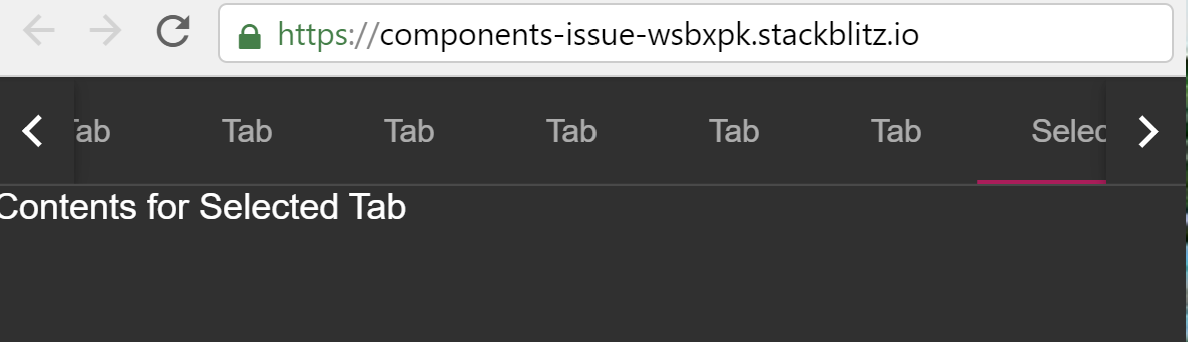
Tab is only partially visible and pagination button remains enabled. When tab titles vary in size only a few pixels of the last tab are visible. Clicking on the last tab manually scrolls it fully into view.
#### Environment
- Angular: 8.2.14
- CDK/Material: 8.2.3
- Browser(s): Chrome, Firefox, Internet Explorer 11, Safari
- Operating System (e.g. Windows, macOS, Ubuntu): All
コントリビューションガイド
調査の方向性
リンクされた StackBlitz の再現と MatPaginatedTabHeader の実装から始め、selectedIndex を最後のタブに設定します。初期レンダリングと最後のタブを手動で選択した場合を比較し、選択したタブが完全に表示され、右側のページネーションボタンが無効になっていることを確認します。
索引モデルが issue の本文から書いたものです。
評価
- 技術スタック
- angular, typescript
- 領域
- frontend
- issue の種類
- バグ
- 難易度
- 3/5
- 見積もり時間
- 1〜2日
- 活発さ
- 停滞
- 明瞭さ
- おおむね明確
- 初心者へのやさしさ
- 45/100