NativeScript / NativeScript/plugins
[nativescript-ui-listview] Upgrade from 10.0.0.1 to 14.2.4 breaks my list
Ouverte
Personne n'a encore pris cette issue.
- Langage dominant
- TypeScript
- Étoiles
- 206
- Forks
- 123
- Merge moyen
- 2 j 1 h
- PR mergées (30 j)
- 1
Description
This only happens on iOS. Android is fine. Items overlap after the upgrade.
On v10:
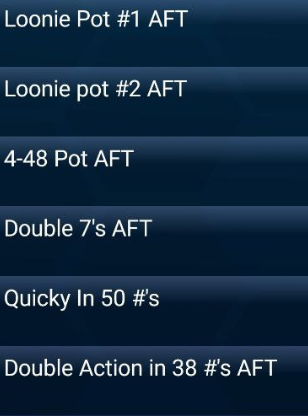
On v14

and the relevant code (note the issue occurs in the "pot" template):
<lv:RadListView class='event-list' row="1" height="100%" items="{{ list }}" itemTemplateSelector="{{ templateSelector }}">
        <lv:RadListView.listViewLayout>
          <lv:ListViewLinearLayout scrollDirection="Vertical" />
        </lv:RadListView.listViewLayout>
        <lv:RadListView.itemTemplates>
          <template key="promotion">
            <StackLayout class='promotion'>
              <Label text="{{  title  }}" class='title' textWrap='true' />
              <Label text="{{  description  }}" class='description' textWrap='true' />
            </StackLayout>
          </template>
          <template key="event">
            <StackLayout class="event">
              <Label col="1" class="event-name" textWrap="true">
                <FormattedString>
                  <Span text="{{name}}" />
                  <Span text=" - " />
                  <Span text="{{ humanDate(date) }}" />
                </FormattedString>
              </Label>
              <Label text="{{ 'Caller: ' + caller}}" class="event-caller" textWrap="true" />
              <Label text="{{times}}" class="event-times" textWrap="true" />
              <Label text="{{ other }}" class="event-other" visibility="{{ other ? 'visible' : 'collapsed' }}" textWrap="true" />
            </StackLayout>
          </template>
          <template key="pot">
            <StackLayout class="pot">
              <Label text="{{name}}" textWrap="true" />
              <Label class="playoff" textWrap="true" visibility="{{ playoffDate ? 'visible' : 'collapsed' }}">
                <FormattedString>
                  <span text="Playoff: " />
                  <span text="{{ humanDate(playoffDate) }}" />
                  <span text="{{ ' ' + playoffEvent }}" />
                  <span text="{{ formatPlayoffPrize(playoffPrize) }}" />
                </FormattedString>
              </Label>
              <Label class="info" text="{{info}}" textWrap="true" visibility="{{ info ? 'visible' : 'collapsed' }}" />
              <FlexboxLayout flexDirection="row" width="100%" justifyContent="space-between">
                <Repeater items="{{balls}}">
                  <Repeater.itemsLayout>
                    <StackLayout orientation="horizontal" />
                  </Repeater.itemsLayout>
                  <Repeater.itemTemplate>
                    <Image src="{{ `~/assets/images/balls-lettered/` + $value + `.png` }}" margin="10" height="50" visibility="{{ $value != '0' ? 'visible' : 'collapsed' }}" />
                  </Repeater.itemTemplate>
                </Repeater>
                <Label textAlignment="right" verticalAlignment="bottom" textWrap="true">
                  <FormattedString>
                    <Span text="{{numbers ? 'in ' + numbers + '#s or less ': ''}}" textWrap="true" textAlignment="right" />
                    <Span text="{{formatPrize(prize)}}" textAlignment="right" />
                  </FormattedString>
                </Label>
              </FlexboxLayout>
            </StackLayout>
          </template>
        </lv:RadListView.itemTemplates>


      </lv:RadListView>
Guide de contribution
Ouvrir le guide de contribution
Par où commencer
- Lisez l'issue en entier, puis le guide de contribution du projet.
- Signalez en commentaire que vous la prenez — cela évite que deux personnes fassent le même travail.
- Forkez le dépôt et travaillez sur une branche.
- Ouvrez une pull request qui référence le numéro de l'issue.
Piste de recherche
Commencez par le balisage RadListView fourni et le modèle d’élément pot, puis reproduisez le chevauchement sur iOS en comparant les versions 10.0.0.1 et 14.2.4. Suivez la disposition de la liste et le comportement de dimensionnement des éléments ; le travail est terminé lorsque les éléments pot ne se chevauchent plus sur iOS, tout en conservant le comportement Android existant.
Rédigé par le modèle d'indexation à partir du texte de l'issue.
Évaluation
- Stack technique
- ios, typescript
- Domaine
- frontend, mobile
- Type d'issue
- Bug
- Difficulté
- 4/5
- Temps estimé
- 3-5 jours
- Activité
- À l'abandon
- Clarté
- À clarifier
- Accessibilité débutants
- 30/100