NativeScript / NativeScript/plugins
[nativescript-ui-listview] Upgrade from 10.0.0.1 to 14.2.4 breaks my list
Abierto
Nadie ha tomado este issue todavía.
- Lenguaje dominante
- TypeScript
- Estrellas
- 206
- Forks
- 123
- Merge medio
- 2 d 1 h
- PR fusionados (30 d)
- 1
Descripción
This only happens on iOS. Android is fine. Items overlap after the upgrade.
On v10:
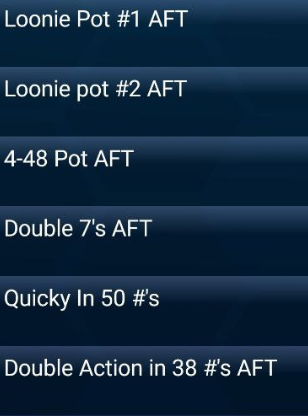
On v14

and the relevant code (note the issue occurs in the "pot" template):
<lv:RadListView class='event-list' row="1" height="100%" items="{{ list }}" itemTemplateSelector="{{ templateSelector }}">
        <lv:RadListView.listViewLayout>
          <lv:ListViewLinearLayout scrollDirection="Vertical" />
        </lv:RadListView.listViewLayout>
        <lv:RadListView.itemTemplates>
          <template key="promotion">
            <StackLayout class='promotion'>
              <Label text="{{  title  }}" class='title' textWrap='true' />
              <Label text="{{  description  }}" class='description' textWrap='true' />
            </StackLayout>
          </template>
          <template key="event">
            <StackLayout class="event">
              <Label col="1" class="event-name" textWrap="true">
                <FormattedString>
                  <Span text="{{name}}" />
                  <Span text=" - " />
                  <Span text="{{ humanDate(date) }}" />
                </FormattedString>
              </Label>
              <Label text="{{ 'Caller: ' + caller}}" class="event-caller" textWrap="true" />
              <Label text="{{times}}" class="event-times" textWrap="true" />
              <Label text="{{ other }}" class="event-other" visibility="{{ other ? 'visible' : 'collapsed' }}" textWrap="true" />
            </StackLayout>
          </template>
          <template key="pot">
            <StackLayout class="pot">
              <Label text="{{name}}" textWrap="true" />
              <Label class="playoff" textWrap="true" visibility="{{ playoffDate ? 'visible' : 'collapsed' }}">
                <FormattedString>
                  <span text="Playoff: " />
                  <span text="{{ humanDate(playoffDate) }}" />
                  <span text="{{ ' ' + playoffEvent }}" />
                  <span text="{{ formatPlayoffPrize(playoffPrize) }}" />
                </FormattedString>
              </Label>
              <Label class="info" text="{{info}}" textWrap="true" visibility="{{ info ? 'visible' : 'collapsed' }}" />
              <FlexboxLayout flexDirection="row" width="100%" justifyContent="space-between">
                <Repeater items="{{balls}}">
                  <Repeater.itemsLayout>
                    <StackLayout orientation="horizontal" />
                  </Repeater.itemsLayout>
                  <Repeater.itemTemplate>
                    <Image src="{{ `~/assets/images/balls-lettered/` + $value + `.png` }}" margin="10" height="50" visibility="{{ $value != '0' ? 'visible' : 'collapsed' }}" />
                  </Repeater.itemTemplate>
                </Repeater>
                <Label textAlignment="right" verticalAlignment="bottom" textWrap="true">
                  <FormattedString>
                    <Span text="{{numbers ? 'in ' + numbers + '#s or less ': ''}}" textWrap="true" textAlignment="right" />
                    <Span text="{{formatPrize(prize)}}" textAlignment="right" />
                  </FormattedString>
                </Label>
              </FlexboxLayout>
            </StackLayout>
          </template>
        </lv:RadListView.itemTemplates>


      </lv:RadListView>
Guía de contribución
Primeros pasos
- Lee el issue completo y luego la guía de contribución del proyecto.
- Comenta en el issue que vas a ocuparte — evita que dos personas hagan lo mismo.
- Haz un fork del repositorio y trabaja en una rama.
- Abre un pull request que haga referencia al número del issue.
Línea de trabajo
Comienza con el markup proporcionado de RadListView y la plantilla de elemento pot, y luego reproduce la superposición en iOS comparando las versiones 10.0.0.1 y 14.2.4. Rastrea el diseño de la lista y el comportamiento del dimensionamiento de los elementos; el trabajo estará terminado cuando los elementos pot ya no se superpongan en iOS, mientras el comportamiento existente de Android permanezca intacto.
Escrito por el modelo de indexación a partir del texto del issue.
Evaluación
- Stack tecnológico
- ios, typescript
- Área
- frontend, mobile
- Tipo de issue
- Error
- Dificultad
- 4/5
- Tiempo estimado
- 3-5 días
- Estado de actividad
- Estancado
- Claridad
- Necesita aclaración
- Aptitud para principiantes
- 30/100