NativeScript / NativeScript/plugins
iOS Listview & InputFields
Ninguém assumiu esta issue ainda.
- Linguagem predominante
- TypeScript
- Estrelas
- 206
- Forks
- 123
- Merge médio
- 2d 1h
- PRs com merge (30d)
- 1
Descrição
Hello everyone;
I have a nativescript angular project that has a few DateTimePickerFields inside of some ListViews that behaves unreliably on iOS (android is completely fine).
Essentially, if i have a ListView with 3 separate DateTimePickerFields, and I tap&set the DTPF at position 0, a random other DTPF will get the value.
My knowledge with Nativescript & Angular is limited; so if I'm doing something wrong or if anyone has some tips/tricks i would be greatly appreciative.
(demo of app and issue)
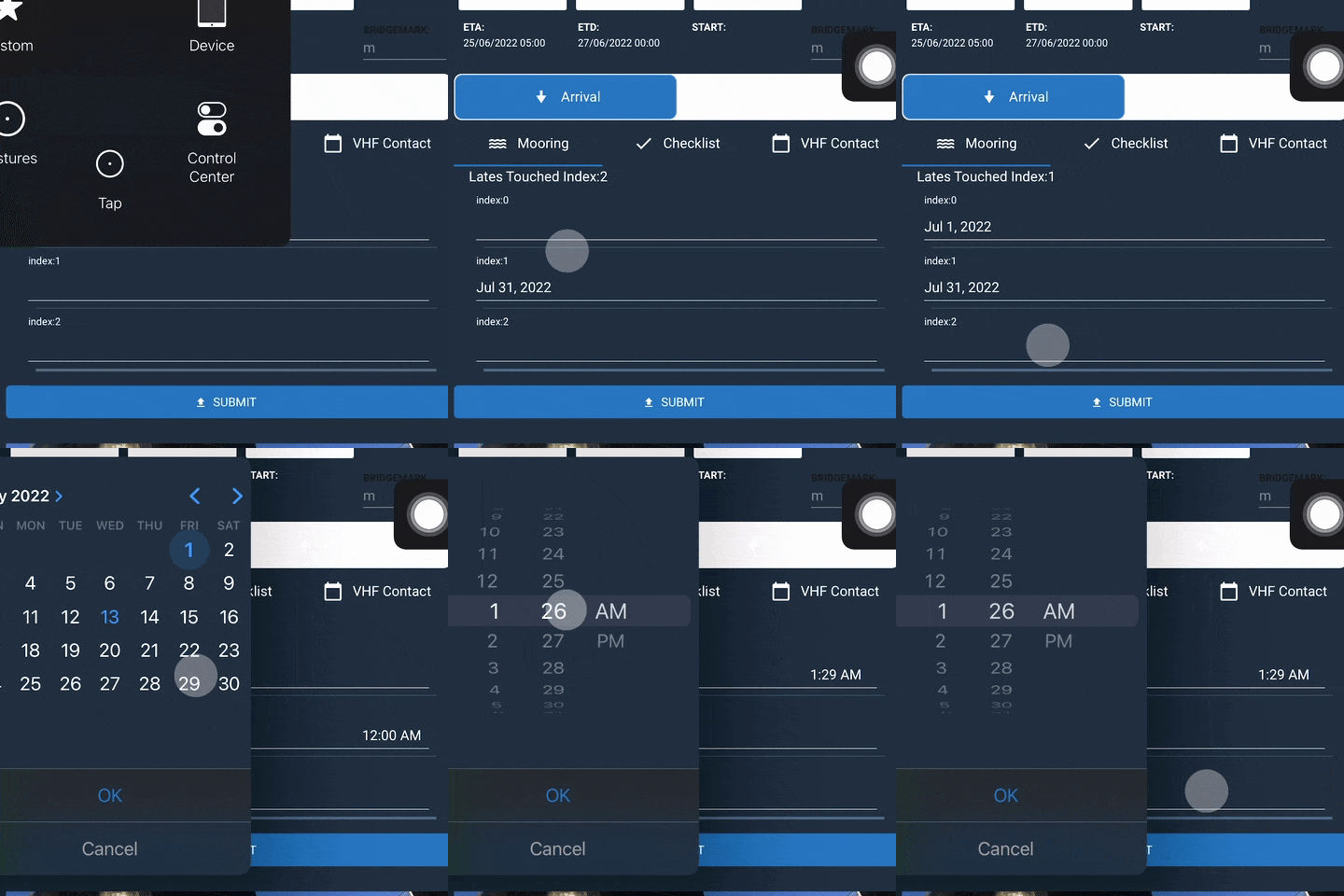
(inputs on item of index 0 usually work; once we touched DTPF index 2, the value goes in DTF index1 and yeah...)
(simplified code)
PMSubDetailsMooringsComponent.html
  <ListView
      [items]="displayItems"
      [itemTemplateSelector]="selectItemTemplate"
    >
      <ng-template
        let-item="item"
        let-i="index"
      >
        <FlexboxLayout
          flexDirection="column"
        >
          <Label
            [text]="'index:'+ i"
          ></Label>

          <DateTimePickerFields
            [(ngModel)]="item"
            (touch)="yes(i)"
          ></DateTimePickerFields>
       </FlexboxLayout>
     </ng-template>
</ListView>
PMSubDetailsMooringsComponent.ts
export class PMSubDetailsMooringsComponent extends PMBaseComponent {
    displayItems: Date = {[null,null,null]}
    index = -1;


 yes(i) {
        //just using this to display what value got touched
        this.index = i;
    }
}
"dependencies": {
"@angular-devkit/build-angular": "14.0.0",
"@angular/animations": "14.0.0",
"@angular/common": "14.0.0",
"@angular/compiler": "14.0.0",
"@angular/core": "14.0.0",
"@angular/forms": "14.0.0",
"@angular/platform-browser": "14.0.0",
"@angular/platform-browser-dynamic": "14.0.0",
"@angular/router": "14.0.0",
"@bezlepkin/nativescript-ar": "^1.0.4",
"@jeanbenitez/logical-expression-parser": "^1.0.0",
"@nativescript-community/drawingpad": "^4.1.0",
"@nativescript-community/ui-pulltorefresh": "^2.4.8",
"@nativescript/angular": "13.0.4",
"@nativescript/appversion": "^2.0.0",
"@nativescript/background-http": "^5.0.2",
"@nativescript/core": "8.2.5",
"@nativescript/datetimepicker": "2.1.11",
"@nativescript/fingerprint-auth": "^8.0.0",
"@nativescript/firebase": "^11.1.3",
"@nativescript/imagepicker": "^1.0.6",
"@nativescript/iqkeyboardmanager": "2.0.0",
"@nativescript/picker": "4.0.1",
"@nativescript/secure-storage": "^3.0.0",
"@nativescript/theme": "~3.0.0",
"@nstudio/nativescript-barcodescanner": "^5.0.1",
"@nstudio/nativescript-cardview": "2.0.1",
"@nstudio/nativescript-checkbox": "2.0.5",
"@nstudio/nativescript-filterable-listpicker": "^3.0.0",
"@ticnat/nativescript-searchable-select": "^1.0.7",
"crypto-browserify": "^3.12.0",
"moment": "^2.29.1",
"moment-timezone": "^0.5.34",
"nativescript-carousel": "^7.0.1",
"nativescript-localstorage": "^2.0.2",
"nativescript-mediafilepicker": "^4.0.2",
"nativescript-permissions": "1.3.11",
"nativescript-plugin-filepicker": "file:libraries/nativescript-plugin-filepicker-1.0.1.tgz",
"nativescript-ui-calendar": "^7.0.2",
"nativescript-ui-core": "5.0.1",
"nativescript-ui-gauge": "8.0.0",
"nativescript-ui-listview": "10.2.2",
"nativescript-ui-sidedrawer": "^10.0.1",
"stream-browserify": "^3.0.0",
"typescript": "4.6.4",
"zone.js": "0.11.5"
},
"devDependencies": {
"@angular/cli": "14.0.0",
"@angular/compiler-cli": "14.0.0",
"@nativescript/android": "8.0.0",
"@nativescript/ios": "8.3.0",
"@nativescript/schematics": "^11.0.0",
"@nativescript/types": "~8.1.0",
"@nativescript/webpack": "5.0.6",
"@ngtools/webpack": "14.0.0",
"@types/node": "^17.0.41",
"sass": "~1.39.0"
},
Guia de contribuição
Primeiros passos
- Leia a issue inteira e depois o guia de contribuição do projeto.
- Comente na issue dizendo que vai assumir — evita que duas pessoas façam o mesmo trabalho.
- Faça um fork do repositório e trabalhe em uma branch.
- Abra um pull request que referencie o número da issue.
Direção de pesquisa
Comece com PMSubDetailsMooringsComponent.html e PMSubDetailsMooringsComponent.ts, concentrando-se nos bindings de ListView, itemTemplateSelector e DateTimePickerFields. Reproduza o comportamento no iOS usando o exemplo fornecido com três itens e, em seguida, compare o índice tocado com o valor atualizado. Está concluído quando o campo selecionado recebe consistentemente seu próprio valor e o comportamento foi verificado no iOS e no Android.
Escrita pelo modelo de indexação a partir do texto da issue.
Avaliação
- Stack de tecnologia
- angular, ios, typescript
- Domínio
- mobile-dev
- Tipo de issue
- Bug
- Dificuldade
- 4/5
- Tempo estimado
- 3-5 dias
- Status de atividade
- Estagnada
- Clareza
- Precisa de esclarecimento
- Facilidade para iniciantes
- 25/100