NativeScript / NativeScript/plugins
iOS Listview & InputFields
Nadie ha tomado este issue todavía.
- Lenguaje dominante
- TypeScript
- Estrellas
- 206
- Forks
- 123
- Merge medio
- 2 d 1 h
- PR fusionados (30 d)
- 1
Descripción
Hello everyone;
I have a nativescript angular project that has a few DateTimePickerFields inside of some ListViews that behaves unreliably on iOS (android is completely fine).
Essentially, if i have a ListView with 3 separate DateTimePickerFields, and I tap&set the DTPF at position 0, a random other DTPF will get the value.
My knowledge with Nativescript & Angular is limited; so if I'm doing something wrong or if anyone has some tips/tricks i would be greatly appreciative.
(demo of app and issue)
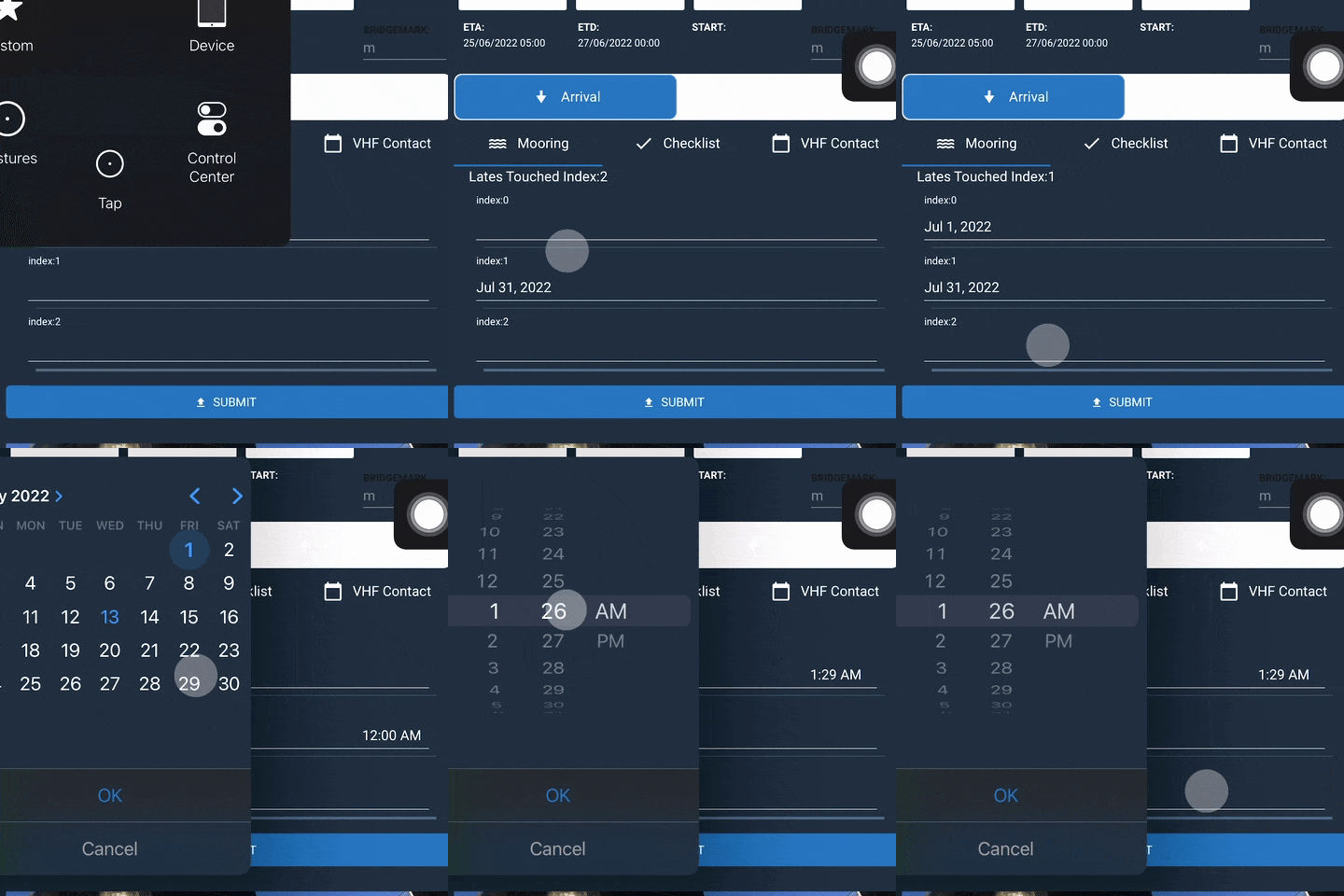
(inputs on item of index 0 usually work; once we touched DTPF index 2, the value goes in DTF index1 and yeah...)
(simplified code)
PMSubDetailsMooringsComponent.html
  <ListView
      [items]="displayItems"
      [itemTemplateSelector]="selectItemTemplate"
    >
      <ng-template
        let-item="item"
        let-i="index"
      >
        <FlexboxLayout
          flexDirection="column"
        >
          <Label
            [text]="'index:'+ i"
          ></Label>

          <DateTimePickerFields
            [(ngModel)]="item"
            (touch)="yes(i)"
          ></DateTimePickerFields>
       </FlexboxLayout>
     </ng-template>
</ListView>
PMSubDetailsMooringsComponent.ts
export class PMSubDetailsMooringsComponent extends PMBaseComponent {
    displayItems: Date = {[null,null,null]}
    index = -1;


 yes(i) {
        //just using this to display what value got touched
        this.index = i;
    }
}
"dependencies": {
"@angular-devkit/build-angular": "14.0.0",
"@angular/animations": "14.0.0",
"@angular/common": "14.0.0",
"@angular/compiler": "14.0.0",
"@angular/core": "14.0.0",
"@angular/forms": "14.0.0",
"@angular/platform-browser": "14.0.0",
"@angular/platform-browser-dynamic": "14.0.0",
"@angular/router": "14.0.0",
"@bezlepkin/nativescript-ar": "^1.0.4",
"@jeanbenitez/logical-expression-parser": "^1.0.0",
"@nativescript-community/drawingpad": "^4.1.0",
"@nativescript-community/ui-pulltorefresh": "^2.4.8",
"@nativescript/angular": "13.0.4",
"@nativescript/appversion": "^2.0.0",
"@nativescript/background-http": "^5.0.2",
"@nativescript/core": "8.2.5",
"@nativescript/datetimepicker": "2.1.11",
"@nativescript/fingerprint-auth": "^8.0.0",
"@nativescript/firebase": "^11.1.3",
"@nativescript/imagepicker": "^1.0.6",
"@nativescript/iqkeyboardmanager": "2.0.0",
"@nativescript/picker": "4.0.1",
"@nativescript/secure-storage": "^3.0.0",
"@nativescript/theme": "~3.0.0",
"@nstudio/nativescript-barcodescanner": "^5.0.1",
"@nstudio/nativescript-cardview": "2.0.1",
"@nstudio/nativescript-checkbox": "2.0.5",
"@nstudio/nativescript-filterable-listpicker": "^3.0.0",
"@ticnat/nativescript-searchable-select": "^1.0.7",
"crypto-browserify": "^3.12.0",
"moment": "^2.29.1",
"moment-timezone": "^0.5.34",
"nativescript-carousel": "^7.0.1",
"nativescript-localstorage": "^2.0.2",
"nativescript-mediafilepicker": "^4.0.2",
"nativescript-permissions": "1.3.11",
"nativescript-plugin-filepicker": "file:libraries/nativescript-plugin-filepicker-1.0.1.tgz",
"nativescript-ui-calendar": "^7.0.2",
"nativescript-ui-core": "5.0.1",
"nativescript-ui-gauge": "8.0.0",
"nativescript-ui-listview": "10.2.2",
"nativescript-ui-sidedrawer": "^10.0.1",
"stream-browserify": "^3.0.0",
"typescript": "4.6.4",
"zone.js": "0.11.5"
},
"devDependencies": {
"@angular/cli": "14.0.0",
"@angular/compiler-cli": "14.0.0",
"@nativescript/android": "8.0.0",
"@nativescript/ios": "8.3.0",
"@nativescript/schematics": "^11.0.0",
"@nativescript/types": "~8.1.0",
"@nativescript/webpack": "5.0.6",
"@ngtools/webpack": "14.0.0",
"@types/node": "^17.0.41",
"sass": "~1.39.0"
},
Guía de contribución
Primeros pasos
- Lee el issue completo y luego la guía de contribución del proyecto.
- Comenta en el issue que vas a ocuparte — evita que dos personas hagan lo mismo.
- Haz un fork del repositorio y trabaja en una rama.
- Abre un pull request que haga referencia al número del issue.
Línea de trabajo
Comienza con PMSubDetailsMooringsComponent.html y PMSubDetailsMooringsComponent.ts, centrándote en los bindings de ListView, itemTemplateSelector y DateTimePickerFields. Reproduce el comportamiento en iOS usando el ejemplo proporcionado de tres elementos y, después, compara el índice tocado con el valor actualizado. Se considera terminado cuando el campo seleccionado recibe sistemáticamente su propio valor y el comportamiento se ha verificado en iOS y Android.
Escrito por el modelo de indexación a partir del texto del issue.
Evaluación
- Stack tecnológico
- angular, ios, typescript
- Área
- mobile-dev
- Tipo de issue
- Error
- Dificultad
- 4/5
- Tiempo estimado
- 3-5 días
- Estado de actividad
- Estancado
- Claridad
- Necesita aclaración
- Aptitud para principiantes
- 25/100