NativeScript / NativeScript/plugins
iOS Listview & InputFields
Dieses Issue hat noch niemand übernommen.
- Vorherrschende Sprache
- TypeScript
- Sterne
- 206
- Forks
- 123
- Ø Merge
- 2 T. 1 Std.
- Gemergte PRs (30 T.)
- 1
Beschreibung
Hello everyone;
I have a nativescript angular project that has a few DateTimePickerFields inside of some ListViews that behaves unreliably on iOS (android is completely fine).
Essentially, if i have a ListView with 3 separate DateTimePickerFields, and I tap&set the DTPF at position 0, a random other DTPF will get the value.
My knowledge with Nativescript & Angular is limited; so if I'm doing something wrong or if anyone has some tips/tricks i would be greatly appreciative.
(demo of app and issue)
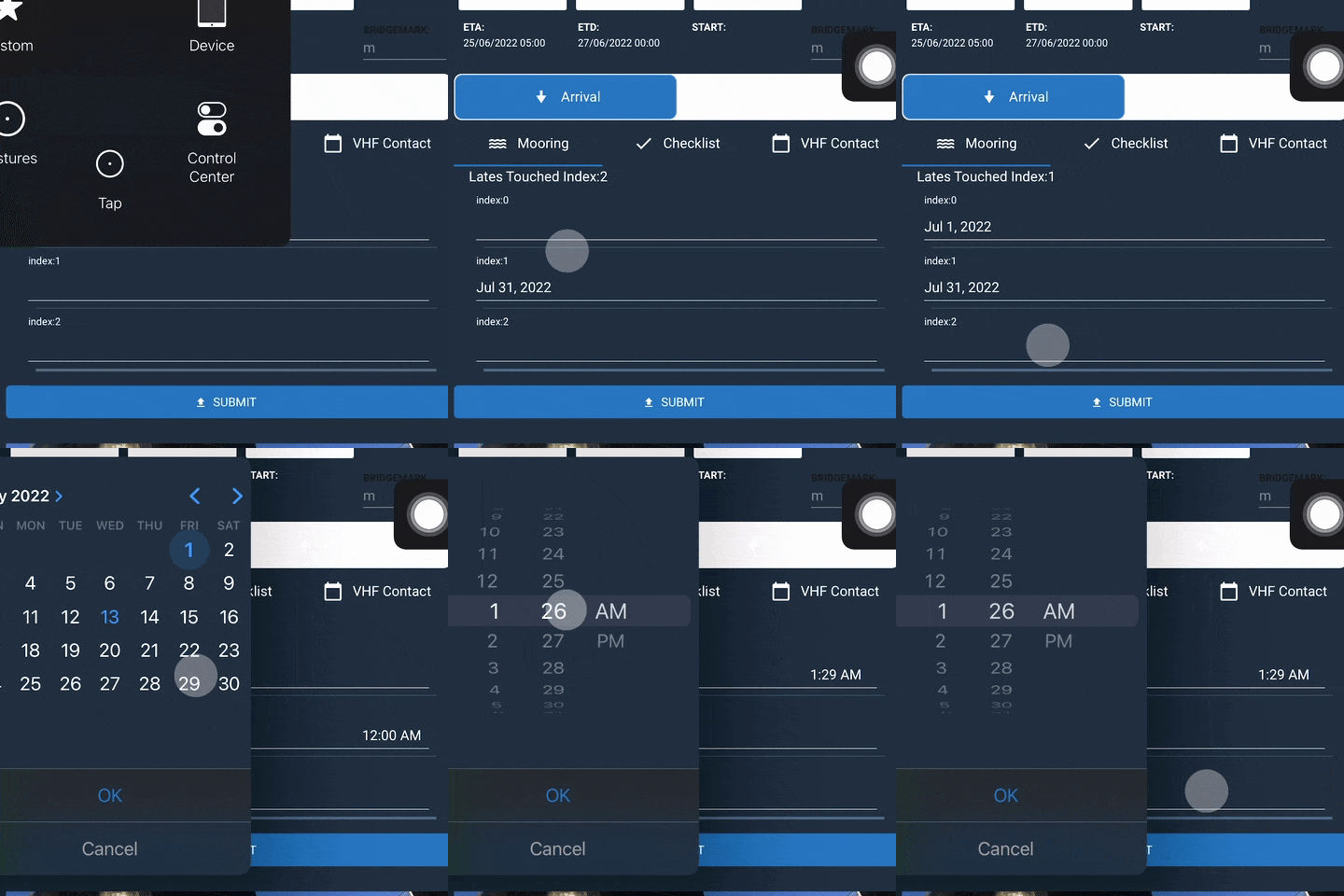
(inputs on item of index 0 usually work; once we touched DTPF index 2, the value goes in DTF index1 and yeah...)
(simplified code)
PMSubDetailsMooringsComponent.html
  <ListView
      [items]="displayItems"
      [itemTemplateSelector]="selectItemTemplate"
    >
      <ng-template
        let-item="item"
        let-i="index"
      >
        <FlexboxLayout
          flexDirection="column"
        >
          <Label
            [text]="'index:'+ i"
          ></Label>

          <DateTimePickerFields
            [(ngModel)]="item"
            (touch)="yes(i)"
          ></DateTimePickerFields>
       </FlexboxLayout>
     </ng-template>
</ListView>
PMSubDetailsMooringsComponent.ts
export class PMSubDetailsMooringsComponent extends PMBaseComponent {
    displayItems: Date = {[null,null,null]}
    index = -1;


 yes(i) {
        //just using this to display what value got touched
        this.index = i;
    }
}
"dependencies": {
"@angular-devkit/build-angular": "14.0.0",
"@angular/animations": "14.0.0",
"@angular/common": "14.0.0",
"@angular/compiler": "14.0.0",
"@angular/core": "14.0.0",
"@angular/forms": "14.0.0",
"@angular/platform-browser": "14.0.0",
"@angular/platform-browser-dynamic": "14.0.0",
"@angular/router": "14.0.0",
"@bezlepkin/nativescript-ar": "^1.0.4",
"@jeanbenitez/logical-expression-parser": "^1.0.0",
"@nativescript-community/drawingpad": "^4.1.0",
"@nativescript-community/ui-pulltorefresh": "^2.4.8",
"@nativescript/angular": "13.0.4",
"@nativescript/appversion": "^2.0.0",
"@nativescript/background-http": "^5.0.2",
"@nativescript/core": "8.2.5",
"@nativescript/datetimepicker": "2.1.11",
"@nativescript/fingerprint-auth": "^8.0.0",
"@nativescript/firebase": "^11.1.3",
"@nativescript/imagepicker": "^1.0.6",
"@nativescript/iqkeyboardmanager": "2.0.0",
"@nativescript/picker": "4.0.1",
"@nativescript/secure-storage": "^3.0.0",
"@nativescript/theme": "~3.0.0",
"@nstudio/nativescript-barcodescanner": "^5.0.1",
"@nstudio/nativescript-cardview": "2.0.1",
"@nstudio/nativescript-checkbox": "2.0.5",
"@nstudio/nativescript-filterable-listpicker": "^3.0.0",
"@ticnat/nativescript-searchable-select": "^1.0.7",
"crypto-browserify": "^3.12.0",
"moment": "^2.29.1",
"moment-timezone": "^0.5.34",
"nativescript-carousel": "^7.0.1",
"nativescript-localstorage": "^2.0.2",
"nativescript-mediafilepicker": "^4.0.2",
"nativescript-permissions": "1.3.11",
"nativescript-plugin-filepicker": "file:libraries/nativescript-plugin-filepicker-1.0.1.tgz",
"nativescript-ui-calendar": "^7.0.2",
"nativescript-ui-core": "5.0.1",
"nativescript-ui-gauge": "8.0.0",
"nativescript-ui-listview": "10.2.2",
"nativescript-ui-sidedrawer": "^10.0.1",
"stream-browserify": "^3.0.0",
"typescript": "4.6.4",
"zone.js": "0.11.5"
},
"devDependencies": {
"@angular/cli": "14.0.0",
"@angular/compiler-cli": "14.0.0",
"@nativescript/android": "8.0.0",
"@nativescript/ios": "8.3.0",
"@nativescript/schematics": "^11.0.0",
"@nativescript/types": "~8.1.0",
"@nativescript/webpack": "5.0.6",
"@ngtools/webpack": "14.0.0",
"@types/node": "^17.0.41",
"sass": "~1.39.0"
},
Beitragsleitfaden
Erste Schritte
- Lies das ganze Issue und danach den Beitragsleitfaden des Projekts.
- Schreib ins Issue, dass du es übernimmst — das erspart doppelte Arbeit.
- Forke das Repository und arbeite in einem Branch.
- Öffne einen Pull Request, der die Issue-Nummer nennt.
Rechercherichtung
Beginne mit PMSubDetailsMooringsComponent.html und PMSubDetailsMooringsComponent.ts und konzentriere dich auf die Bindings von ListView, itemTemplateSelector und DateTimePickerFields. Reproduziere das Verhalten unter iOS anhand des bereitgestellten Beispiels mit drei Elementen und vergleiche anschließend den berührten Index mit dem aktualisierten Wert. Abgeschlossen ist die Aufgabe, wenn das ausgewählte Feld konsistent seinen eigenen Wert erhält und das Verhalten unter iOS und Android verifiziert wurde.
Vom Indexierungsmodell aus dem Issue-Text verfasst.
Bewertung
- Tech-Stack
- angular, ios, typescript
- Bereich
- mobile-dev
- Issue-Typ
- Bug
- Schwierigkeit
- 4/5
- Geschätzter Aufwand
- 3-5 Tage
- Aktivitätsstatus
- Veraltet
- Klarheit
- Muss geklärt werden
- Anfängerfreundlichkeit
- 25/100