AdguardTeam / AdguardTeam/AdguardForiOS
DoH/3 DNS upstream can be added in the native implementation mode
- Ngôn ngữ chính
- Swift
- Star
- 1.7k
- Fork
- 240
- Chỉ số merge pull request
- Không có pull request nào được merge trong 30 ngày
Mô tả
### Version
AdGuard for iOS 4.5 (1002)
### Environment
iPhone XS, 16.5.1
### Steps to reproduce
1. Launch AdGuard
2. Open the Protection tab -> DNS protection screen -> DNS implementation
3. Switch the implementation from AdGuard to `Native`
4. Go to DNS server screen
5. Scroll down and click the `Add a custom DNS server`
6. Enter any server name
7. Enter `h3://dns.adguard-dns.com/dns-query` in the DNS server address field
8. Tap the `Save` button
### Expected behaviour
The error message "DNS-over-HTTPS/3 is not supported by the system" is displayed.
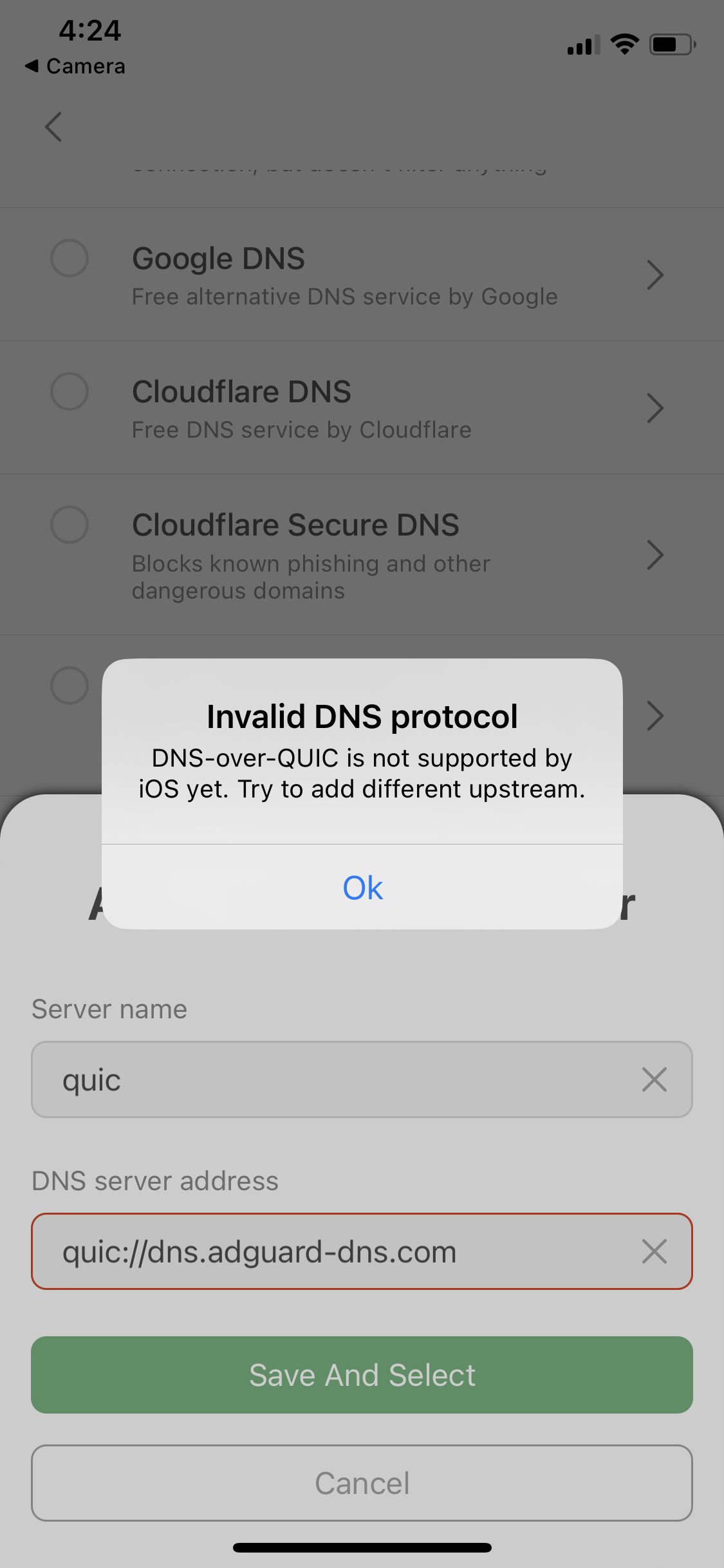
Similar to when trying to add DoQ upstreams.
Error message for DoQ upstreams
### Actual behaviour
DNS server has been added and selected successfully
Hướng dẫn đóng góp
Chưa lập chỉ mục được hướng dẫn đóng góp cho kho mã nguồn này
Đánh giá
Issue này chưa được đánh giá.