AdguardTeam / AdguardTeam/AdguardForiOS
DoH/3 DNS upstream can be added in the native implementation mode
- Lenguaje dominante
- Swift
- Estrellas
- 1.7k
- Forks
- 240
- Métricas de merge de PR
- Sin PR fusionados en 30 d
Descripción
### Version
AdGuard for iOS 4.5 (1002)
### Environment
iPhone XS, 16.5.1
### Steps to reproduce
1. Launch AdGuard
2. Open the Protection tab -> DNS protection screen -> DNS implementation
3. Switch the implementation from AdGuard to `Native`
4. Go to DNS server screen
5. Scroll down and click the `Add a custom DNS server`
6. Enter any server name
7. Enter `h3://dns.adguard-dns.com/dns-query` in the DNS server address field
8. Tap the `Save` button
### Expected behaviour
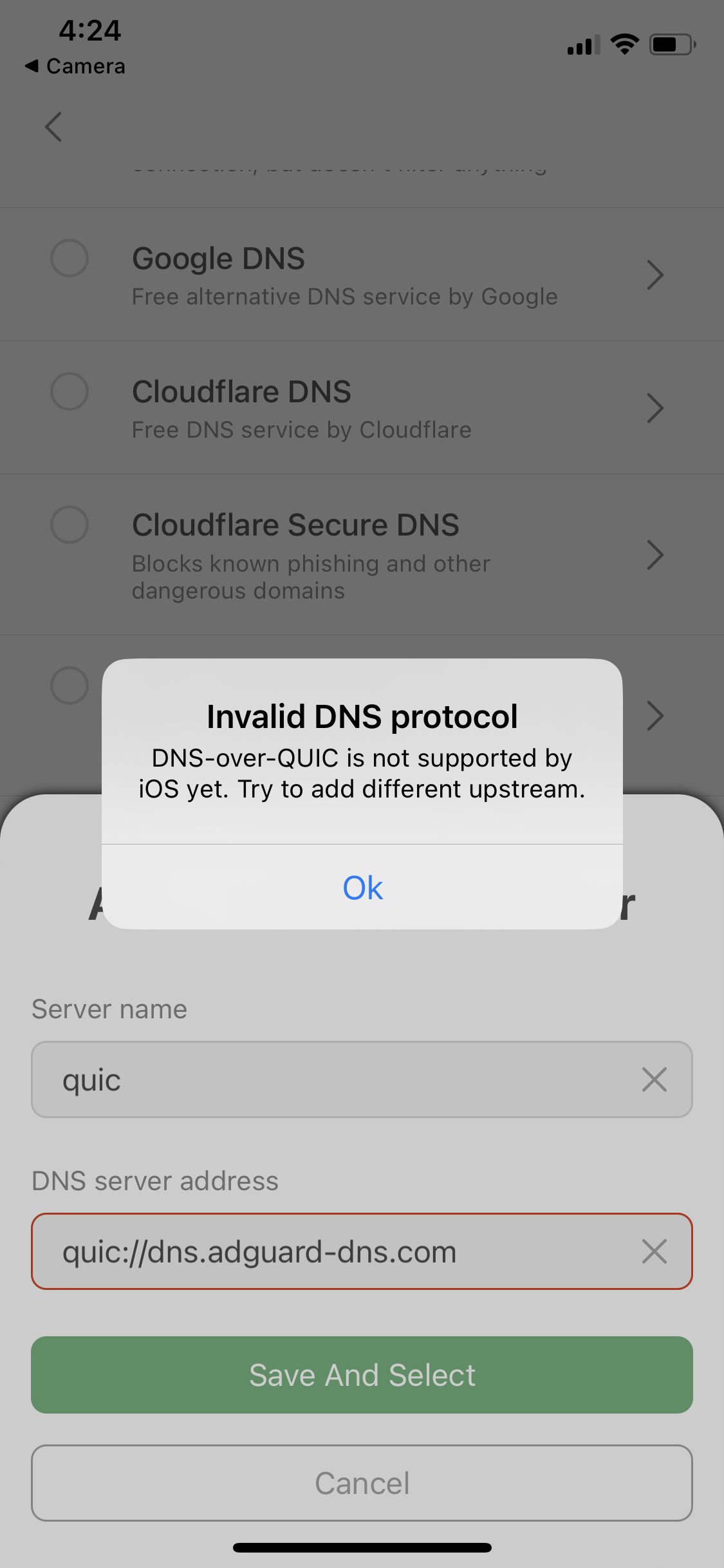
The error message "DNS-over-HTTPS/3 is not supported by the system" is displayed.
Similar to when trying to add DoQ upstreams.
Error message for DoQ upstreams
### Actual behaviour
DNS server has been added and selected successfully
Guía de contribución
No hay ninguna guía de contribución indexada para este repositorio
Evaluación
Este issue todavía no se ha evaluado.