redhat-developer / redhat-developer/vscode-java
The action icon will not show the code actions in the side bar of the editor
未关闭
还没有人认领这个 Issue。
question
upstream
- 主要语言
- TypeScript
- 星标
- 2.3k
- 派生
- 546
- 平均合并
- 20 小时 1 分钟
- 30 天内合并 PR
- 11
描述
[provide a description of the issue]
Environment
- Operating System: Windows/Mac/Linux
- JDK version: jdk11.0.1
- Visual Studio Code version: 1.30.2
- Java extension version:0.37.0(build 4)
Steps To Reproduce
Click the action icon, it will not show the code actions in the side bar of the editor, if I didn't open this class which exists the errors the in the editor window.
Current Result
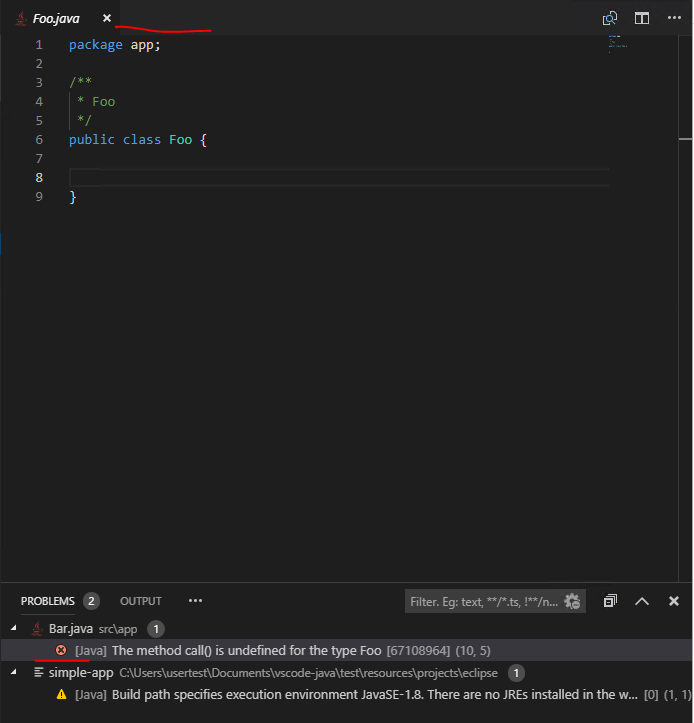
Expected Result
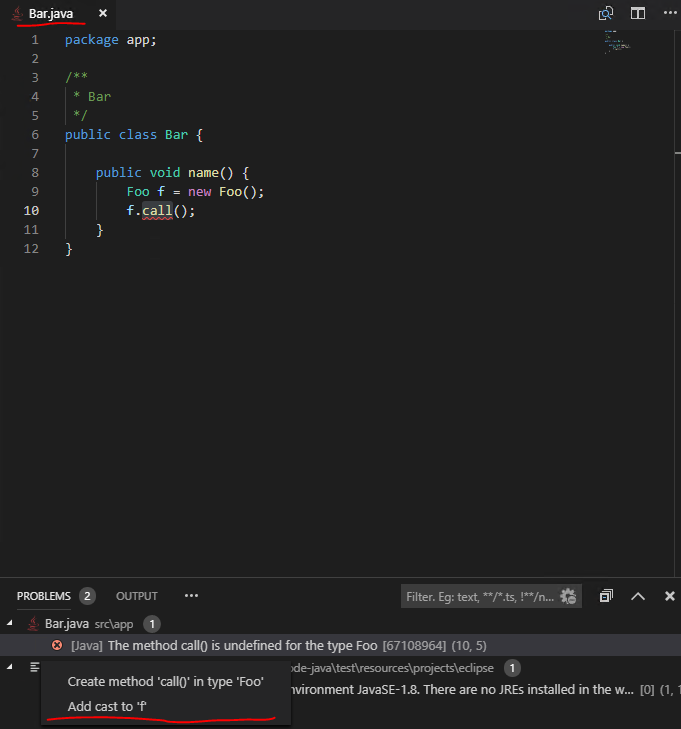
贡献指南
从这里开始
- 先读完整个 Issue,再读项目的贡献指南。
- 在 Issue 下留言说明你要接手 —— 这能避免两个人做同样的事。
- Fork 仓库,在一个分支上完成修改。
- 提交 Pull Request,并在描述里引用这个 Issue 编号。
调研方向
使用列出的 JDK、Visual Studio Code 和 Java extension 版本重现该问题,按照所述的操作图标步骤,在打开和不打开包含错误的类这两种情况下分别执行。跟踪 VS Code Java extension 中的 code-actions 入口点,并验证侧边栏会显示可用操作,而无需打开包含错误的类。
由索引模型根据 Issue 内容生成。
评估
- 技术栈
- java, typescript, vscode
- 领域
- devtools
- Issue 类型
- 缺陷
- 难度
- 4/5
- 预计耗时
- 3-5 天
- 活跃度
- 停滞
- 描述清晰度
- 需要澄清
- 新手友好度
- 25/100