redhat-developer / redhat-developer/vscode-java
The action icon will not show the code actions in the side bar of the editor
Open
Nobody has claimed this yet.
question
upstream
- Dominant language
- TypeScript
- Stars
- 2.3k
- Forks
- 546
- Avg merge
- 20h 1m
- Merged PRs (30d)
- 11
Description
[provide a description of the issue]
Environment
- Operating System: Windows/Mac/Linux
- JDK version: jdk11.0.1
- Visual Studio Code version: 1.30.2
- Java extension version:0.37.0(build 4)
Steps To Reproduce
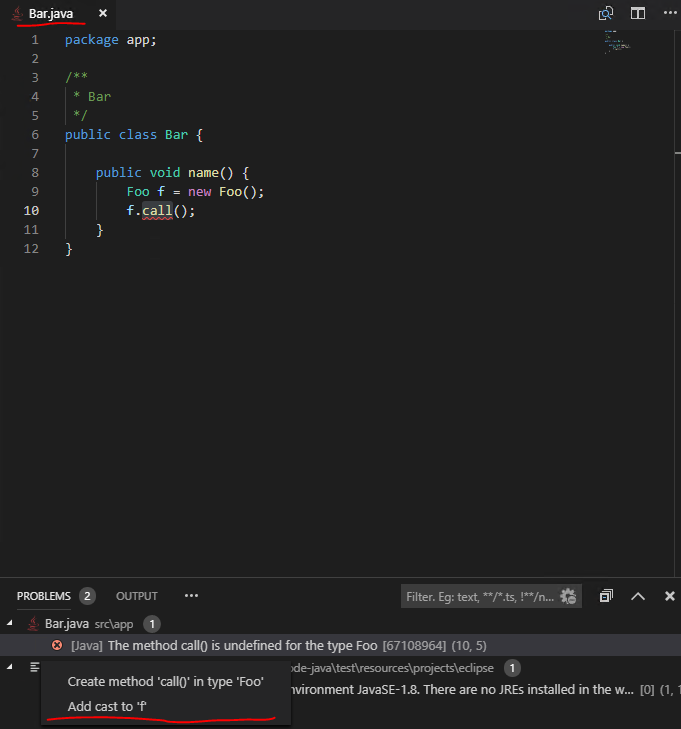
Click the action icon, it will not show the code actions in the side bar of the editor, if I didn't open this class which exists the errors the in the editor window.
Current Result
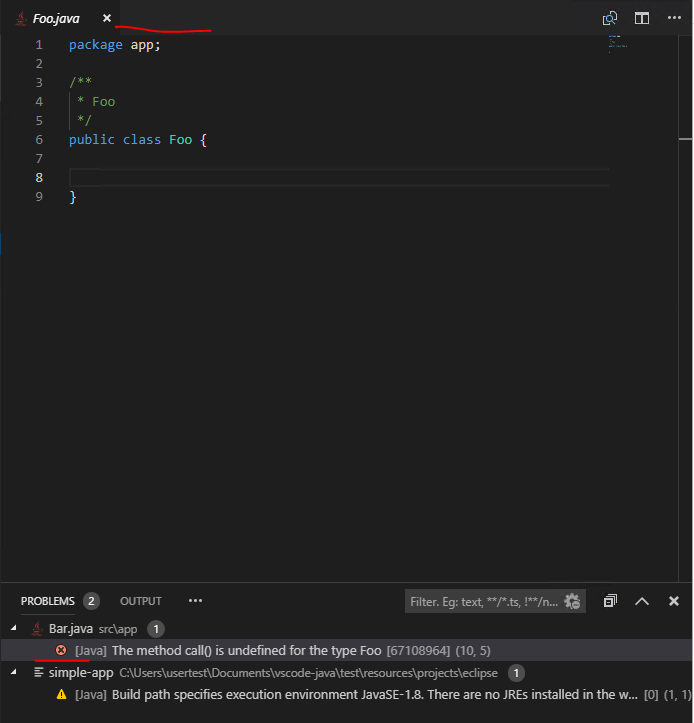
Expected Result
Contributor guide
First steps
- Read the whole issue, then the project's contributing guide.
- Comment on the issue to say you are picking it up — it saves two people doing the same work.
- Fork the repository and make your change on a branch.
- Open a pull request that references the issue number.
Research direction
Reproduce the problem using the listed JDK, Visual Studio Code, and Java extension versions, following the stated action-icon steps with and without opening the class containing errors. Trace the code-actions entry point in the VS Code Java extension and verify that the sidebar shows the available actions without requiring the error-containing class to be opened.
Written by the indexing model from the issue text.
Assessment
- Tech stack
- java, typescript, vscode
- Domain
- devtools
- Issue type
- Bug
- Difficulty
- 4/5
- Estimated time
- 3-5 days
- Activity status
- Stale
- Clarity
- Needs clarification
- Newbie friendliness
- 25/100