redhat-developer / redhat-developer/vscode-java
Wrong reported errors by compiler
Nobody has claimed this yet.
- Dominant language
- TypeScript
- Stars
- 2.3k
- Forks
- 546
- Avg merge
- 20h 1m
- Merged PRs (30d)
- 11
Description
I have some pieces of code that compiles fine in IntelliJ and Gradle but VSCode reports them as errors.
Examples:
-
Error in import
import sun.security.ssl.ProtocolVersion;
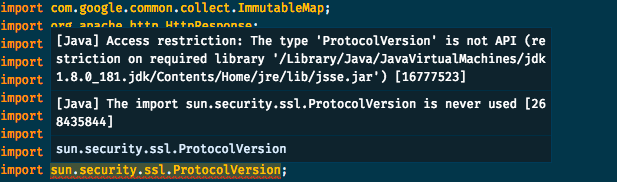
I have to point that I'm not using the JVM in the error description. Here's my workspace's settings:
{
   "java.home": "/Users/augusto.dias/.sdkman/candidates/java/8.0.181-oracle",
   "java.jdt.ls.vmargs": "-javaagent:/Users/augusto.dias/my-project/.vscode/lombok.jar -Xbootclasspath/a:/Users/augusto.dias/my-project/.vscode/lombok.jar"
}
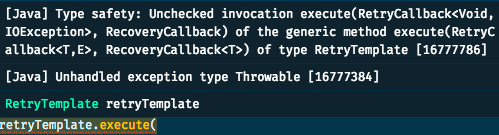
- Wrong exception handling
I have a RetryTemplate class from spring and I'm calling execute as the following example:
retryTemplate.execute(getCallback(),getRecovery());

private RetryCallback<Void, IOException> getCallback() {
    return context -> {
        if (context.getLastThrowable() instanceof IOException) {
                    IOException e = (IOException) context.getLastThrowable();
    // do some other things
                    throw e;
        }
        return null;
    };
}

private RecoveryCallback getRecovery() {
    return context -> {
        Throwable lastThrowable = context.getLastThrowable();
    // do some other things
        throw lastThrowable instanceof Exception ? (Exception) lastThrowable : new Exception(lastThrowable);
    }
}
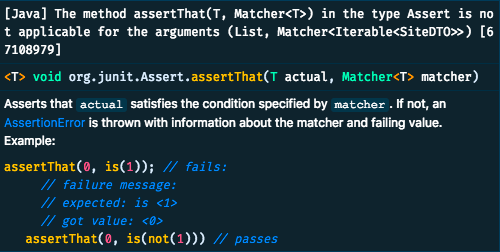
- And finally: false error in method signature
    assertThat((List) ((Envelope) responseEntity.getBody()).getData(), hasItems(siteDTO));
    assertThat((List) ((Envelope) responseEntity.getBody()).getData(), hasSize(1));
Environment
- Operating System: macOS Mojave
- JDK version: 1.8
- Visual Studio Code version: 1.29.1
- Java extension version: 0.34.0
Contributor guide
First steps
- Read the whole issue, then the project's contributing guide.
- Comment on the issue to say you are picking it up — it saves two people doing the same work.
- Fork the repository and make your change on a branch.
- Open a pull request that references the issue number.
Research direction
Start by reproducing the three reported diagnostics in the provided Java snippets using the workspace settings, JDK 1.8, VS Code 1.29.1, and Java extension 0.34.0. Compare the language-server results with IntelliJ and Gradle, then isolate whether each false error has the same cause. Done means the affected examples no longer produce incorrect diagnostics, with regression coverage for the reported cases.
Written by the indexing model from the issue text.
Assessment
- Tech stack
- java, vscode
- Domain
- devtools
- Issue type
- Bug
- Difficulty
- 4/5
- Estimated time
- 3-5 days
- Activity status
- Stale
- Clarity
- Needs clarification
- Newbie friendliness
- 25/100