redhat-developer / redhat-developer/vscode-java
Formatting a java source file results in a weird presentation
未关闭
还没有人认领这个 Issue。
bug
formatter
- 主要语言
- TypeScript
- 星标
- 2.3k
- 派生
- 547
- 平均合并
- 20 小时 1 分钟
- 30 天内合并 PR
- 11
描述
After update the extension to version 1.13.0. I get weird code formatting results.
Environment
- Operating System: RockyLinux 8.6
- JDK version: openjdk 17.0.5
- Visual Studio Code version: 1.74.3
- Java extension version: 1.13.0
Steps To Reproduce
- Start of with a file. any file.
- Fiddle around the file ie: putting 2 imports on the same line
- Add some tabs before another import
- run the formatter (right-click and format this document)
Current Result
After Upgrading to 1.13.0
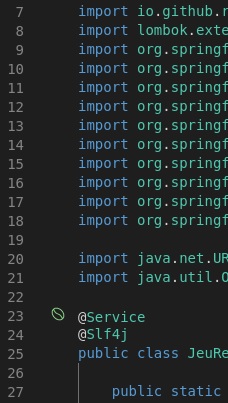
After running the formatter I end up with this
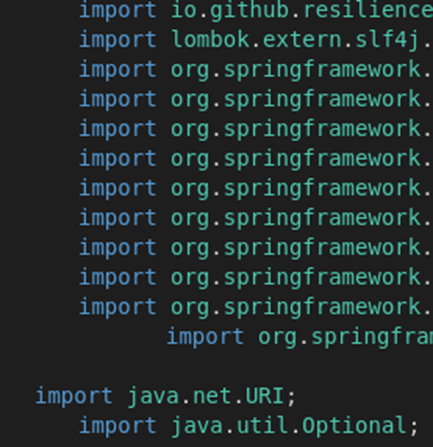
Same formatter output, but with some tabs to show the the indentation isn't aligning properly.
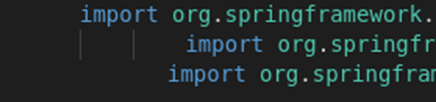
Expected Result
The indentation should always be exact!
Additional Informations
I also have the Spring boot extensions installed.
After updating to version 1.13.0, I get some visual cues that my file contains a Spring Bean.
贡献指南
从这里开始
- 先读完整个 Issue,再读项目的贡献指南。
- 在 Issue 下留言说明你要接手 —— 这能避免两个人做同样的事。
- Fork 仓库,在一个分支上完成修改。
- 提交 Pull Request,并在描述里引用这个 Issue 编号。
调研方向
未指定源文件、测试或入口点。在所述的 VS Code、Java extension、JDK 和 Rocky Linux 环境中复现该格式化情况,然后跟踪 Java 格式化器集成,以确定导入和缩进未对齐的原因。完成的标准是:格式化能够始终生成完全准确的缩进,且不会出现所报告的视觉线索。
由索引模型根据 Issue 内容生成。
评估
- 技术栈
- java, vscode
- 领域
- developer-experience, tooling
- Issue 类型
- 缺陷
- 难度
- 4/5
- 预计耗时
- 3-5 天
- 活跃度
- 停滞
- 描述清晰度
- 基本清楚
- 新手友好度
- 30/100