redhat-developer / redhat-developer/vscode-java
failed to run samples/webflux-websocket under Spring GraphQL project
Chưa có ai nhận issue này.
- Ngôn ngữ chính
- TypeScript
- Star
- 2.3k
- Fork
- 546
- Merge trung bình
- 20 giờ 1 phút
- Pull request đã merge (30 ngày)
- 11
Mô tả
See https://github.com/spring-projects/spring-graphql/issues/408 - Thought it's a Spring GraphQL problem, but turns out to be a VSCode Java problem. Running the sample project in command prompt works fine.
Environment
- Operating System: Debian (WSL)
- JDK version: JDK17
- Visual Studio Code version:
Version: 1.68.0 (user setup)
Commit: 4af164ea3a06f701fe3e89a2bcbb421d2026b68f
Date: 2022-06-08T11:44:16.822Z
Electron: 17.4.7
Chromium: 98.0.4758.141
Node.js: 16.13.0
V8: 9.8.177.13-electron.0
OS: Windows_NT x64 10.0.19044
- Java extension version: v0.23.0
Steps To Reproduce
Steps:
$ git clone git@github.com:spring-projects/spring-graphql.git
Cloning into 'spring-graphql'...
remote: Enumerating objects: 13481, done.
remote: Counting objects: 100% (2931/2931), done.
remote: Compressing objects: 100% (669/669), done.
remote: Total 13481 (delta 2257), reused 2461 (delta 2113), pack-reused 10550
Receiving objects: 100% (13481/13481), 2.23 MiB | 1.13 MiB/s, done.
Resolving deltas: 100% (5538/5538), done.

$ cd spring-graphql/samples/webflux-websocket/

$ code .  # launch VSCode which has Extension Pack for Java installed
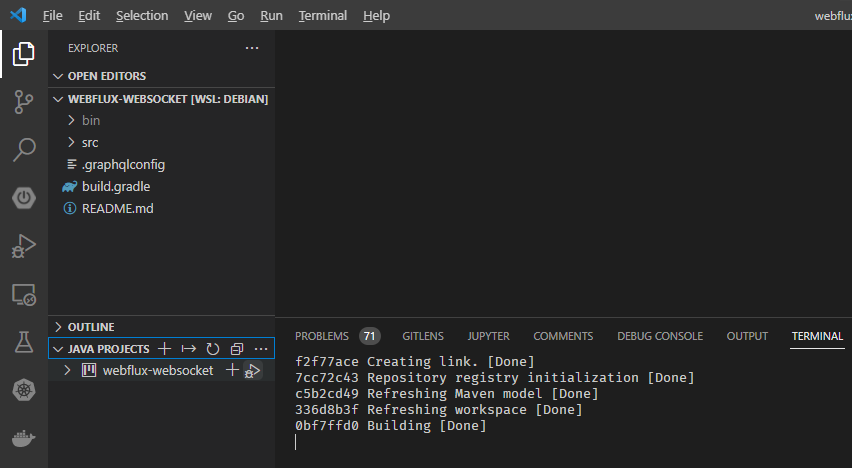
Wait for Java Build to complete (watch Java Build Status):
f2f77ace Creating link. [Done]
7cc72c43 Repository registry initialization [Done]
c5b2cd49 Refreshing Maven model [Done]
336d8b3f Refreshing workspace [Done]
0bf7ffd0 Building [Done]
Go to JAVA PROJECTS and click [Debug] Icon:
Then got results:
 =========|_|==============|___/=/_/_/_/
 :: Spring Boot ::       (v2.7.0-SNAPSHOT)

2022-06-10 10:58:50.883  INFO 10045 --- [  restartedMain] i.s.sample.graphql.SampleApplication     : Starting SampleApplication using Java 1.8.0_311 on powerberry with PID 10045 (/home/tigerinus/dev/tigerinus/spring-graphql/samples/webflux-websocket/bin/main started by tigerinus in /home/tigerinus/dev/tigerinus/spring-graphql/samples/webflux-websocket)
2022-06-10 10:58:50.885  INFO 10045 --- [  restartedMain] i.s.sample.graphql.SampleApplication     : No active profile set, falling back to 1 default profile: "default"
2022-06-10 10:58:50.957  INFO 10045 --- [  restartedMain] .e.DevToolsPropertyDefaultsPostProcessor : Devtools property defaults active! Set 'spring.devtools.add-properties' to 'false' to disable
2022-06-10 10:58:50.959  INFO 10045 --- [  restartedMain] .e.DevToolsPropertyDefaultsPostProcessor : For additional web related logging consider setting the 'logging.level.web' property to 'DEBUG'
2022-06-10 10:58:52.103 DEBUG 10045 --- [  restartedMain] reactor.netty.tcp.TcpResources           : [http] resources will use the default LoopResources: DefaultLoopResources {prefix=reactor-http, daemon=true, selectCount=4, workerCount=4}
2022-06-10 10:58:52.104 DEBUG 10045 --- [  restartedMain] reactor.netty.tcp.TcpResources           : [http] resources will use the default ConnectionProvider: reactor.netty.resources.DefaultPooledConnectionProvider@12e972e3
2022-06-10 10:58:52.586 DEBUG 10045 --- [  restartedMain] o.s.w.r.handler.SimpleUrlHandlerMapping  : Patterns [/webjars/**, /**] in 'resourceHandlerMapping'
2022-06-10 10:58:52.946  INFO 10045 --- [  restartedMain] o.s.b.a.e.web.EndpointLinksResolver      : Exposing 3 endpoint(s) beneath base path '/actuator'
2022-06-10 10:58:53.118 DEBUG 10045 --- [  restartedMain] o.s.w.r.r.m.a.ControllerMethodResolver   : ControllerAdvice beans: none
2022-06-10 10:58:53.161 DEBUG 10045 --- [  restartedMain] o.s.w.s.adapter.HttpWebHandlerAdapter    : enableLoggingRequestDetails='false': form data and headers will be masked to prevent unsafe logging of potentially sensitive data
2022-06-10 10:58:53.612  WARN 10045 --- [  restartedMain] onfigReactiveWebServerApplicationContext : Exception encountered during context initialization - cancelling refresh attempt: org.springframework.beans.factory.BeanCreationException: Error creating bean with name 'graphQlSource' defined in class path resource [org/springframework/boot/autoconfigure/graphql/GraphQlAutoConfiguration.class]: Bean instantiation via factory method failed; nested exception is org.springframework.beans.BeanInstantiationException: Failed to instantiate [org.springframework.graphql.execution.GraphQlSource]: Factory method 'graphQlSource' threw exception; nested exception is java.lang.ClassCastException: com.sun.proxy.$Proxy86 cannot be cast to org.springframework.graphql.data.method.annotation.BatchMapping
2022-06-10 10:58:53.645  INFO 10045 --- [  restartedMain] ConditionEvaluationReportLoggingListener :

Error starting ApplicationContext. To display the conditions report re-run your application with 'debug' enabled.
2022-06-10 10:58:53.671 ERROR 10045 --- [  restartedMain] o.s.boot.SpringApplication               : Application run failed

org.springframework.beans.factory.BeanCreationException: Error creating bean with name 'graphQlSource' defined in class path resource [org/springframework/boot/autoconfigure/graphql/GraphQlAutoConfiguration.class]: Bean instantiation via factory method failed; nested exception is org.springframework.beans.BeanInstantiationException: Failed to instantiate [org.springframework.graphql.execution.GraphQlSource]: Factory method 'graphQlSource' threw exception; nested exception is java.lang.ClassCastException: com.sun.proxy.$Proxy86 cannot be cast to org.springframework.graphql.data.method.annotation.BatchMapping
If I do
$ cd spring-graphql/samples/webflux-websocket/
$ ../../gradlew bootRun
... then everything works fine.
So it's something related to VSCode Java support.
I tried both JDK17 and JDK8 in VSCode and got the same error.
I tried both JDK17 and JDK8 in command line and they are working fine.
Hướng dẫn đóng góp
Bắt đầu từ đâu
- Đọc hết issue, rồi đọc hướng dẫn đóng góp của dự án.
- Bình luận trên issue rằng bạn sẽ nhận — tránh hai người làm cùng một việc.
- Fork repository và làm thay đổi trên một nhánh.
- Mở pull request có tham chiếu số hiệu của issue.
Hướng nghiên cứu
Tái hiện lỗi từ samples/webflux-websocket bằng cách mở nó trong VS Code và sử dụng tác vụ Java Projects Debug, sau đó so sánh với ../../gradlew bootRun. Điều tra đường dẫn hỗ trợ Java của VS Code tạo ra ClassCastException; hoàn tất khi sample khởi động thành công thông qua VS Code giống như khi chạy từ dòng lệnh.
Do mô hình lập chỉ mục viết ra từ nội dung của issue.
Đánh giá
- Công nghệ
- java, spring-boot, typescript, vscode
- Lĩnh vực
- developer-experience, tooling
- Loại issue
- Lỗi
- Độ khó
- 4/5
- Thời gian dự kiến
- 3-5 ngày
- Mức độ hoạt động
- Đình trệ
- Độ rõ ràng
- Khá rõ ràng
- Mức phù hợp với người mới
- 35/100