redhat-developer / redhat-developer/vscode-java
java.import.exclusions being ignored for Eclipse projects on startup
未关闭
还没有人认领这个 Issue。
bug
extension-start
preferences
- 主要语言
- TypeScript
- 星标
- 2.3k
- 派生
- 546
- 平均合并
- 20 小时 1 分钟
- 30 天内合并 PR
- 11
描述
I've tried to ignore a project in a workspace with multiple Eclipse projects but I have been unsuccessful. This did work in the past for me, but at some point, it stopped working again.
My settings.json config for excluding in repro repo:
"java.import.exclusions": [
        "**/project1/**"
    ]
Environment
- Operating System: macOS Catalina 10.15.7
- JDK version: Language server JDK: openjdk version "13.0.2" 2020-01-14 | Runtime JDK: openjdk version "1.8.0_252"
- Visual Studio Code version: Version: 1.59.1
- Java extension version: v0.81.0
Steps To Reproduce
- Clone Repro repo
- Open folder in VSCode with Java extension enabled
Current Result
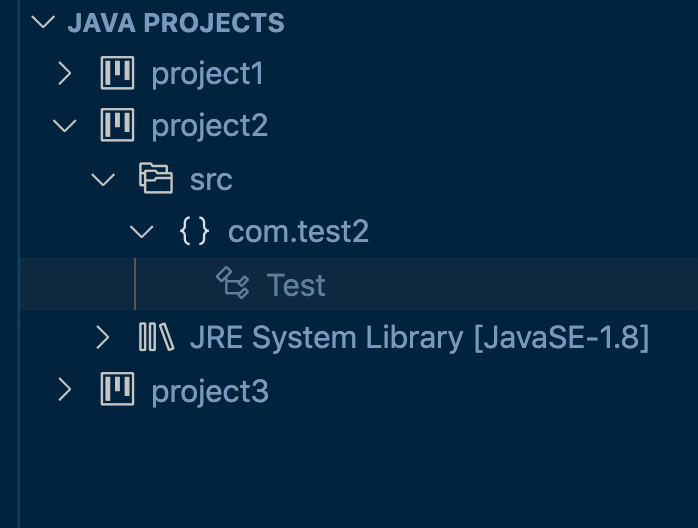
Expected Result
project1 would not be imported
Additional Informations
I've also tested on my Windows 11 PC with the same VSCode and extension version (though different JDK versions) with the same results.
贡献指南
从这里开始
- 先读完整个 Issue,再读项目的贡献指南。
- 在 Issue 下留言说明你要接手 —— 这能避免两个人做同样的事。
- Fork 仓库,在一个分支上完成修改。
- 提交 Pull Request,并在描述里引用这个 Issue 编号。
调研方向
使用链接的复现仓库、settings.json 中对 project1 的排除设置以及提供的日志来复现该问题。首先跟踪 Java 扩展中针对多个 Eclipse 项目的 java.import.exclusions 启动处理流程。完成标准是:打开工作区时不导入 project1,同时其他项目仍然可用。
由索引模型根据 Issue 内容生成。
评估
- 技术栈
- java, typescript
- 领域
- devtools, tooling
- Issue 类型
- 缺陷
- 难度
- 3/5
- 预计耗时
- 1-2 天
- 活跃度
- 停滞
- 描述清晰度
- 描述清楚
- 新手友好度
- 38/100