redhat-developer / redhat-developer/vscode-java
java.import.exclusions being ignored for Eclipse projects on startup
Nobody has claimed this yet.
- Dominant language
- TypeScript
- Stars
- 2.3k
- Forks
- 546
- Avg merge
- 20h 1m
- Merged PRs (30d)
- 11
Description
I've tried to ignore a project in a workspace with multiple Eclipse projects but I have been unsuccessful. This did work in the past for me, but at some point, it stopped working again.
My settings.json config for excluding in repro repo:
"java.import.exclusions": [
        "**/project1/**"
    ]
Environment
- Operating System: macOS Catalina 10.15.7
- JDK version: Language server JDK: openjdk version "13.0.2" 2020-01-14 | Runtime JDK: openjdk version "1.8.0_252"
- Visual Studio Code version: Version: 1.59.1
- Java extension version: v0.81.0
Steps To Reproduce
- Clone Repro repo
- Open folder in VSCode with Java extension enabled
Current Result
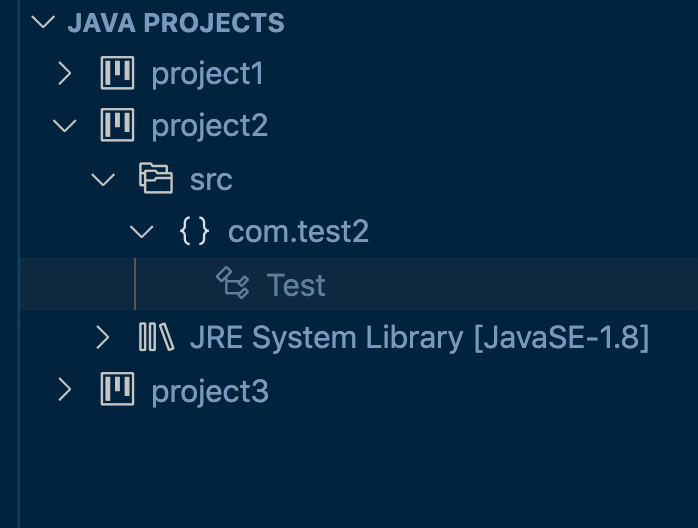
Expected Result
project1 would not be imported
Additional Informations
I've also tested on my Windows 11 PC with the same VSCode and extension version (though different JDK versions) with the same results.
Contributor guide
First steps
- Read the whole issue, then the project's contributing guide.
- Comment on the issue to say you are picking it up — it saves two people doing the same work.
- Fork the repository and make your change on a branch.
- Open a pull request that references the issue number.
Research direction
Reproduce the issue using the linked repro repository, the settings.json exclusion for project1, and the supplied logs. Start by tracing startup handling of java.import.exclusions for multiple Eclipse projects in the Java extension. Done means project1 is not imported when the workspace opens, while other projects remain available.
Written by the indexing model from the issue text.
Assessment
- Tech stack
- java, typescript
- Domain
- devtools, tooling
- Issue type
- Bug
- Difficulty
- 3/5
- Estimated time
- 1-2 days
- Activity status
- Stale
- Clarity
- Clearly specified
- Newbie friendliness
- 38/100