redhat-developer / redhat-developer/vscode-java
If there's a syntax error inside an arrow function, the entire function is highlighted as an error in the editor
Chưa có ai nhận issue này.
- Ngôn ngữ chính
- TypeScript
- Star
- 2.3k
- Fork
- 547
- Merge trung bình
- 20 giờ 1 phút
- Pull request đã merge (30 ngày)
- 11
Mô tả
When an arrow function is assigned to a variable with a generic type parameter, and there is a syntax error inside the arrow function, VSCode highlights the entire arrow function as an error. This obscures the location of the syntax error and makes the code difficult to read.
Environment
Version: 1.54.3 (user setup)
Commit: 2b9aebd5354a3629c3aba0a5f5df49f43d6689f8
Date: 2021-03-15T10:55:45.459Z
Electron: 11.3.0
Chrome: 87.0.4280.141
Node.js: 12.18.3
V8: 8.7.220.31-electron.0
OS: Windows_NT x64 10.0.18362
Steps To Reproduce
Repository: https://github.com/AnthonyWeston/java-test
- Add an arrow function with an undefined variable name inside it, and assign the function to a variable with a generic type parameter:
List<Integer> test = Stream.of("1", "2", "3")
    .map(s -> {
        int result = Integer.parseInt(s);
        return oops;
    })
    .collect(Collectors.toList());
});
Current Result
VSCode highlights the entire arrow function as an error, obscuring the location of the undefined variable and making the code difficult to read. The error message is "Cannot infer type argument(s) for map(Function<? super T,? extends R>)"
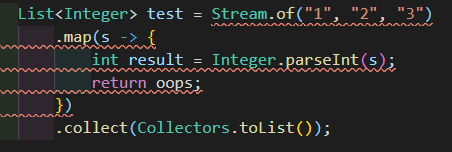
Expected Result
Only the variable assignment is highlighted as an error, and the undefined variable is highlighted as an error and clearly visible.
Additional Information
Logs: https://github.com/AnthonyWeston/java-test/blob/main/log.log
Hướng dẫn đóng góp
Bắt đầu từ đâu
- Đọc hết issue, rồi đọc hướng dẫn đóng góp của dự án.
- Bình luận trên issue rằng bạn sẽ nhận — tránh hai người làm cùng một việc.
- Fork repository và làm thay đổi trên một nhánh.
- Mở pull request có tham chiếu số hiệu của issue.
Hướng nghiên cứu
Sử dụng repository java-test được liên kết và ví dụ arrow-function được cung cấp để tái hiện việc tô sáng chẩn đoán trong VS Code. So sánh các chẩn đoán hiện tại và dự kiến, bao gồm biến chưa được định nghĩa bên trong arrow function; hoàn thành có nghĩa là lỗi cú pháp được định vị thay vì toàn bộ hàm bị tô sáng.
Do mô hình lập chỉ mục viết ra từ nội dung của issue.
Đánh giá
- Công nghệ
- java, vscode
- Lĩnh vực
- devtools
- Loại issue
- Lỗi
- Độ khó
- 4/5
- Thời gian dự kiến
- 3-5 ngày
- Mức độ hoạt động
- Đình trệ
- Độ rõ ràng
- Đặc tả rõ ràng
- Mức phù hợp với người mới
- 35/100