redhat-developer / redhat-developer/vscode-java
[Formatter Bug] Comments of the parameters are indented incorrectly
Đang mở
Chưa có ai nhận issue này.
bug
formatter
ux
- Ngôn ngữ chính
- TypeScript
- Star
- 2.3k
- Fork
- 546
- Merge trung bình
- 20 giờ 1 phút
- Pull request đã merge (30 ngày)
- 11
Mô tả
Expected Result
(Image Format)

(Text Format)
     * @param test
     *            test test test
     * @param test
     *            test test test test
Current Result
(Image Format)
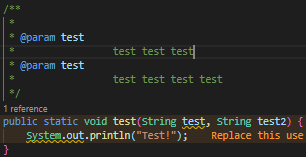
(Text Format)
     * @param test
     *                 test test test
     * @param test
     *                 test test test test
Formatter XML Config
<?xml version="1.0" encoding="UTF-8" standalone="no"?>
<profiles version="12">
  <profile kind="CodeFormatterProfile" name="Test Formatter" version="12">
    <setting id="org.eclipse.jdt.core.formatter.comment.format_javadoc_comments" value="true"/>
    <setting id="org.eclipse.jdt.core.formatter.indentation.size" value="4"/>
    <setting id="org.eclipse.jdt.core.formatter.never_indent_line_comments_on_first_column" value="false"/>
    <setting id="org.eclipse.jdt.core.formatter.comment.preserve_white_space_between_code_and_line_comments" value="false"/>
    <setting id="org.eclipse.jdt.core.formatter.comment.format_line_comments" value="true"/>
    <setting id="org.eclipse.jdt.core.formatter.never_indent_block_comments_on_first_column" value="false"/>
    <setting id="org.eclipse.jdt.core.formatter.comment.format_block_comments" value="true"/>
    <setting id="org.eclipse.jdt.core.formatter.join_lines_in_comments" value="true"/>
  </profile>
</profiles>
Environment
- Operating System: Windows 10
- JDK version: jdk-14.0.2.12-hotspot
- Visual Studio Code version: 1.53.0-insider
- Java extension version: 0.74.0
Additional Informations
I can't update the XML profile version because the project need to support old eclipse versions.
Hướng dẫn đóng góp
Bắt đầu từ đâu
- Đọc hết issue, rồi đọc hướng dẫn đóng góp của dự án.
- Bình luận trên issue rằng bạn sẽ nhận — tránh hai người làm cùng một việc.
- Fork repository và làm thay đổi trên một nhánh.
- Mở pull request có tham chiếu số hiệu của issue.
Hướng nghiên cứu
Bắt đầu bằng cách tái hiện đầu ra của formatter với Formatter XML Config được cung cấp và so sánh mức thụt lề hiện tại với mức thụt lề dự kiến cho các chú thích Javadoc @param. Hoàn tất khi các mô tả tham số đã được định dạng sử dụng mức thụt lề dự kiến thay vì khoảng cách thừa được hiển thị trong báo cáo.
Do mô hình lập chỉ mục viết ra từ nội dung của issue.
Đánh giá
- Công nghệ
- java, vscode
- Lĩnh vực
- tooling
- Loại issue
- Lỗi
- Độ khó
- 4/5
- Thời gian dự kiến
- 3-5 ngày
- Mức độ hoạt động
- Đình trệ
- Độ rõ ràng
- Khá rõ ràng
- Mức phù hợp với người mới
- 42/100