redhat-developer / redhat-developer/vscode-java
All sources open as java even when they are not.
まだ誰も着手していません。
- 主要言語
- TypeScript
- スター
- 2.3k
- フォーク
- 546
- 平均マージ
- 20時間 1分
- マージ済み PR(30日)
- 11
説明
Go to definition opens external sources as a .class file. As far as I can tell a file extension can only belong to a single language. In this case .class is related to java? The actual source file that corresponds to the .class file is not always a .java file. I suspect that if the source was opened as a .java, .scala, .clj etc... vscode would give proper syntax highlighting for the source
Environment
- Operating System: OSX 10.14.5
- JDK version: 1.8.0_162
- Visual Studio Code version: 1.36.1
- Java extension version: redhat.java@0.47.0
Steps To Reproduce
- Include a maven dependency that is not written in java.
- Go to definition for a class in that dependency.
Here is a sample project includes a scala kafka client. org.sample.app.App declares a SimpleConsumer, F12 on it.
non-java-dep-sources-sample.zip
Current Result
The source opens as a .class file and attempts to use the java syntax highlighting.
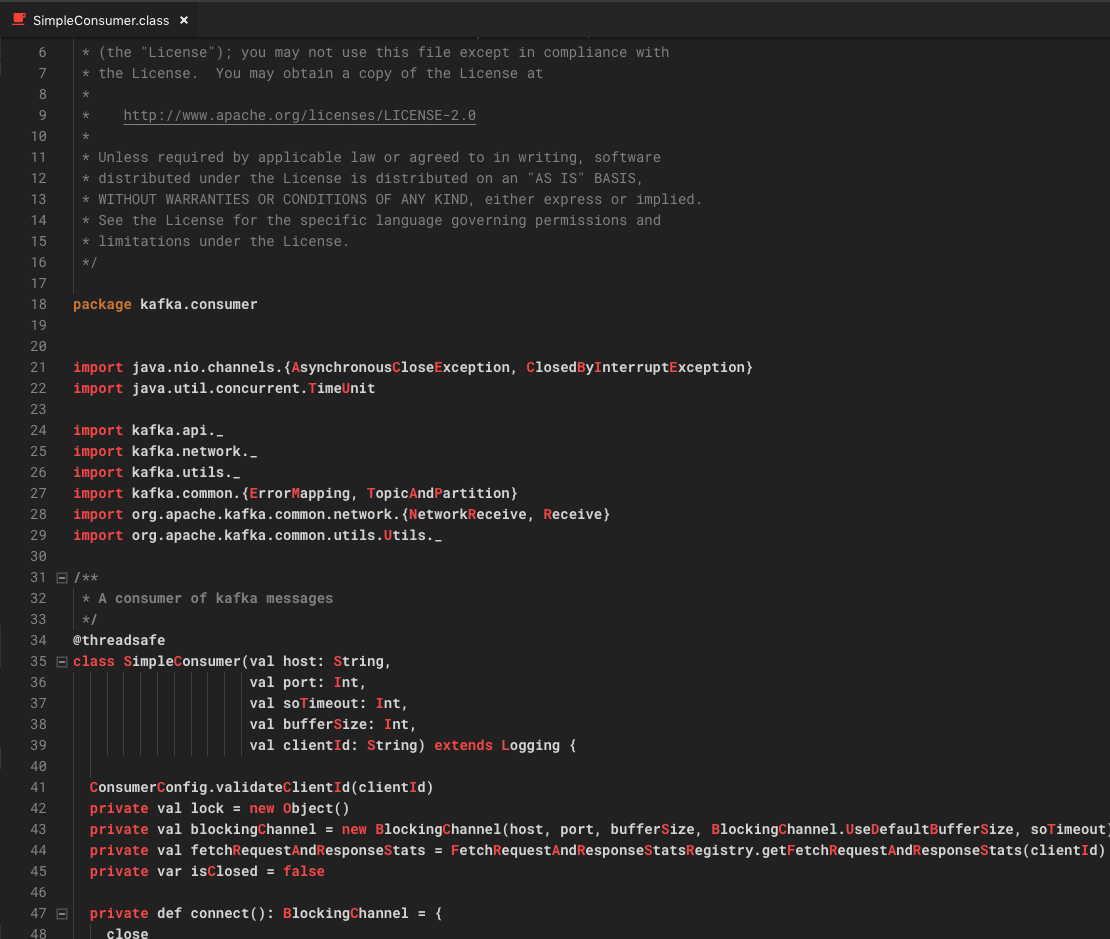
Expected Result
I would expect the source to not be assumed as java. With the scala extension installed I would expect scala highlighting to work.
Scala extension: https://marketplace.visualstudio.com/items?itemName=scala-lang.scala
Additional Informations
I did see #786 and it said that the .class extension is working as designed. I see this as a short coming. The .class extension makes sense if you are viewing decompiled code, but not once sources are available.
コントリビューションガイド
はじめの一歩
- issue を最後まで読み、次にプロジェクトのコントリビューションガイドを読みます。
- 着手することを issue にコメントします — 二人が同じ作業をするのを防げます。
- リポジトリをフォークし、ブランチを切って変更します。
- issue 番号を参照したプルリクエストを送ります。
調査の方向性
外部ソースの Go to definition フローから始め、リンクされている non-java-dep-sources-sample.zip プロジェクト(Scala Kafka client を含む)を使って動作を再現します。利用可能なソースが .class ファイルとして開かれる理由を追跡し、その後、ソースが Java であると仮定されなくなっていること、およびインストール済みの Scala 拡張機能がハイライトを提供できることを確認します。
索引モデルが issue の本文から書いたものです。
評価
- 技術スタック
- java, scala, typescript, vscode
- 領域
- developer-experience, tooling
- issue の種類
- バグ
- 難易度
- 4/5
- 見積もり時間
- 3〜5日
- 活発さ
- 停滞
- 明瞭さ
- おおむね明確
- 初心者へのやさしさ
- 35/100