realpython / realpython/python-guide
Describing making Python 3 the default `python` under Homebrew
Dieses Issue hat noch niemand übernommen.
- Vorherrschende Sprache
- Batchfile
- Sterne
- 29.8k
- Forks
- 5.9k
- PR-Merge-Kennzahlen
- Keine gemergten PRs in 30 T.
Beschreibung
So, about this section in the OS X installation guides:
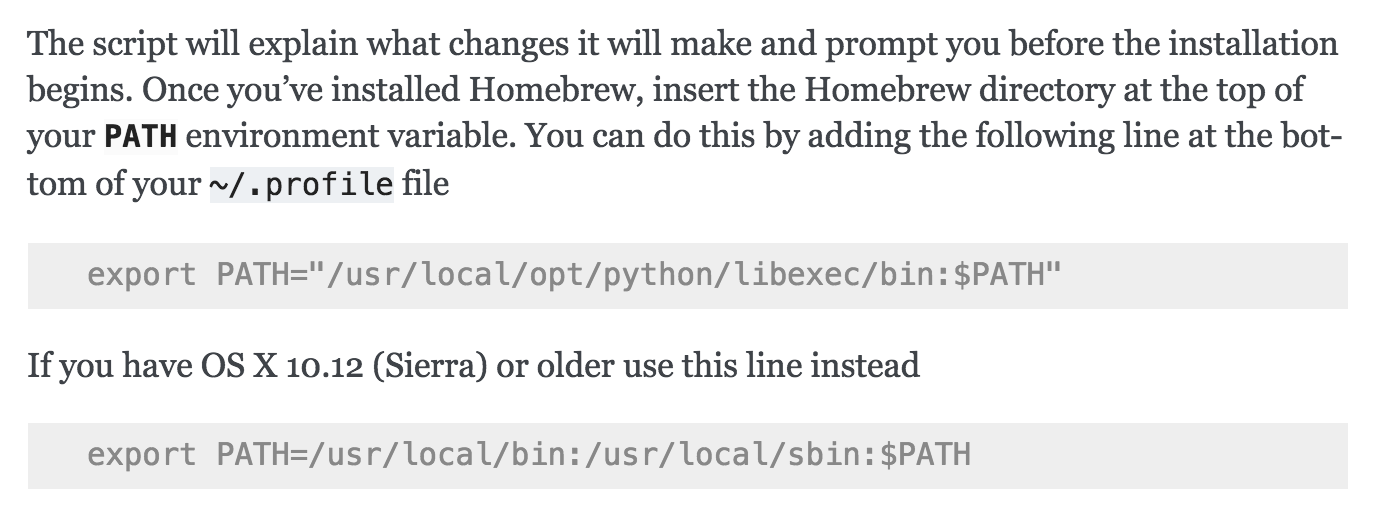
That opt/python/libexec behavior is not actually about 10.12 Sierra vs. newer versions of macOS. Homebrew does not make the unqualified python command be Python 3 on any version of macOS. If this behavior was different in the past, that was due to a different Homebrew version, not a different macOS version. (Homebrew's policy is to not shadow system-provided components in a way that might break things.)
Maybe this section should be updated to something like:
Once you've installed Homebrew, insert the Homebrew directory at the top
of your :envvar:`PATH` environment variable if you are running 10.12 Sierra or older.
You can do this by adding the following line at the bottom of your :file:`~/.profile` file:

.. code-block:: console

    export PATH="/usr/local/bin:/usr/local/sbin:$PATH"

Now, we can install Python 3:

.. code-block:: console

    $ brew install python

Then, to make your default `python` command point to Python 3:

.. code-block:: console

    export PATH="/usr/local/opt/python/libexec/bin:$PATH"
And the section in the Python 2 installation about doing PATH="/usr/local/opt/python@2/libexec/bin:$PATH" is no longer necessary: the Homebrew python@2 formula now provides a python command that is in /usr/local/bin by default.
Might also want to provide a link to Homebrew's Homebrew and Python page, which goes in to more detail.
Beitragsleitfaden
Erste Schritte
- Lies das ganze Issue und danach den Beitragsleitfaden des Projekts.
- Schreib ins Issue, dass du es übernimmst — das erspart doppelte Arbeit.
- Forke das Repository und arbeite in einem Branch.
- Öffne einen Pull Request, der die Issue-Nummer nennt.
Rechercherichtung
Durchsuche die OS X-Installationsanleitungen nach dem im Issue gezeigten Abschnitt zu Homebrew und Python 3 und lies anschließend die Seite „Homebrew und Python“ von Homebrew, um das aktuelle Verhalten zu prüfen. Aktualisiere die Anweisungen für Python 3 und Python 2, sodass sie die PATH-Behandlung widerspiegeln und auf die Homebrew-Dokumentation verlinken; als erledigt gilt die Aufgabe, wenn die Unterscheidung zwischen macOS-Versionen und das Standardverhalten des python-Befehls korrekt sind.
Vom Indexierungsmodell aus dem Issue-Text verfasst.
Bewertung
- Tech-Stack
- python
- Bereich
- documentation
- Issue-Typ
- Dokumentation
- Schwierigkeit
- 2/5
- Geschätzter Aufwand
- 1-3 Stunden
- Aktivitätsstatus
- Veraltet
- Klarheit
- Klar beschrieben
- Anfängerfreundlichkeit
- 35/100