[Android] `maxFontSizeMultiplier` doesn't cap line height on Android (Fabric) — height keeps growing with device font scale even when JS pre-caps the value
Chưa có ai nhận issue này.
- Ngôn ngữ chính
- C++
- Star
- 127k
- Fork
- 25.3k
- Merge trung bình
- 1 ngày 23 giờ
- Pull request đã merge (30 ngày)
- 4
Mô tả
Description
On Android with the New Architecture (Fabric) enabled, maxFontSizeMultiplier does not fully cap rendered text size. Even when an explicit, already-capped lineHeight value is passed from JS (a fixed number that does not depend on the device's actual font scale), the rendered layout height still changes depending on the device's real system font scale setting — as if the native layer re-applies the raw (uncapped) Configuration.fontScale on top of the value React Native was given.
fontSize itself appears to be capped correctly (min(fontScale, maxFontSizeMultiplier), matching TextAttributeProps.getEffectiveFontSize() / PixelUtil.toPixelFromSP()), but the line height / leading used for layout does not seem to go through the same capped calculation, and continues to track the device's raw font scale.
Expected Behavior
With maxFontSizeMultiplier set to a fixed value, the effective scaling multiplier applied to a <Text> (including its line height / layout height) should never exceed that value, regardless of how much larger the device's actual system font scale is — matching the documented behavior ("Specifies the largest possible scale a font can reach when allowFontScaling is enabled").
Actual Behavior
Rendered text height keeps growing with the device's real font scale even when maxFontSizeMultiplier is fixed and even when an already-capped lineHeight is explicitly supplied from JS. Only fully disabling allowFontScaling and computing sizes manually produces a stable, correctly-capped result.
Steps to reproduce
1. Minimal repro — fixed maxFontSizeMultiplier, size still varies by device font scale
import { PixelRatio, Text, View } from 'react-native';

export default function FontScaleTest() {
  const fontScale = PixelRatio.getFontScale();
  return (
    <View style={{ flex: 1, justifyContent: 'center' }}>
      <Text
        allowFontScaling={true}
        maxFontSizeMultiplier={1.5}
        style={{ fontSize: 20, backgroundColor: 'yellow' }}
        onLayout={e =>
          console.log(
            'fontScale=',
            fontScale,
            'height=',
            e.nativeEvent.layout.height,
          )
        }
      >
        가나다
      </Text>
    </View>
  );
}
Set the device's system font size so that PixelRatio.getFontScale() reports 1.5, force-quit and cold-start the app, and note the logged height. Then set the device font size so getFontScale() reports 2.0, force-quit and cold-start again, and compare.
Expected: identical height in both cases, since maxFontSizeMultiplier={1.5} should cap the effective multiplier to 1.5 in both (min(1.5, 1.5) = 1.5 and min(2.0, 1.5) = 1.5).
Actual:
| Device fontScale | height |
|---|---|
| 1.5 | 34.844444 |
| 2.0 | 39.822224 |
A ~14.3% difference, reproduced consistently across cold starts.
2. Isolating the cause — explicit pre-capped lineHeight still leaks
To rule out "the automatic default line-height calculation ignores the cap," we passed an explicit lineHeight computed in JS so it is numerically identical regardless of the device's font scale (since maxFontSizeMultiplier should cap both cases to the same 1.5):
<Text
  allowFontScaling
  maxFontSizeMultiplier={1.5}
  numberOfLines={1}
  style={{
    fontSize: 20,
    lineHeight: 20 * 1.5 * 1.2 /* = 36, same value in both cases */,
  }}
  onLayout={e =>
    console.log('fontScale=', fontScale, 'height=', e.nativeEvent.layout.height)
  }
>
  Aa가나다
</Text>
| fontScale=1.5 | fontScale=2.0 | delta | |
|---|---|---|---|
| Auto lineHeight | 34.844444 | 39.822224 | +14.3% |
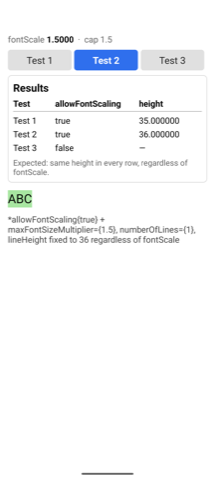
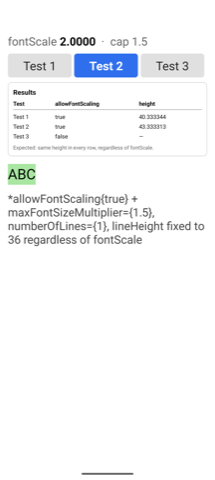
| Explicit fixed lineHeight (36 in both cases) | 36.266666 | 43.377773 | +19.6% |
Even though the exact same JS-computed number (36) was passed to lineHeight in both cases, the rendered height still differs by ~19.6% depending on the device's real font scale. This rules out "default line-height calculation doesn't check the cap" as the sole explanation — something in the native layer appears to reintroduce the raw, uncapped fontScale/scaledDensity even when the JS side has already fully accounted for the cap.
3. Confirmed workaround — disabling allowFontScaling entirely and computing everything manually removes the discrepancy
const cappedScale = Math.min(fontScale, 1.5);
const fontSize = 20 * cappedScale;     // 30 in both cases
const lineHeight = fontSize * 1.1615;  // 34.845 in both cases

<Text allowFontScaling={false} numberOfLines={1} style={{ fontSize, lineHeight }} onLayout={...}>
  Aa가나다
</Text>
| fontScale=1.5 | fontScale=2.0 | |
|---|---|---|
| height | 35.200001 | 35.200001 |
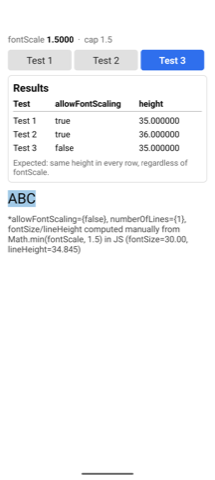
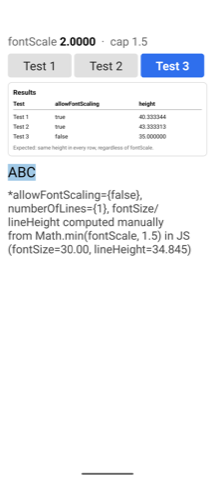
Identical. This strongly suggests the leak only happens through the allowFontScaling={true} / SP-based native scaling path, and is avoided entirely by using allowFontScaling={false} with manual DIP-based sizing.
Additional Context
-
We initially suspected this could be the previously-fixed issue in #47499 (Fabric ignoring
maxFontSizeMultiplierentirely), fixed by #47614 and shipped in 0.78 — but that fix predates both our original 0.83.1 install and the 0.87.0 re-verification below, and the magnitude of the discrepancy (~14–20%) doesn't match "completely ignored" (which would produce a difference closer to the raw fontScale ratio,2.0 / 1.5 ≈ 33%). -
We also ruled out the New Architecture "layout not recalculated after returning from background without a full restart" issue (#51768) by reproducing with a full cold start (force-quit + relaunch) between each font-scale change.
-
The pattern (fontSize appears correctly capped; line height / layout height does not) points at a discrepancy between the code path that sizes glyphs and the code path that determines line height/leading for layout purposes, but we were not able to pin down the exact native function responsible.
-
Minimal repro repository (local RN CLI project,
react-native@0.87.0, New Architecture enabled, matches the environment above exactly): https://github.com/silverj0805/RNFontScaleRepro.src/App.tsxbundles all three cases above into one screen with tab switching and on-screenPixelRatio.getFontScale()/onLayoutheight readouts (see the screenshots above), so results can be checked without a console attached. -
This bug was originally reproduced and reported against
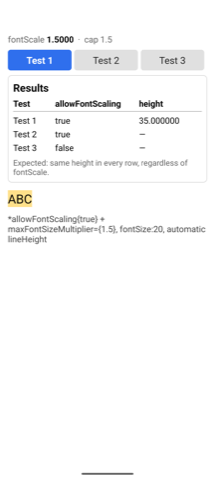
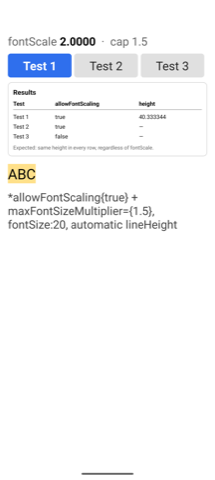
react-native@0.83.1. After the first version of this issue was flagged as targeting an unsupported version, the repro project was upgraded end-to-end to 0.87.0 (the latest stable release at time of writing) and re-verified on an Android emulator (Pixel 8 Pro, API 35,font_scaleset viaadb shell settings put system font_scale <value>, cold-started between changes) — the bug reproduces identically on 0.87.0, withonLayoutheight values matching to the sub-pixel:Test fontScale=1.5 fontScale=2.0 1 (auto lineHeight) 35.000000 40.333344 2 (explicit fixed lineHeight=36) 36.000000 43.333313 3 (workaround: allowFontScaling=false+ manual math)35.000000 35.000000 Same shape as the physical-device numbers: Test 1 and 2 keep growing with the device's raw
fontScalepast the1.5cap, Test 3 stays exactly fixed — on a stock Pixel emulator, independent of the Galaxy S21/One UI hardware above, so this isn't Samsung-specific either. (These emulator numbers were measured withABCas the sample text rather than the Hangul text shown in the physical-device numbers and code snippets above — the pattern is identical either way, since the leak is in the line-height calculation, not the glyphs.)
React Native Version
0.87.0
Affected Platforms
Runtime - Android
Areas
Fabric - The New Renderer
Output of npx @react-native-community/cli info
System:
  OS: macOS 26.4.1
  CPU: (8) arm64 Apple M1 Pro
  Memory: 192.83 MB / 16.00 GB
  Shell:
    version: "5.9"
    path: /bin/zsh
Binaries:
  Node:
    version: 22.17.0
    path: /opt/homebrew/opt/node@22/bin/node
  Yarn:
    version: 3.6.4
    path: /opt/homebrew/opt/node@22/bin/yarn
  npm:
    version: 10.9.2
    path: /opt/homebrew/opt/node@22/bin/npm
  Watchman:
    version: 2025.06.30.00
    path: /opt/homebrew/bin/watchman
Managers:
  CocoaPods:
    version: 1.15.2
    path: /Users/choieunjeong/.rbenv/shims/pod
SDKs:
  iOS SDK:
    Platforms:
      - DriverKit 25.4
      - iOS 26.4
      - macOS 26.4
      - tvOS 26.4
      - visionOS 26.4
      - watchOS 26.4
  Android SDK:
    API Levels:
      - "31"
      - "33"
      - "34"
      - "35"
      - "36"
      - "37"
    Build Tools:
      - 30.0.2
      - 30.0.3
      - 33.0.0
      - 33.0.1
      - 34.0.0
      - 35.0.0
      - 36.0.0
      - 37.0.0
    System Images:
      - android-35 | Google Play ARM 64 v8a
      - android-36.1 | Google APIs ARM 64 v8a
      - android-36 | Google APIs ARM 64 v8a
      - android-36 | Google Play ARM 64 v8a
    Android NDK: Not Found
IDEs:
  Android Studio: 2025.2 AI-252.28238.7.2523.14688667
  Xcode:
    version: 26.4/17E192
    path: /usr/bin/xcodebuild
Languages:
  Java:
    version: 17.0.11
    path: /usr/bin/javac
  Ruby:
    version: 2.7.6
    path: /Users/choieunjeong/.rbenv/shims/ruby
npmPackages:
  "@react-native-community/cli":
    installed: 20.2.0
    wanted: 20.2.0
  react:
    installed: 19.2.3
    wanted: 19.2.3
  react-native:
    installed: 0.87.0
    wanted: 0.87.0
  react-native-macos: Not Found
npmGlobalPackages:
  "*react-native*": Not Found
Android:
  hermesEnabled: true
  newArchEnabled: true
iOS:
  hermesEnabled: true
  newArchEnabled: true
Stacktrace or Logs
Not applicable — this is not a crash and produces no error, warning, or stack trace. The bug is a numeric layout discrepancy, demonstrated instead by the `onLayout` height measurements and screenshots above (same JS input, different rendered `height` depending on the device's raw font scale).
MANDATORY Reproducer
https://github.com/silverj0805/RNFontScaleRepro
Screenshots and Videos
From the linked reproducer, same maxFontSizeMultiplier={1.5} cap in every screenshot, only the device's actual font scale differs (1.5 vs 2.0):
The problem — case 1 (automatic lineHeight):
| Device fontScale = 1.5 | Device fontScale = 2.0 |
|---|---|
 |
 |
The problem — case 2 (explicit, pre-capped lineHeight):
| Device fontScale = 1.5 | Device fontScale = 2.0 |
|---|---|
 |
 |
The workaround — case 3 (allowFontScaling={false} + manual math), for comparison:
| Device fontScale = 1.5 | Device fontScale = 2.0 |
|---|---|
 |
 |
Hướng dẫn đóng góp
Bắt đầu từ đâu
- Đọc hết issue, rồi đọc hướng dẫn đóng góp của dự án.
- Bình luận trên issue rằng bạn sẽ nhận — tránh hai người làm cùng một việc.
- Fork repository và làm thay đổi trên một nhánh.
- Mở pull request có tham chiếu số hiệu của issue.
Hướng nghiên cứu
Bắt đầu với reproducer được liên kết trong src/App.tsx và so sánh các chiều cao onLayout đối với hệ số tỉ lệ phông chữ của thiết bị có giới hạn và không giới hạn. Truy vết đường dẫn bố cục văn bản Android Fabric để xử lý việc tỉ lệ hóa line-height, sử dụng các trường hợp được báo cáo với maxFontSizeMultiplier và lineHeight tường minh làm kịch bản hồi quy. Hoàn tất có nghĩa là chiều cao được render vẫn bị giới hạn khi hệ số tỉ lệ phông chữ của thiết bị vượt quá 1.5, với một bài kiểm thử hồi quy bao phủ cả hai trường hợp.
Do mô hình lập chỉ mục viết ra từ nội dung của issue.
Đánh giá
- Công nghệ
- android, react-native
- Lĩnh vực
- mobile-dev
- Loại issue
- Lỗi
- Độ khó
- 4/5
- Thời gian dự kiến
- 3-5 ngày
- Mức độ hoạt động
- Sôi nổi
- Độ rõ ràng
- Khá rõ ràng
- Mức phù hợp với người mới
- 55/100