[iOS][Fabric] Runtime Dynamic Type change leaves stale text layout: lines overflow and clip, onTextLayout reports stale widths (0.86)
Nessuno ha ancora preso questa issue.
- Lingua principale
- C++
- Stelle
- 127k
- Fork
- 25.3k
- Merge medio
- 1g 23h
- PR unite (30g)
- 4
Descrizione
Description
On iOS with the New Architecture, when the user changes the Dynamic Type size while the app is running, already-rendered <Text> keeps its stale line breaks and box heights while glyphs draw at the new scale. Lines run past the right edge of the screen and are clipped mid-glyph. onTextLayout continues to report the stale (fitting) line widths, so the app cannot even detect the overflow programmatically. Killing and relaunching the app at the same Dynamic Type size renders the identical tree correctly.
This looks like the same stale-cached-text-measurement mechanism as #45857 (fixed via #45978) and is adjacent to #45655 (no re-render on font scale change), but it still reproduces on 0.86.0.
Observations:
- Plain
<View>/<Text>trees reproduce it — no third-party code involved (mainbranch of the reproducer). - The
with-reanimatedbranch (same screen with the cards wrapped inreact-native-reanimatedAnimated.Views, mirroring the production layout where this was first observed) reproduces identically. In production this also manifested as some text "freezing" at the pre-change font scale while other text scaled — i.e. mixed text sizes on one screen. - Android is unaffected.
- Fresh mounts after a cold start are always correct; the defect only appears when the content size category changes during the app's lifetime.
- Originally observed in production on RN 0.83 (Expo SDK 55) as paragraphs of rich text drawing past the right viewport edge whenever Dynamic Type was above default; no combination of
flexShrink, explicitwidth, two-pass mount afteronLayout, or removingonPress/accessibilityRolefrom nested spans avoided it.
Steps to reproduce
npm install && npx expo run:ios --configuration Release(reproducer repo below)- Launch on an iOS simulator at the default text size — everything renders correctly (banner shows
fontScale 1.000 · 0 overflowing). - While the app is running:
xcrun simctl ui booted content_size extra-extra-large - Observe: paragraphs draw past the right content edge (marked by a red hairline) with stale line breaks; the two cards clip their text; the banner still claims
0 overflowingbecauseonTextLayoutreturns stale line widths. - Kill and relaunch the app — the identical tree renders correctly at
fontScale 1.235.
React Native Version
0.86.0
Affected Platforms
Runtime - iOS
Areas
Fabric - The New Renderer
Output of npx @react-native-community/cli info
System:
  OS: macOS 26.3.1
  CPU: (8) arm64 Apple M1
  Memory: 355.03 MB / 16.00 GB
  Shell:
    version: "5.9"
    path: /bin/zsh
Binaries:
  Node:
    version: 22.20.0
    path: /usr/local/bin/node
  Yarn: Not Found
  npm:
    version: 10.9.3
    path: /usr/local/bin/npm
  Watchman: Not Found
Managers:
  CocoaPods:
    version: 1.16.2
    path: /opt/homebrew/bin/pod
SDKs:
  iOS SDK:
    Platforms:
      - DriverKit 25.5
      - iOS 26.5
      - macOS 26.5
      - tvOS 26.5
      - visionOS 26.5
      - watchOS 26.5
IDEs:
  Xcode:
    version: 26.6/17F113
npmPackages:
  react: 19.2.0
  react-native: 0.86.0
Metro: bundled (Release build, no dev server)
Stacktrace or Logs
No crash — layout-only defect. The measurement API returns false negatives:
after the runtime Dynamic Type change, text visibly overflows the container,
yet onTextLayout still reports every line as fitting inside the Yoga box
("0 overflowing" in the reproducer's banner), because the reported line
widths are the pre-change values.
Reproducer
https://github.com/v-metricsadmin/rn-ios-dynamic-type-stale-text-layout
Screenshots and Videos
| Fresh launch @ default (correct) | Runtime change to XXL (broken) | Relaunch @ XXL (correct) |
|---|---|---|
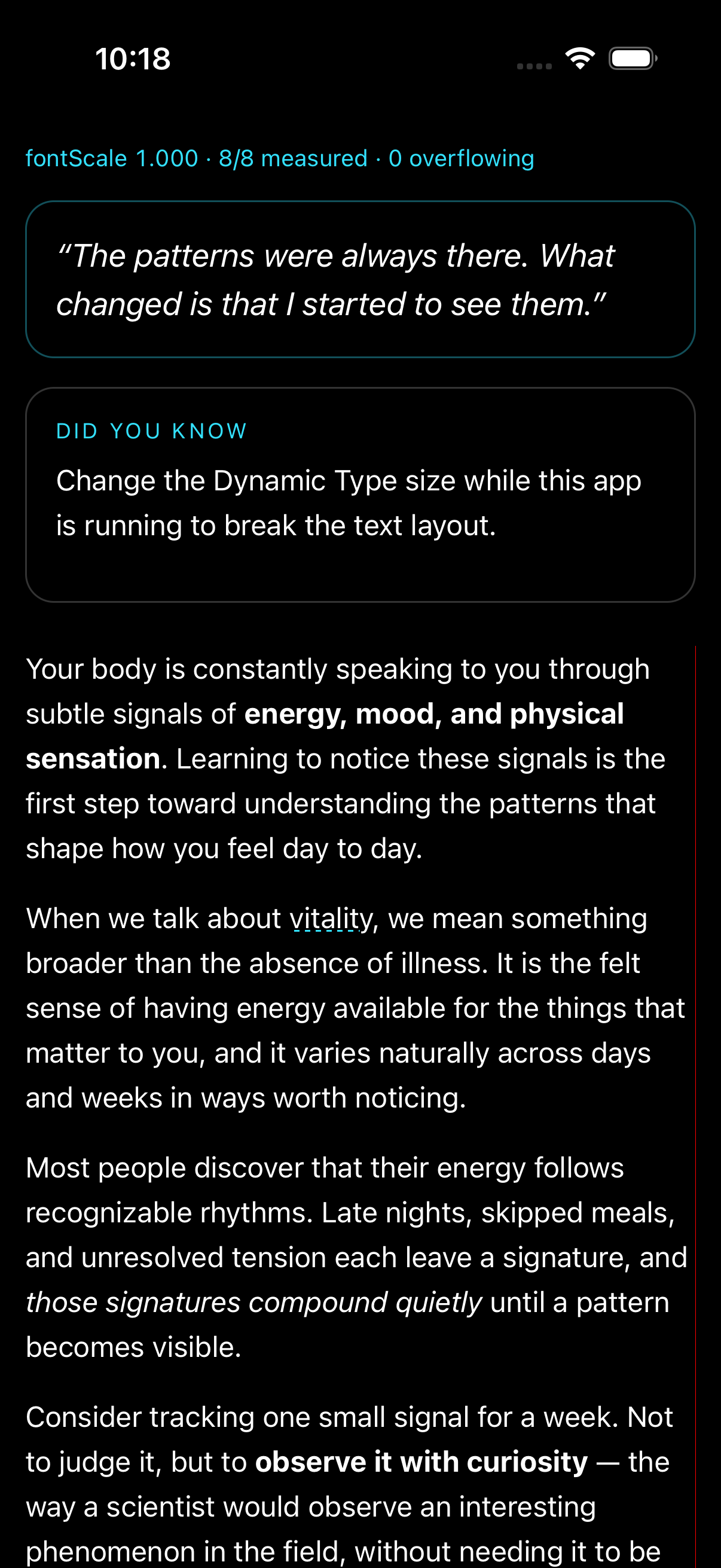 |
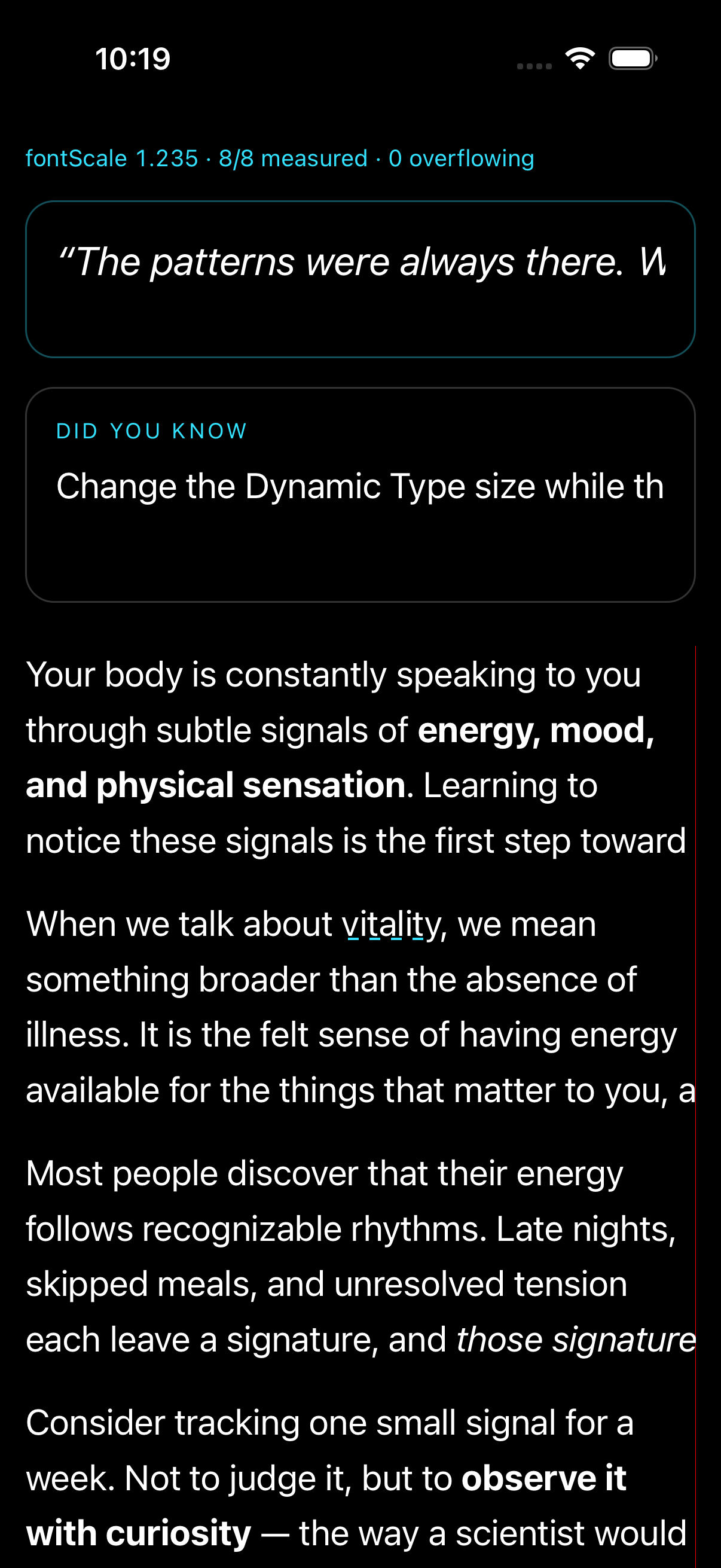 |
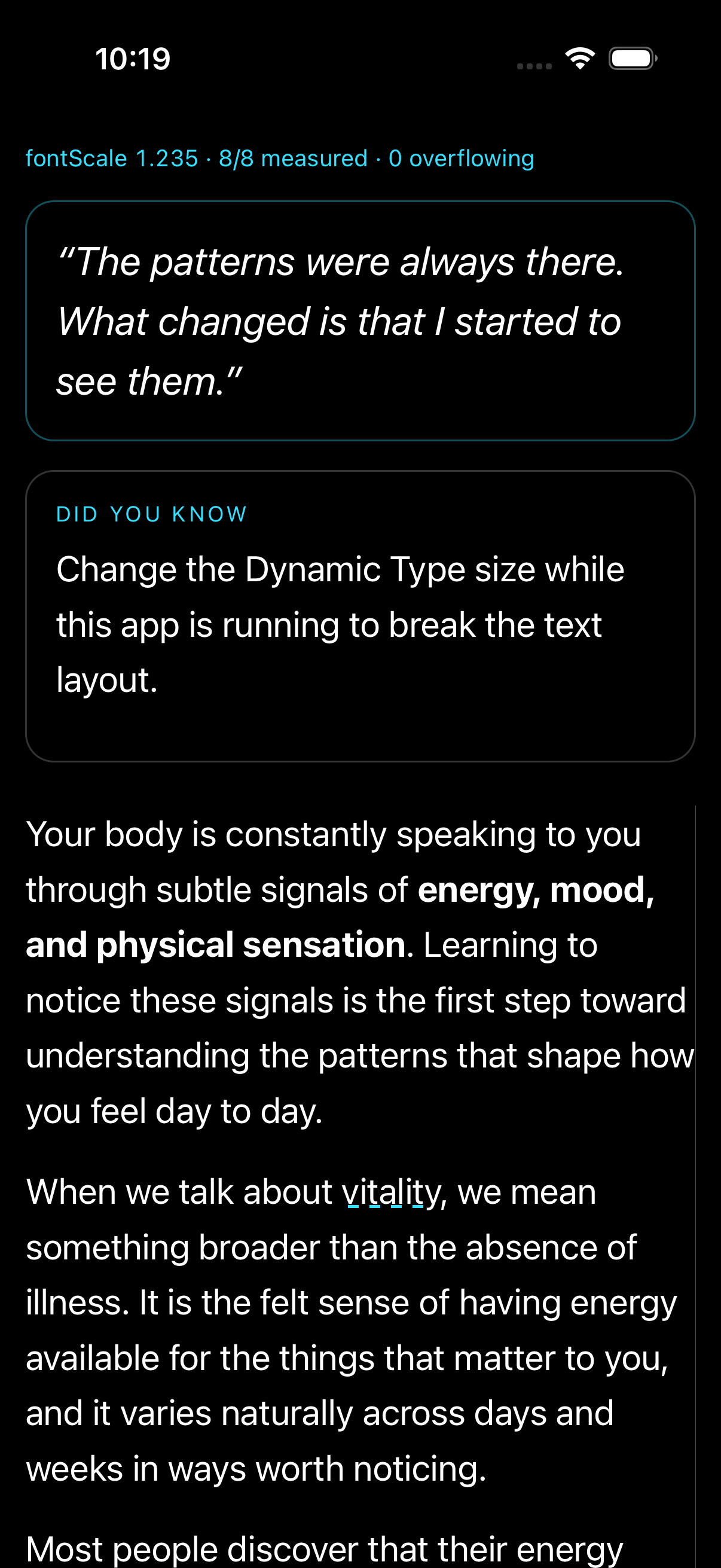 |
Same defect on the with-reanimated branch (production-fidelity variant) — cards stop wrapping and clip after the runtime change:
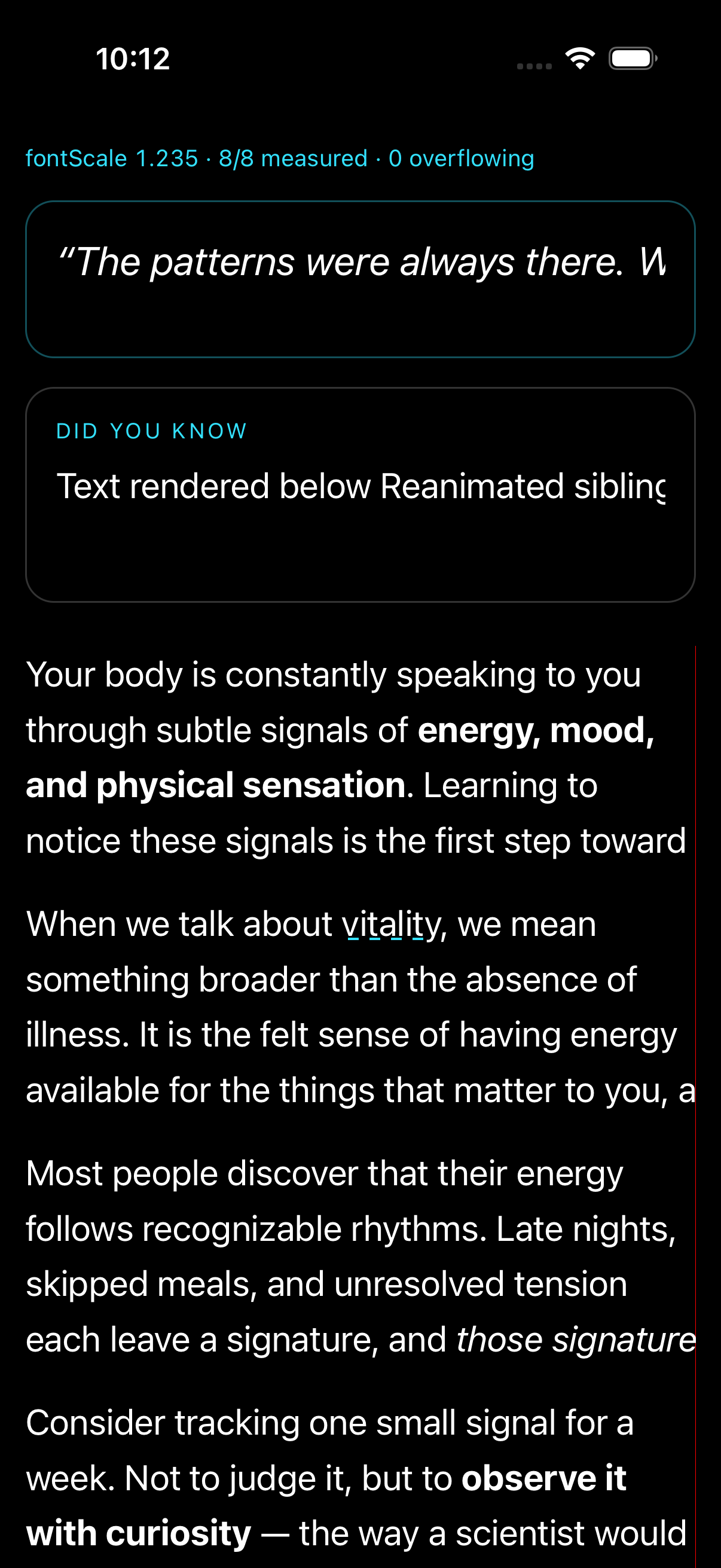
Guida per i contributori
Apri la guida per i contributori
Come iniziare
- Leggi tutta la issue e poi la guida ai contributi del progetto.
- Commenta sulla issue per dire che te ne occupi tu — evita che due persone facciano lo stesso lavoro.
- Fai un fork del repository e lavora su un branch.
- Apri una pull request che faccia riferimento al numero della issue.
Direzione di ricerca
Inizia con il reproducer rn-ios-dynamic-type-stale-text-layout collegato ed esegui npm install && npx expo run:ios --configuration Release. Modifica il content size del simulatore durante l’esecuzione e confronta il layout e l’output di onTextLayout con un riavvio a freddo, usando entrambi i branch plain e with-reanimated. Il lavoro è completo quando le modifiche a Dynamic Type durante l’esecuzione ridistribuiscono il testo, riportano le larghezze delle righe correnti e non causano più ritagli o overflow.
Scritto dal modello di indicizzazione a partire dal testo della issue.
Valutazione
- Stack tecnologico
- cpp, ios, react-native
- Ambito
- mobile
- Tipo di issue
- Bug
- Difficoltà
- 4/5
- Tempo stimato
- 3-5 giorni
- Stato di attività
- Tranquilla
- Chiarezza
- Abbastanza chiara
- Idoneità per principianti
- 48/100