[iOS][Fabric] Runtime Dynamic Type change leaves stale text layout: lines overflow and clip, onTextLayout reports stale widths (0.86)
Personne n'a encore pris cette issue.
- Langage dominant
- C++
- Étoiles
- 127k
- Forks
- 25.3k
- Merge moyen
- 1 j 23 h
- PR mergées (30 j)
- 4
Description
Description
On iOS with the New Architecture, when the user changes the Dynamic Type size while the app is running, already-rendered <Text> keeps its stale line breaks and box heights while glyphs draw at the new scale. Lines run past the right edge of the screen and are clipped mid-glyph. onTextLayout continues to report the stale (fitting) line widths, so the app cannot even detect the overflow programmatically. Killing and relaunching the app at the same Dynamic Type size renders the identical tree correctly.
This looks like the same stale-cached-text-measurement mechanism as #45857 (fixed via #45978) and is adjacent to #45655 (no re-render on font scale change), but it still reproduces on 0.86.0.
Observations:
- Plain
<View>/<Text>trees reproduce it — no third-party code involved (mainbranch of the reproducer). - The
with-reanimatedbranch (same screen with the cards wrapped inreact-native-reanimatedAnimated.Views, mirroring the production layout where this was first observed) reproduces identically. In production this also manifested as some text "freezing" at the pre-change font scale while other text scaled — i.e. mixed text sizes on one screen. - Android is unaffected.
- Fresh mounts after a cold start are always correct; the defect only appears when the content size category changes during the app's lifetime.
- Originally observed in production on RN 0.83 (Expo SDK 55) as paragraphs of rich text drawing past the right viewport edge whenever Dynamic Type was above default; no combination of
flexShrink, explicitwidth, two-pass mount afteronLayout, or removingonPress/accessibilityRolefrom nested spans avoided it.
Steps to reproduce
npm install && npx expo run:ios --configuration Release(reproducer repo below)- Launch on an iOS simulator at the default text size — everything renders correctly (banner shows
fontScale 1.000 · 0 overflowing). - While the app is running:
xcrun simctl ui booted content_size extra-extra-large - Observe: paragraphs draw past the right content edge (marked by a red hairline) with stale line breaks; the two cards clip their text; the banner still claims
0 overflowingbecauseonTextLayoutreturns stale line widths. - Kill and relaunch the app — the identical tree renders correctly at
fontScale 1.235.
React Native Version
0.86.0
Affected Platforms
Runtime - iOS
Areas
Fabric - The New Renderer
Output of npx @react-native-community/cli info
System:
  OS: macOS 26.3.1
  CPU: (8) arm64 Apple M1
  Memory: 355.03 MB / 16.00 GB
  Shell:
    version: "5.9"
    path: /bin/zsh
Binaries:
  Node:
    version: 22.20.0
    path: /usr/local/bin/node
  Yarn: Not Found
  npm:
    version: 10.9.3
    path: /usr/local/bin/npm
  Watchman: Not Found
Managers:
  CocoaPods:
    version: 1.16.2
    path: /opt/homebrew/bin/pod
SDKs:
  iOS SDK:
    Platforms:
      - DriverKit 25.5
      - iOS 26.5
      - macOS 26.5
      - tvOS 26.5
      - visionOS 26.5
      - watchOS 26.5
IDEs:
  Xcode:
    version: 26.6/17F113
npmPackages:
  react: 19.2.0
  react-native: 0.86.0
Metro: bundled (Release build, no dev server)
Stacktrace or Logs
No crash — layout-only defect. The measurement API returns false negatives:
after the runtime Dynamic Type change, text visibly overflows the container,
yet onTextLayout still reports every line as fitting inside the Yoga box
("0 overflowing" in the reproducer's banner), because the reported line
widths are the pre-change values.
Reproducer
https://github.com/v-metricsadmin/rn-ios-dynamic-type-stale-text-layout
Screenshots and Videos
| Fresh launch @ default (correct) | Runtime change to XXL (broken) | Relaunch @ XXL (correct) |
|---|---|---|
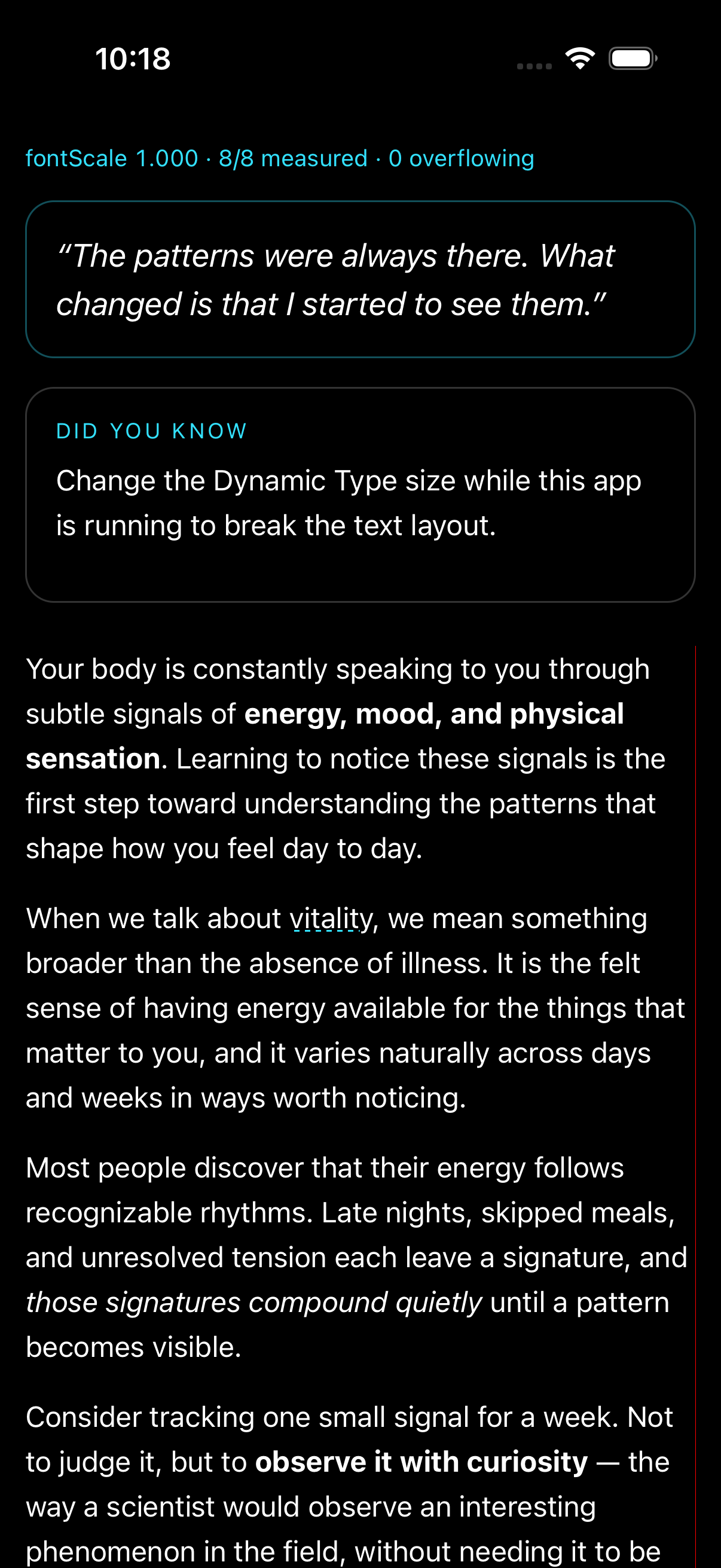 |
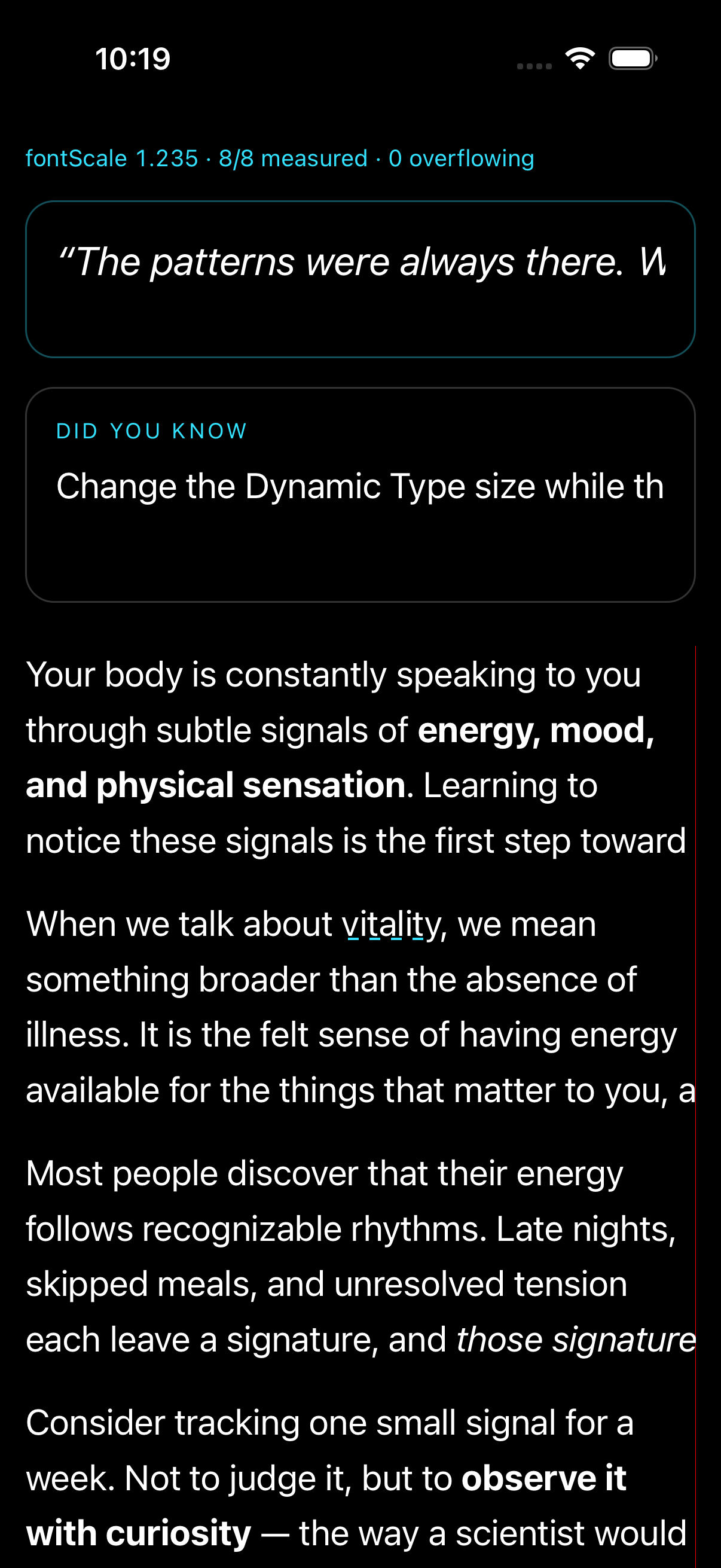 |
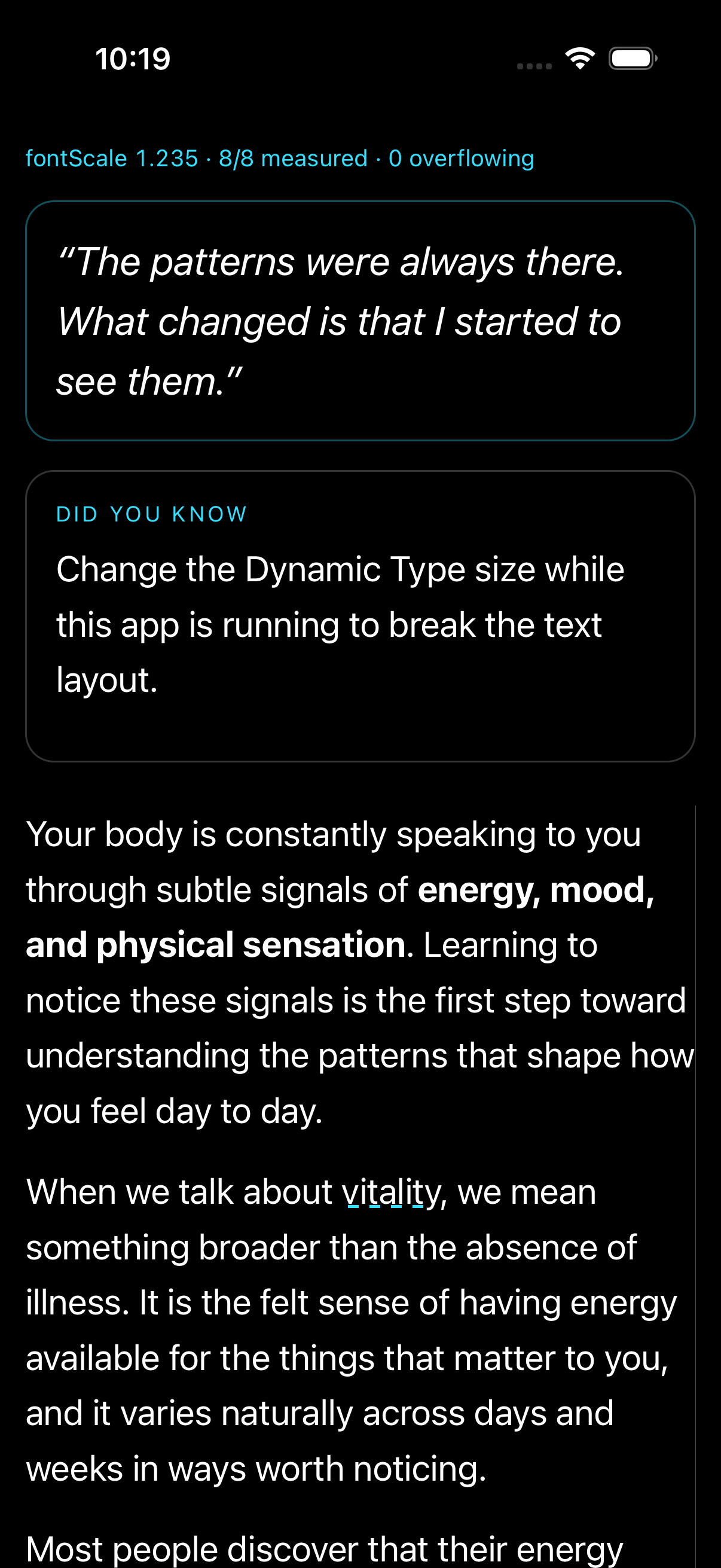 |
Same defect on the with-reanimated branch (production-fidelity variant) — cards stop wrapping and clip after the runtime change:
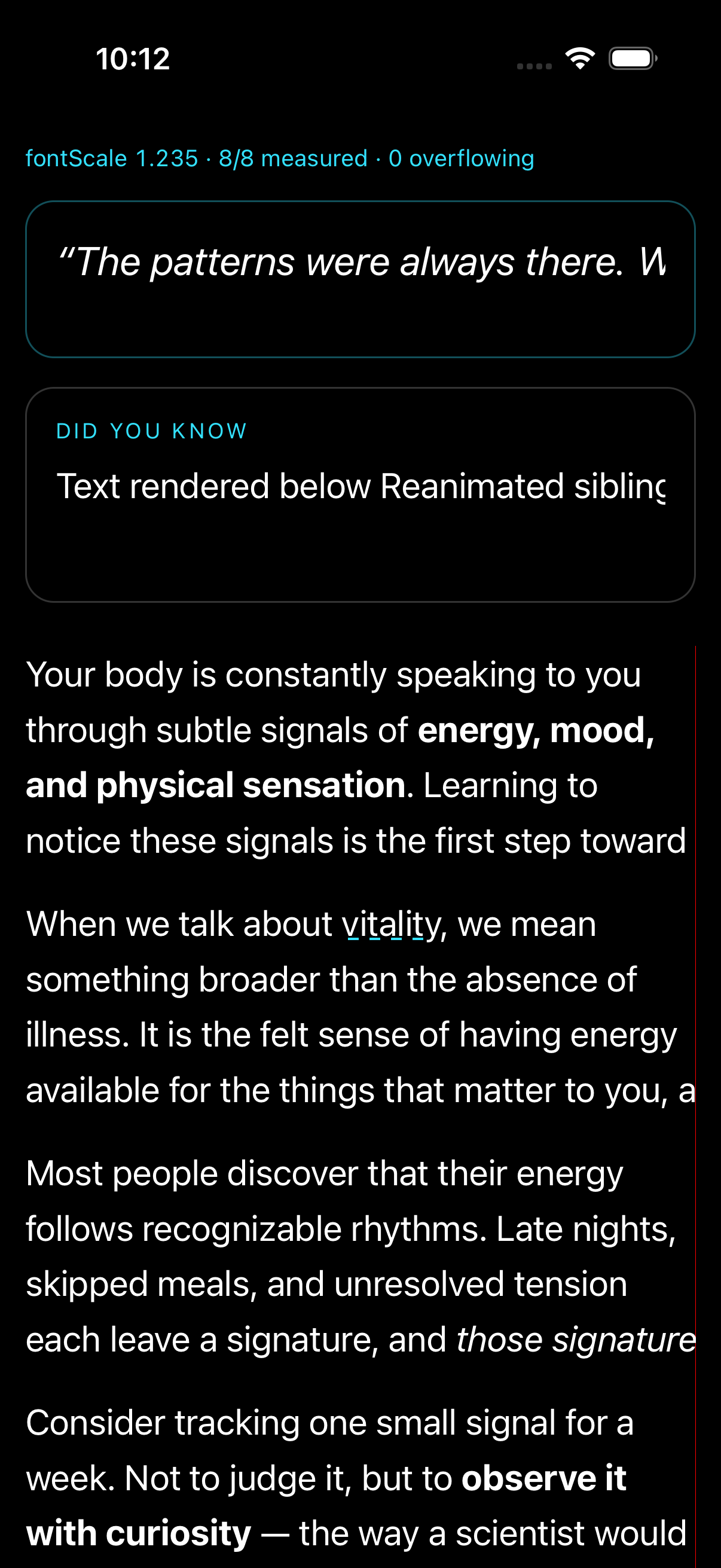
Guide de contribution
Ouvrir le guide de contribution
Par où commencer
- Lisez l'issue en entier, puis le guide de contribution du projet.
- Signalez en commentaire que vous la prenez — cela évite que deux personnes fassent le même travail.
- Forkez le dépôt et travaillez sur une branche.
- Ouvrez une pull request qui référence le numéro de l'issue.
Piste de recherche
Commencez avec le reproducer rn-ios-dynamic-type-stale-text-layout lié et exécutez npm install && npx expo run:ios --configuration Release. Modifiez la content size du simulateur à l’exécution et comparez le layout et la sortie de onTextLayout avec un relancement à froid, en utilisant les deux branches plain et with-reanimated. C’est terminé lorsque les changements de Dynamic Type à l’exécution redistribuent le texte, indiquent les largeurs de ligne actuelles et n’entraînent plus de rognage ni de débordement.
Rédigé par le modèle d'indexation à partir du texte de l'issue.
Évaluation
- Stack technique
- cpp, ios, react-native
- Domaine
- mobile
- Type d'issue
- Bug
- Difficulté
- 4/5
- Temps estimé
- 3-5 jours
- Activité
- Calme
- Clarté
- Plutôt claire
- Accessibilité débutants
- 48/100