plotly / plotly/react-plotly.js
Graph content cropped after legend update
Nobody has claimed this yet.
- Dominant language
- JavaScript
- Stars
- 1.1k
- Forks
- 138
- Avg merge
- 3d 2h
- Merged PRs (30d)
- 4
Description
Hi,
It seems that when I update the data in a Plot object, it often occurs that the content of the new graph is clipped at the position where the legend used to be before the update (bars are missing on the right). The clipPath elements (highlighted in second image) with class "axesclip" seem to have something to do with it.

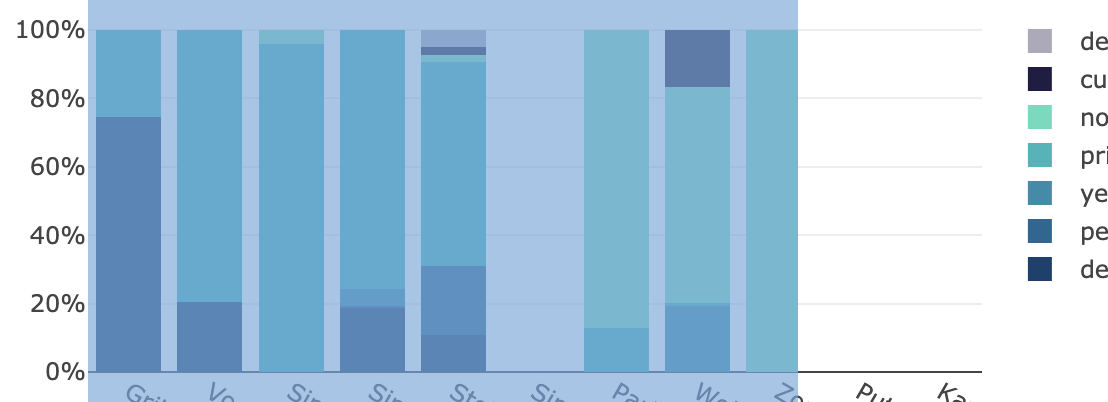
Does anyone have an idea how this could be resolved?
Does a manual trigger to redraw the entire plot exist in react?
Thank you.
Kind regards,
Timo
Contributor guide
No contributing guide indexed for this repository
First steps
- Read the whole issue, then the project's contributing guide.
- Comment on the issue to say you are picking it up — it saves two people doing the same work.
- Fork the repository and make your change on a branch.
- Open a pull request that references the issue number.
Research direction
Start by reproducing the reported graph update in a Plot object and inspect the axesclip clipPath elements before and after the legend changes. Trace the React update path and determine whether the graph is redrawn with the updated clipping region; done means updated content is no longer cropped after the legend changes.
Written by the indexing model from the issue text.
Assessment
- Tech stack
- javascript, react
- Domain
- data-visualization, frontend
- Issue type
- Bug
- Difficulty
- 3/5
- Estimated time
- 1-2 days
- Activity status
- Stale
- Clarity
- Needs clarification
- Newbie friendliness
- 35/100