Line break for text is not working in Scattergl()
Open
Nobody has claimed this yet.
bug
P3
- Dominant language
- Python
- Stars
- 18.8k
- Forks
- 2.8k
- Avg merge
- 16h 26m
- Merged PRs (30d)
- 21
Description
Python: 3.9
Plotly: 2.4.2+
from plotly.subplots import make_subplots
import plotly.graph_objects as go

fig = make_subplots(rows=1, cols=2, subplot_titles=("Using go.Scattergl()", "Using go.Scatter()"))

fig.add_trace(
    go.Scattergl(x=[1, 2, 3], y=[4, 5, 6], text="This is a<br>line break.", mode='markers+text+lines'),
    row=1, col=1
)

fig.add_trace(
    go.Scatter(x=[20, 30, 40], y=[50, 60, 70], text="This is a<br>line break.", mode='markers+text+lines'),
    row=1, col=2
)

fig.update_layout(height=600, width=800)
fig.write_html("test_gl_linebreak.html")
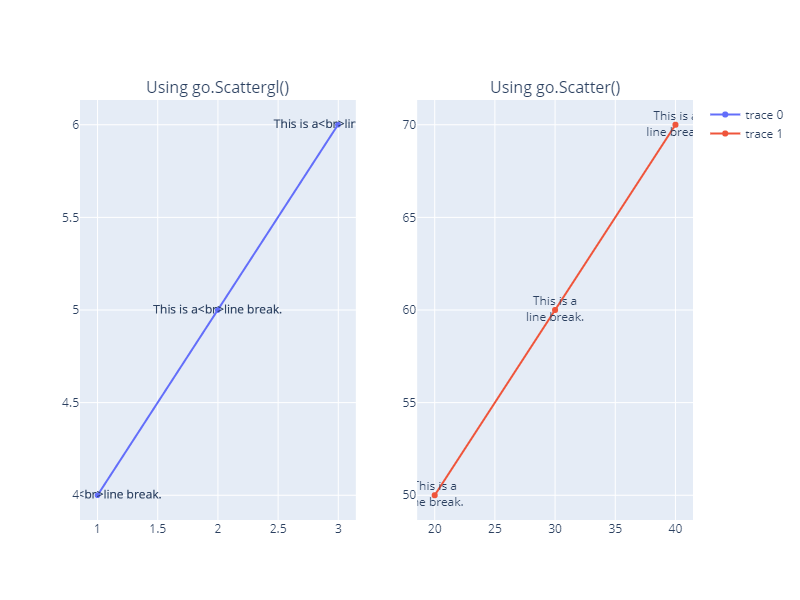
)
Contributor guide
First steps
- Read the whole issue, then the project's contributing guide.
- Comment on the issue to say you are picking it up — it saves two people doing the same work.
- Fork the repository and make your change on a branch.
- Open a pull request that references the issue number.
Research direction
Start by running the provided Python reproduction and compare the two traces written to test_gl_linebreak.html: Scattergl() and Scatter(). Inspect the Scattergl text-rendering path after confirming that the same text displays a line break in Scatter(). Done means the line break renders consistently for Scattergl text without regressing the regular Scatter case.
Written by the indexing model from the issue text.
Assessment
- Tech stack
- python
- Domain
- data-visualization
- Issue type
- Bug
- Difficulty
- 3/5
- Estimated time
- 1-2 days
- Activity status
- Active
- Clarity
- Mostly clear
- Newbie friendliness
- 65/100