https.get, https.request and both function calls with and without explicit URL arguments behave differently for same request options.
Dieses Issue hat noch niemand übernommen.
- Vorherrschende Sprache
- JavaScript
- Sterne
- 122k
- Forks
- 37.3k
- Ø Merge
- 4 T. 2 Std.
- Gemergte PRs (30 T.)
- 283
Beschreibung
Version
v16.15.0
Platform
Darwin MBP-NSR 21.6.0 Darwin Kernel Version 21.6.0: Mon Aug 22 20:19:52 PDT 2022; root:xnu-8020.140.49~2/RELEASE_ARM64_T6000 arm64
Subsystem
No response
What steps will reproduce the bug?
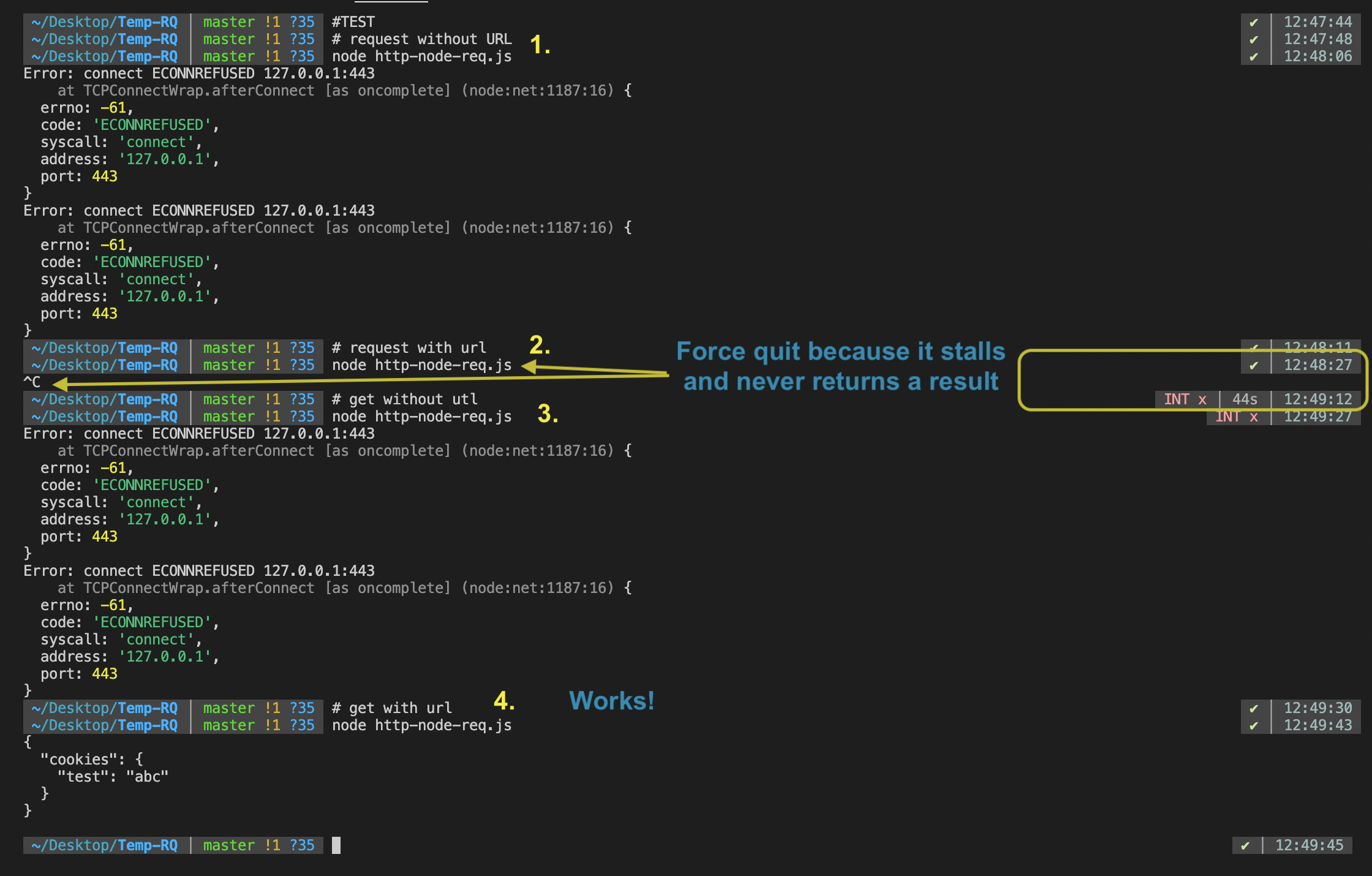
run this script and toggle the comments on line 33 and 34 to first use request then use get
Also if you also toggle comments on line 35 you will see different behaviours
results from all four cases are provided ahead
const https = require("https")

const options = {
  headers: {
    "Cache-Control": "no-cache",
    "accept": "*/*",
    "accept-encoding": "gzip",
    "accept-language": "en-GB,en-US;q=0.9,en;q=0.8",
    "amiusingrequestly": "true",
    "cache-control": "no-cache",
    "connection": "keep-alive",
    "cookie": "test=abc",
    "host": "github.com",
    "pragma": "no-cache",
    "referer": "https://github.com/",
    "sec-ch-ua": "\"Chromium\";v=\"106\", \"Google Chrome\";v=\"106\", \"Not;A=Brand\";v=\"99\"",
    "sec-ch-ua-mobile": "?0",
    "sec-ch-ua-platform": "\"macOS\"",
    "sec-fetch-dest": "manifest",
    "sec-fetch-mode": "cors",
    "sec-fetch-site": "same-origin",
    "user-agent": "Mozilla/5.0 (Macintosh; Intel Mac OS X 10_15_7) AppleWebKit/537.36 (KHTML, like Gecko) Chrome/106.0.0.0 Safari/537.36",
  },
  method: "GET",
  rejectUnauthorized: false,
  requestCert: true,
  strictSSL: false,
  url: "https://httpbin.org/cookies",
}
async function main() {
  try{
    let output = await new Promise ((resolve, reject) => {
      // let req = https.get( // line 33
      let req = https.request(  // line 34
        // options.url, // line 35
        options,
        (res) => {
          let data = []
          res.on('data', (buffer) => {
            data.push(buffer)
          });
          res.on('end', () => {
            resolve({data: Buffer.concat(data).toString(), res})
          });
        }
      )
    req.on('error', (e) => {
      console.error(e);
      reject(e)
    });
    })
    console.log(output.data)
  } catch(e) {
    console.error(e)
  }
}
main()
How often does it reproduce? Is there a required condition?
every time for the request options provided in the script.
What is the expected behavior?
Following the docs for requests and get seems like they should behave the same way for the same options. And if it works in one case (using get with explicit URL parameters), it should also work for the other cases.
What do you see instead?
when we use get in the above script everything works fine when URL is provided explicitly
in ever other case I either get this error
Error: connect ECONNREFUSED 127.0.0.1:443
    at TCPConnectWrap.afterConnect [as oncomplete] (node:net:1187:16) {
  errno: -61,
  code: 'ECONNREFUSED',
  syscall: 'connect',
  address: '127.0.0.1',
  port: 443
}
Error: connect ECONNREFUSED 127.0.0.1:443
    at TCPConnectWrap.afterConnect [as oncomplete] (node:net:1187:16) {
  errno: -61,

  code: 'ECONNREFUSED',
  syscall: 'connect',
  address: '127.0.0.1',
  port: 443
}
or the request just stalls in the case of request with url
screenshot as summary of the bug
Additional information
I haven't tried to test this for any other case so not completely sure if this is a problem because of node/https or has something to do with the request options or the URL
Also haven't tried any other version of node.
Just stumbled into this and couldn't find a related issue so raising one now.
Beitragsleitfaden
Erste Schritte
- Lies das ganze Issue und danach den Beitragsleitfaden des Projekts.
- Schreib ins Issue, dass du es übernimmst — das erspart doppelte Arbeit.
- Forke das Repository und arbeite in einem Branch.
- Öffne einen Pull Request, der die Issue-Nummer nennt.
Rechercherichtung
Beginnen Sie mit der Dokumentation zu https.get und https.request und führen Sie das bereitgestellte Reproduktionsskript aus, wobei Sie die Aufrufe und die explizite URL in den Zeilen 33–35 abwechselnd aktivieren und deaktivieren. Vergleichen Sie alle vier Fälle mit denselben Optionen, einschließlich der beobachteten Verbindungsfehler und des Hängenbleibens. Die Aufgabe ist abgeschlossen, wenn das Verhalten erklärt ist und die relevanten Aufrufformen die bereitgestellten Request-Optionen konsistent verarbeiten.
Vom Indexierungsmodell aus dem Issue-Text verfasst.
Bewertung
- Tech-Stack
- javascript, node.js
- Bereich
- backend, networking
- Issue-Typ
- Bug
- Schwierigkeit
- 4/5
- Geschätzter Aufwand
- 3-5 Tage
- Aktivitätsstatus
- Ruhig
- Klarheit
- Größtenteils klar
- Anfängerfreundlichkeit
- 45/100