How to create submenus (or multiple command UIs)
まだ誰も着手していません。
- 主要言語
- C++
- スター
- 2.2k
- フォーク
- 242
- 平均マージ
- 11分
- マージ済み PR(30日)
- 1
説明
I have some UI
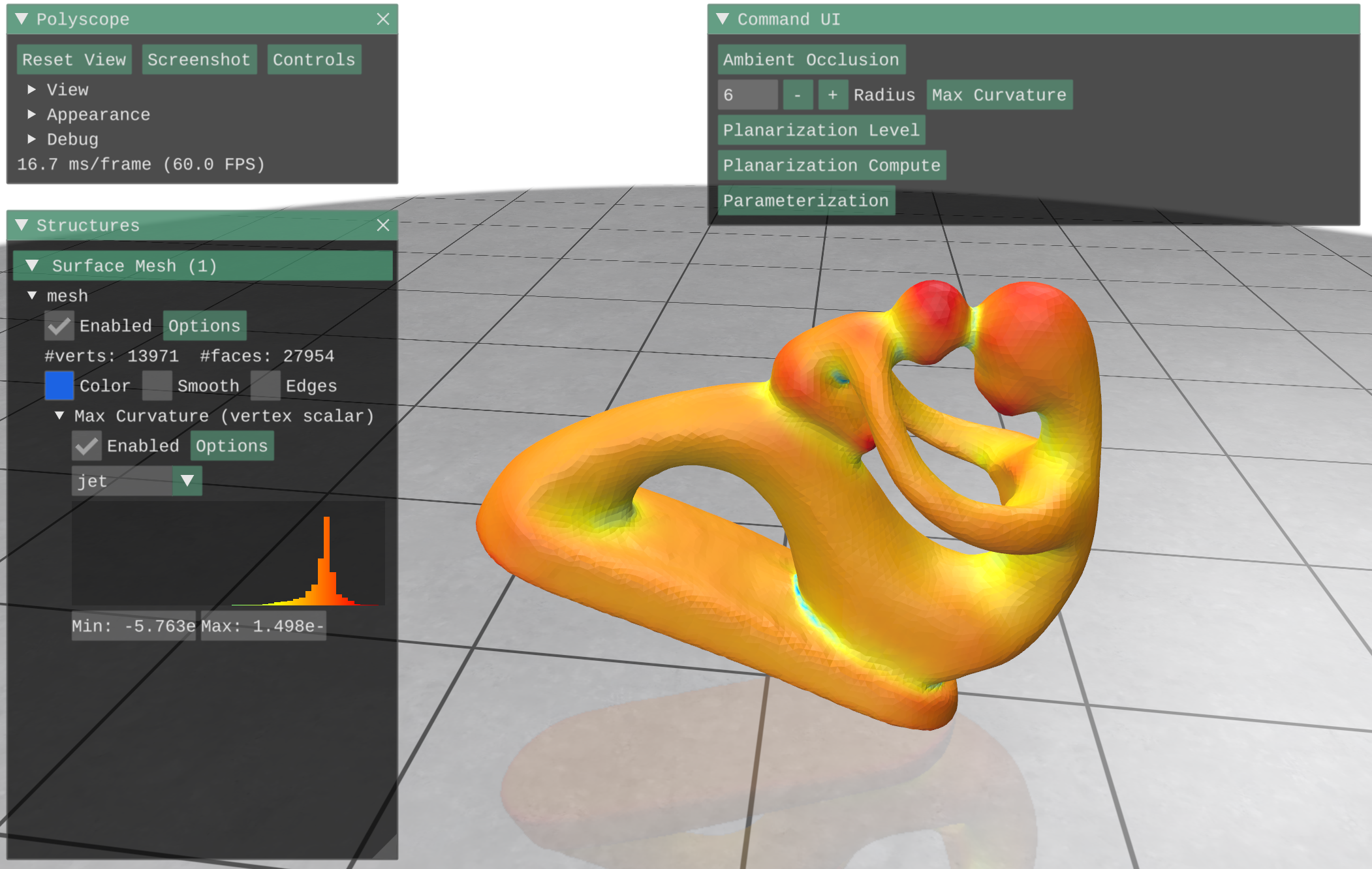
Everything into the Command UI is a Imgui::Button inside the callback
    ImGui::InputInt("Radius", &radius);

    ImGui::SameLine();

    //
    // Button
    if (ImGui::Button("Max Curvature"))
    {
        // get mesh
        polyscope::registerSurfaceMesh("mesh", V, F);

        // Compute curvature directions via quadric fitting
        MatrixXd PD1, PD2;
        VectorXd PV1, PV2;
        std::vector<Index> bv = {};

        igl::principal_curvature(V, F, PD1, PD2, PV1, PV2, bv, radius);

        polyscope::getSurfaceMesh("mesh")
            ->addVertexScalarQuantity("Max Curvature", PV1,
                                      polyscope::DataType::SYMMETRIC);

    }
pretty standard. Now I'd like to add the "radius" input inside the button scope, so that when I press the button all the relevant data is presented to the user.
Of course, if I simply put the input widget code inside the button one the input widget is just show for an instant then deleted, as the callback runs over and over.
The best option would be to create a separate sub-UI, possibly opening down below the command UI itself. Or to create multiple command UIs.
Is there a way?
Thank you
コントリビューションガイド
このリポジトリのコントリビューションガイドは索引されていません
はじめの一歩
- issue を最後まで読み、次にプロジェクトのコントリビューションガイドを読みます。
- 着手することを issue にコメントします — 二人が同じ作業をするのを防げます。
- リポジトリをフォークし、ブランチを切って変更します。
- issue 番号を参照したプルリクエストを送ります。
調査の方向性
Issue に示されている Command UI callback と ImGui::InputInt および ImGui::Button の使用から始めてください。永続的な radius input または別の submenu を callback の呼び出し間でも表示し続ける方法を検討し、どのインタラクションを完了とみなすべきかを定義してください。Issue にはファイルやテストの指定はありません。
索引モデルが issue の本文から書いたものです。
評価
- 技術スタック
- cpp
- 領域
- frontend
- issue の種類
- 機能追加
- 難易度
- 4/5
- 見積もり時間
- 3〜5日
- 活発さ
- 停滞
- 明瞭さ
- おおむね明確
- 初心者へのやさしさ
- 30/100