microsoft / microsoft/vscode-cpptools
Renaming (F2) parameter in function declaration in header file doesn't rename it in defintion
Nessuno ha ancora preso questa issue.
- Lingua principale
- TypeScript
- Stelle
- 6.2k
- Fork
- 1.7k
- Merge medio
- 14h 46m
- PR unite (30g)
- 61
Descrizione
Environment
- OS and Version: Windows 10
- VS Code Version: 1.70.2
- C/C++ Extension Version: 1.11.5
Bug Summary and Steps to Reproduce
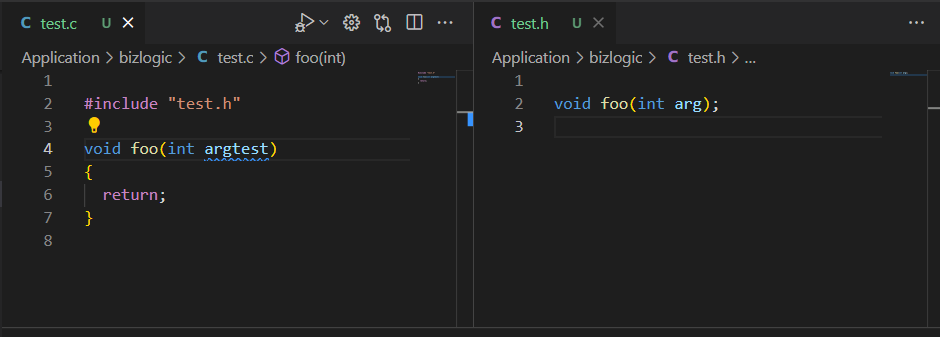
When renaming (F2) a parameter in a function declaration in a header file, the parameter in the function definition in the source file that includes the header file is not renamed and it is also not listed in the refactor preview. The same applies vice versa.
However, if the function declaration is placed in the source file, the parameter in the function definition is listed in the refactor preview if the parameter in the declaration is renamed and vice versa.
Expected behavior
The parameter in the function definition should be listed in the refactor preview for selection if the parameter in the declaration is renamed and vice versa, regardless of whether the declaration is placed in the source or in a included header file.
Code sample and Logs
// test.c

#include "test.h"

void foo(int arg)
{
  return;
}


// test.h

void foo(int arg);
Screenshots
Refactor preview when renaming a parameter in the declaration when it is placed in the source file:

Refactor preview when renaming a parameter in the definition when it is placed in the source file:

After renaming a parameter in the declaration when it is placed in the included header file (no refactor preview):

After renaming a parameter in the definition when it is placed in the included header file (no refactor preview):
Additional context
No response
Guida per i contributori
Apri la guida per i contributori
Come iniziare
- Leggi tutta la issue e poi la guida ai contributi del progetto.
- Commenta sulla issue per dire che te ne occupi tu — evita che due persone facciano lo stesso lavoro.
- Fai un fork del repository e lavora su un branch.
- Apri una pull request che faccia riferimento al numero della issue.
Direzione di ricerca
Riproduci la ridenominazione con l'esempio test.c e test.h dell'issue usando F2 in VS Code, quindi segui la gestione dell'anteprima del refactoring per dichiarazioni e definizioni attraverso un header incluso. È completato quando la ridenominazione di uno dei due elenchi di parametri elenca il parametro corrispondente nell'altro file per la selezione nell'anteprima.
Scritto dal modello di indicizzazione a partire dal testo della issue.
Valutazione
- Stack tecnologico
- cpp, typescript
- Ambito
- tooling
- Tipo di issue
- Bug
- Difficoltà
- 4/5
- Tempo stimato
- 3-5 giorni
- Stato di attività
- Ferma
- Chiarezza
- Abbastanza chiara
- Idoneità per principianti
- 35/100