microsoft / microsoft/vscode-cpptools
Renaming (F2) parameter in function declaration in header file doesn't rename it in defintion
Nadie ha tomado este issue todavía.
- Lenguaje dominante
- TypeScript
- Estrellas
- 6.2k
- Forks
- 1.7k
- Merge medio
- 14 h 46 min
- PR fusionados (30 d)
- 61
Descripción
Environment
- OS and Version: Windows 10
- VS Code Version: 1.70.2
- C/C++ Extension Version: 1.11.5
Bug Summary and Steps to Reproduce
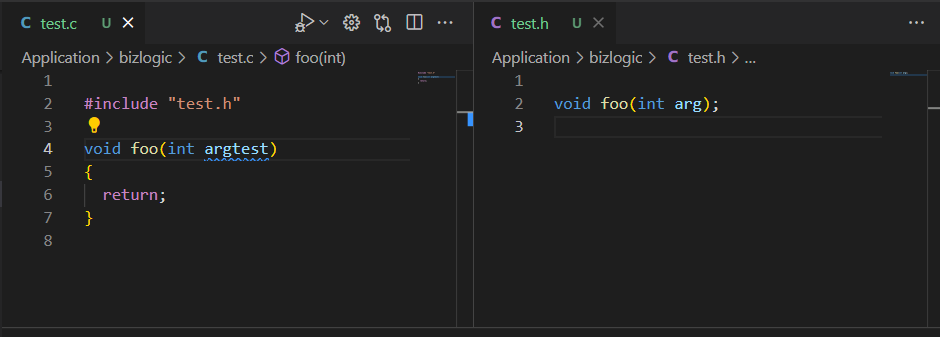
When renaming (F2) a parameter in a function declaration in a header file, the parameter in the function definition in the source file that includes the header file is not renamed and it is also not listed in the refactor preview. The same applies vice versa.
However, if the function declaration is placed in the source file, the parameter in the function definition is listed in the refactor preview if the parameter in the declaration is renamed and vice versa.
Expected behavior
The parameter in the function definition should be listed in the refactor preview for selection if the parameter in the declaration is renamed and vice versa, regardless of whether the declaration is placed in the source or in a included header file.
Code sample and Logs
// test.c

#include "test.h"

void foo(int arg)
{
  return;
}


// test.h

void foo(int arg);
Screenshots
Refactor preview when renaming a parameter in the declaration when it is placed in the source file:

Refactor preview when renaming a parameter in the definition when it is placed in the source file:

After renaming a parameter in the declaration when it is placed in the included header file (no refactor preview):

After renaming a parameter in the definition when it is placed in the included header file (no refactor preview):
Additional context
No response
Guía de contribución
Primeros pasos
- Lee el issue completo y luego la guía de contribución del proyecto.
- Comenta en el issue que vas a ocuparte — evita que dos personas hagan lo mismo.
- Haz un fork del repositorio y trabaja en una rama.
- Abre un pull request que haga referencia al número del issue.
Línea de trabajo
Reproduce el renombrado con el ejemplo de test.c y test.h del issue usando F2 en VS Code y, después, sigue el procesamiento de la vista previa de la refactorización para las declaraciones y definiciones a través de un header incluido. Se considera terminado cuando renombrar cualquiera de las listas de parámetros muestra el parámetro correspondiente del otro archivo para seleccionarlo en la vista previa.
Escrito por el modelo de indexación a partir del texto del issue.
Evaluación
- Stack tecnológico
- cpp, typescript
- Área
- tooling
- Tipo de issue
- Error
- Dificultad
- 4/5
- Tiempo estimado
- 3-5 días
- Estado de actividad
- Estancado
- Claridad
- Bastante claro
- Aptitud para principiantes
- 35/100