microsoft / microsoft/vscode-cpptools
DAP doesn't appear to be sending a request to GDB for modifying a register value.
Nessuno ha ancora preso questa issue.
- Lingua principale
- TypeScript
- Stelle
- 6.2k
- Fork
- 1.7k
- Merge medio
- 14h 46m
- PR unite (30g)
- 61
Descrizione
Environment
- OS and version: Ubuntu 16.04
- VS Code: 1.60.0
- C/C++ extension: 1.7.1
- OS and version of remote machine (if applicable): Android 11
- GDB / LLDB version: GDB 7.11
Bug Summary and Steps to Reproduce
Bug Summary:
When debugging an Android target with GDB, the CPU registers aren't able to be modified through the registers view, but can be modified by running the set command in the debug terminal window.
In the GUI when I attempt to change the register value I see the error below.
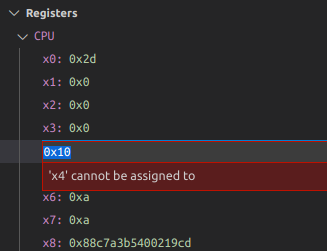
From the engine logs I see that the message to modify the register is never sent to GDB. The DAP responds with the message in the image.
(requires an android target. Likely this is N/A)
Steps to reproduce:
- In this environment...
- With this config...
- Do '...'
- See error...
Debugger Configurations
{
            "name": "Target_CPU",
            "type": "cppdbg",
            "request": "launch",
            "program": "/path/foo",
            "args": [],
            "stopAtEntry": false,
            "cwd": "${workspaceFolder}",
            "MIMode": "gdb",
            "preLaunchTask": "cpuDebugPrelaunchTask",
            "miDebuggerPath": "/path/bin/gdb",
            "miDebuggerServerAddress": ":5039",
            "logging": {
                "engineLogging" : true,
                "trace": true,
                "traceResponse": true
            }
        }
Debugger Logs
// Attempting to set a CPU register from the register view
<--   C (setVariable-18): {"command":"setVariable","arguments":{"variablesReference":1003,"name":"x4","value":"0xd"},"type":"request","seq":18}
--> R (setVariable-18): {"type":"response","request_seq":18,"success":false,"command":"setVariable","message":"'x4' cannot be assigned to","body":{"error":{"id":1107,"format":"'x4' cannot be assigned to"}},"seq":862}

// Attempting to set a register value via console
`set $x4=0xd
<--   C (evaluate-62): {"command":"evaluate","arguments":{"expression":"`set $x4=0xd","frameId":1000,"context":"repl"},"type":"request","seq":62}
--> E (output): {"type":"event","event":"output","body":{"category":"console","output":"1: (427384) <-1106-interpreter-exec console \"set $x4=0xd\"\n"},"seq":1536}
1: (427384) <-1106-interpreter-exec console "set $x4=0xd"
--> E (output): {"type":"event","event":"output","body":{"category":"console","output":"1: (427392) ->1106^done\n"},"seq":1538}
1: (427392) ->1106^done
--> E (output): {"type":"event","event":"output","body":{"category":"console","output":"1: (427392) ->(gdb)\n"},"seq":1540}
1: (427392) ->(gdb)
--> E (output): {"type":"event","event":"output","body":{"category":"console","output":"1: (427392) 1106: elapsed time 7\n"},"seq":1542}
1: (427392) 1106: elapsed time 7
--> E (output): {"type":"event","event":"output","body":{"category":"telemetry","output":"VS/Diagnostics/Debugger/Evaluate","data":{"VS.Diagnostics.Debugger.ImplementationName":"Microsoft.MIDebugEngine","VS.Diagnostics.Debugger.EngineVersion":"17.0.10910.1","VS.Diagnostics.Debugger.HostVersion":"17.0.10910.1","VS.Diagnostics.Debugger.AdapterId":"cppdbg","VS.Diagnostics.Debugger.Evaluate.Duration":8.0,"VS.Diagnostics.Debugger.Evaluate.IsError":false,"VS.Diagnostics.Debugger.Evaluate.ExecuteInConsole":true}},"seq":1544}
--> R (evaluate-62): {"type":"response","request_seq":62,"success":true,"command":"evaluate","body":{"result":"","variablesReference":0},"seq":1546}

// Attempting to set a local variable from the variable view (succeeds)
<--   C (setVariable-20): {"command":"setVariable","arguments":{"variablesReference":1000,"name":"nErr","value":"1"},"type":"request","seq":20}
--> E (output): {"type":"event","event":"output","body":{"category":"console","output":"1: (138064) <-1045-var-assign var7 \"1\"\n"},"seq":868}
1: (138064) <-1045-var-assign var7 "1"
--> E (output): {"type":"event","event":"output","body":{"category":"console","output":"1: (138073) ->1045^done,value=\"1\"\n"},"seq":870}
1: (138073) ->1045^done,value="1"
--> E (output): {"type":"event","event":"output","body":{"category":"console","output":"1: (138073) ->(gdb)\n"},"seq":872}
1: (138073) ->(gdb)
--> E (output): {"type":"event","event":"output","body":{"category":"console","output":"1: (138073) 1045: elapsed time 8\n"},"seq":874}
1: (138073) 1045: elapsed time 8
--> R (setVariable-20): {"type":"response","request_seq":20,"success":true,"command":"setVariable","body":{"value":"1"},"seq":876}
Other Extensions
No response
Additional Information
No response
Guida per i contributori
Apri la guida per i contributori
Come iniziare
- Leggi tutta la issue e poi la guida ai contributi del progetto.
- Commenta sulla issue per dire che te ne occupi tu — evita che due persone facciano lo stesso lavoro.
- Fai un fork del repository e lavora su un branch.
- Apri una pull request che faccia riferimento al numero della issue.
Direzione di ricerca
Inizia tracciando la richiesta DAP setVariable per la vista dei registri e confrontala con il percorso funzionante delle variabili locali e con la richiesta di valutazione della console nei log forniti. Riproduci il problema con la destinazione Android e la configurazione del debugger mostrate; il lavoro è completato quando la modifica di un registro CPU invia la richiesta corrispondente a GDB e restituisce una risposta corretta.
Scritto dal modello di indicizzazione a partire dal testo della issue.
Valutazione
- Stack tecnologico
- android, typescript
- Ambito
- devtools
- Tipo di issue
- Bug
- Difficoltà
- 4/5
- Tempo stimato
- 3-5 giorni
- Stato di attività
- Ferma
- Chiarezza
- Da chiarire
- Idoneità per principianti
- 25/100