microsoft / microsoft/vscode-cpptools
DAP doesn't appear to be sending a request to GDB for modifying a register value.
Dieses Issue hat noch niemand übernommen.
- Vorherrschende Sprache
- TypeScript
- Sterne
- 6.2k
- Forks
- 1.7k
- Ø Merge
- 14 Std. 46 Min.
- Gemergte PRs (30 T.)
- 61
Beschreibung
Environment
- OS and version: Ubuntu 16.04
- VS Code: 1.60.0
- C/C++ extension: 1.7.1
- OS and version of remote machine (if applicable): Android 11
- GDB / LLDB version: GDB 7.11
Bug Summary and Steps to Reproduce
Bug Summary:
When debugging an Android target with GDB, the CPU registers aren't able to be modified through the registers view, but can be modified by running the set command in the debug terminal window.
In the GUI when I attempt to change the register value I see the error below.
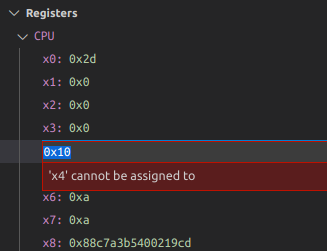
From the engine logs I see that the message to modify the register is never sent to GDB. The DAP responds with the message in the image.
(requires an android target. Likely this is N/A)
Steps to reproduce:
- In this environment...
- With this config...
- Do '...'
- See error...
Debugger Configurations
{
            "name": "Target_CPU",
            "type": "cppdbg",
            "request": "launch",
            "program": "/path/foo",
            "args": [],
            "stopAtEntry": false,
            "cwd": "${workspaceFolder}",
            "MIMode": "gdb",
            "preLaunchTask": "cpuDebugPrelaunchTask",
            "miDebuggerPath": "/path/bin/gdb",
            "miDebuggerServerAddress": ":5039",
            "logging": {
                "engineLogging" : true,
                "trace": true,
                "traceResponse": true
            }
        }
Debugger Logs
// Attempting to set a CPU register from the register view
<--   C (setVariable-18): {"command":"setVariable","arguments":{"variablesReference":1003,"name":"x4","value":"0xd"},"type":"request","seq":18}
--> R (setVariable-18): {"type":"response","request_seq":18,"success":false,"command":"setVariable","message":"'x4' cannot be assigned to","body":{"error":{"id":1107,"format":"'x4' cannot be assigned to"}},"seq":862}

// Attempting to set a register value via console
`set $x4=0xd
<--   C (evaluate-62): {"command":"evaluate","arguments":{"expression":"`set $x4=0xd","frameId":1000,"context":"repl"},"type":"request","seq":62}
--> E (output): {"type":"event","event":"output","body":{"category":"console","output":"1: (427384) <-1106-interpreter-exec console \"set $x4=0xd\"\n"},"seq":1536}
1: (427384) <-1106-interpreter-exec console "set $x4=0xd"
--> E (output): {"type":"event","event":"output","body":{"category":"console","output":"1: (427392) ->1106^done\n"},"seq":1538}
1: (427392) ->1106^done
--> E (output): {"type":"event","event":"output","body":{"category":"console","output":"1: (427392) ->(gdb)\n"},"seq":1540}
1: (427392) ->(gdb)
--> E (output): {"type":"event","event":"output","body":{"category":"console","output":"1: (427392) 1106: elapsed time 7\n"},"seq":1542}
1: (427392) 1106: elapsed time 7
--> E (output): {"type":"event","event":"output","body":{"category":"telemetry","output":"VS/Diagnostics/Debugger/Evaluate","data":{"VS.Diagnostics.Debugger.ImplementationName":"Microsoft.MIDebugEngine","VS.Diagnostics.Debugger.EngineVersion":"17.0.10910.1","VS.Diagnostics.Debugger.HostVersion":"17.0.10910.1","VS.Diagnostics.Debugger.AdapterId":"cppdbg","VS.Diagnostics.Debugger.Evaluate.Duration":8.0,"VS.Diagnostics.Debugger.Evaluate.IsError":false,"VS.Diagnostics.Debugger.Evaluate.ExecuteInConsole":true}},"seq":1544}
--> R (evaluate-62): {"type":"response","request_seq":62,"success":true,"command":"evaluate","body":{"result":"","variablesReference":0},"seq":1546}

// Attempting to set a local variable from the variable view (succeeds)
<--   C (setVariable-20): {"command":"setVariable","arguments":{"variablesReference":1000,"name":"nErr","value":"1"},"type":"request","seq":20}
--> E (output): {"type":"event","event":"output","body":{"category":"console","output":"1: (138064) <-1045-var-assign var7 \"1\"\n"},"seq":868}
1: (138064) <-1045-var-assign var7 "1"
--> E (output): {"type":"event","event":"output","body":{"category":"console","output":"1: (138073) ->1045^done,value=\"1\"\n"},"seq":870}
1: (138073) ->1045^done,value="1"
--> E (output): {"type":"event","event":"output","body":{"category":"console","output":"1: (138073) ->(gdb)\n"},"seq":872}
1: (138073) ->(gdb)
--> E (output): {"type":"event","event":"output","body":{"category":"console","output":"1: (138073) 1045: elapsed time 8\n"},"seq":874}
1: (138073) 1045: elapsed time 8
--> R (setVariable-20): {"type":"response","request_seq":20,"success":true,"command":"setVariable","body":{"value":"1"},"seq":876}
Other Extensions
No response
Additional Information
No response
Beitragsleitfaden
Erste Schritte
- Lies das ganze Issue und danach den Beitragsleitfaden des Projekts.
- Schreib ins Issue, dass du es übernimmst — das erspart doppelte Arbeit.
- Forke das Repository und arbeite in einem Branch.
- Öffne einen Pull Request, der die Issue-Nummer nennt.
Rechercherichtung
Beginne damit, die DAP-setVariable-Anfrage für die Registeransicht nachzuverfolgen, und vergleiche sie mit dem funktionierenden Pfad für lokale Variablen und der Anfrage für die Konsolenauswertung in den bereitgestellten Protokollen. Reproduziere das Problem mit dem gezeigten Android-Ziel und der gezeigten Debugger-Konfiguration; abgeschlossen ist die Aufgabe, wenn das Bearbeiten eines CPU-Registers die entsprechende Anfrage an GDB sendet und eine erfolgreiche Antwort zurückgibt.
Vom Indexierungsmodell aus dem Issue-Text verfasst.
Bewertung
- Tech-Stack
- android, typescript
- Bereich
- devtools
- Issue-Typ
- Bug
- Schwierigkeit
- 4/5
- Geschätzter Aufwand
- 3-5 Tage
- Aktivitätsstatus
- Veraltet
- Klarheit
- Muss geklärt werden
- Anfängerfreundlichkeit
- 25/100