microsoft / microsoft/vscode-cpptools
Ignore Certain Exceptions while Debugging
Nessuno ha ancora preso questa issue.
- Lingua principale
- TypeScript
- Stelle
- 6.2k
- Fork
- 1.7k
- Merge medio
- 14h 46m
- PR unite (30g)
- 61
Descrizione
Type: Debugger
- OS and Version: Windows 10 Enterprise x64
- VS Code Version: 1.25.1
- C/C++ Extension Version: 0.17.7
- Other extensions you installed (and if the issue persists after disabling them): N/A
There currently doesn't appear to be a way to ignore/skip breaking on specific exceptions when debugging.
In my specific use case, an Antivirus DLL is injected (beyond my control) that monitors and regulates memory access, and causes a large number of access violation errors in OS libraries.
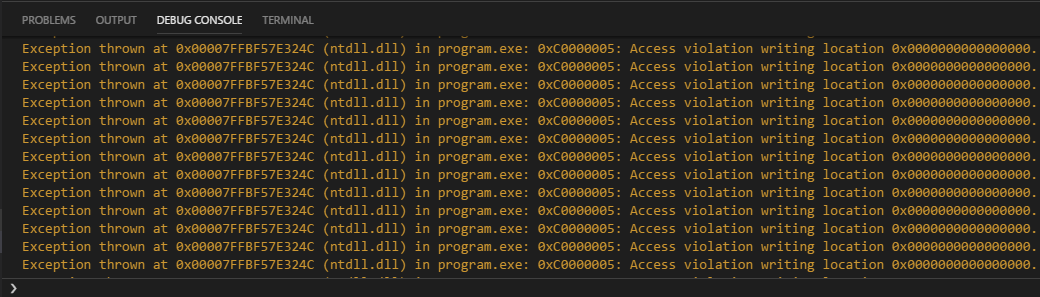
These errors don't seem to cause functional issues with the program, and I can step over them to continue, but there are often 10, 20, or more steps that cause violations per line in the code I write, and it very quickly becomes unreasonable.
This is with the "All Exceptions" box unchecked, when checked the errors are not logged to the debug console, but execution is still paused and so I am presented with the same problem.

Being able to even truly ignore all exceptions and only stop on breakpoints (as mentioned, execution is till paused on thrown exceptions with the "All Exceptions" breakpoint checkbox left clear) would be beneficial, but the ability to specifically ignore types of exceptions would be preferential.
Apologies if this is an existing feature or if an issue was already opened, I spent a good couple of hours digging for a solution and checking to make sure it wasn't already a requested feature and didn't see anything, but I'm new to issue reporting and may have overlooked something.
Guida per i contributori
Apri la guida per i contributori
Come iniziare
- Leggi tutta la issue e poi la guida ai contributi del progetto.
- Commenta sulla issue per dire che te ne occupi tu — evita che due persone facciano lo stesso lavoro.
- Fai un fork del repository e lavora su un branch.
- Apri una pull request che faccia riferimento al numero della issue.
Direzione di ricerca
La issue non indica alcun file di implementazione o test. Inizia tracciando il modo in cui l’estensione C/C++ gestisce l’impostazione del breakpoint “All Exceptions” e le pause sulle eccezioni; confronta il comportamento della console di debug con l’arresto dell’esecuzione. Il lavoro sarà completato quando gli utenti potranno ignorare i tipi di eccezione selezionati oppure continuare realmente senza fermarsi sulle eccezioni quando l’interruzione su tutte le eccezioni è disabilitata.
Scritto dal modello di indicizzazione a partire dal testo della issue.
Valutazione
- Stack tecnologico
- cpp, typescript, vscode
- Ambito
- devtools
- Tipo di issue
- Funzionalità
- Difficoltà
- 4/5
- Tempo stimato
- 3-5 giorni
- Stato di attività
- Ferma
- Chiarezza
- Abbastanza chiara
- Idoneità per principianti
- 25/100