microsoft / microsoft/vscode-cpptools
Ignore Certain Exceptions while Debugging
Dieses Issue hat noch niemand übernommen.
- Vorherrschende Sprache
- TypeScript
- Sterne
- 6.2k
- Forks
- 1.7k
- Ø Merge
- 14 Std. 46 Min.
- Gemergte PRs (30 T.)
- 61
Beschreibung
Type: Debugger
- OS and Version: Windows 10 Enterprise x64
- VS Code Version: 1.25.1
- C/C++ Extension Version: 0.17.7
- Other extensions you installed (and if the issue persists after disabling them): N/A
There currently doesn't appear to be a way to ignore/skip breaking on specific exceptions when debugging.
In my specific use case, an Antivirus DLL is injected (beyond my control) that monitors and regulates memory access, and causes a large number of access violation errors in OS libraries.
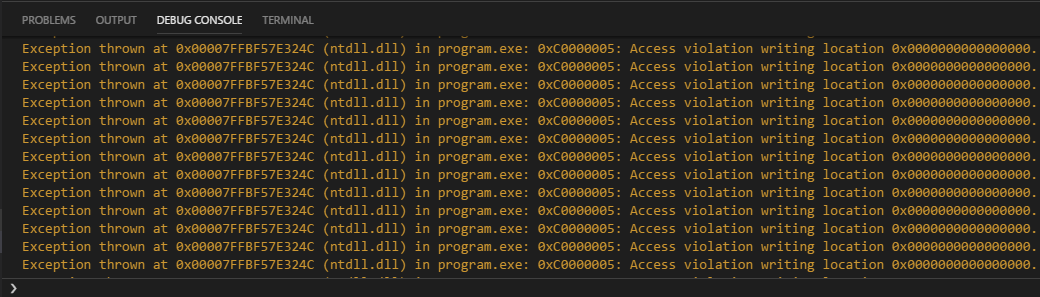
These errors don't seem to cause functional issues with the program, and I can step over them to continue, but there are often 10, 20, or more steps that cause violations per line in the code I write, and it very quickly becomes unreasonable.
This is with the "All Exceptions" box unchecked, when checked the errors are not logged to the debug console, but execution is still paused and so I am presented with the same problem.

Being able to even truly ignore all exceptions and only stop on breakpoints (as mentioned, execution is till paused on thrown exceptions with the "All Exceptions" breakpoint checkbox left clear) would be beneficial, but the ability to specifically ignore types of exceptions would be preferential.
Apologies if this is an existing feature or if an issue was already opened, I spent a good couple of hours digging for a solution and checking to make sure it wasn't already a requested feature and didn't see anything, but I'm new to issue reporting and may have overlooked something.
Beitragsleitfaden
Erste Schritte
- Lies das ganze Issue und danach den Beitragsleitfaden des Projekts.
- Schreib ins Issue, dass du es übernimmst — das erspart doppelte Arbeit.
- Forke das Repository und arbeite in einem Branch.
- Öffne einen Pull Request, der die Issue-Nummer nennt.
Rechercherichtung
Das Issue nennt keine Implementierungsdateien oder Tests. Beginne damit nachzuverfolgen, wie die C/C++-Erweiterung die Breakpoint-Einstellung „All Exceptions“ und das Anhalten bei Exceptions behandelt; vergleiche das Verhalten der Debugkonsole mit dem Anhalten der Ausführung. Als erledigt gilt die Aufgabe, wenn Benutzer ausgewählte Exception-Typen ignorieren können oder die Ausführung tatsächlich fortgesetzt wird, ohne bei Exceptions anzuhalten, wenn das Anhalten bei allen Exceptions deaktiviert ist.
Vom Indexierungsmodell aus dem Issue-Text verfasst.
Bewertung
- Tech-Stack
- cpp, typescript, vscode
- Bereich
- devtools
- Issue-Typ
- Feature
- Schwierigkeit
- 4/5
- Geschätzter Aufwand
- 3-5 Tage
- Aktivitätsstatus
- Veraltet
- Klarheit
- Größtenteils klar
- Anfängerfreundlichkeit
- 25/100