microsoft / microsoft/vscode-cpptools
Ignore Certain Exceptions while Debugging
Nobody has claimed this yet.
- Dominant language
- TypeScript
- Stars
- 6.2k
- Forks
- 1.7k
- Avg merge
- 14h 46m
- Merged PRs (30d)
- 61
Description
Type: Debugger
- OS and Version: Windows 10 Enterprise x64
- VS Code Version: 1.25.1
- C/C++ Extension Version: 0.17.7
- Other extensions you installed (and if the issue persists after disabling them): N/A
There currently doesn't appear to be a way to ignore/skip breaking on specific exceptions when debugging.
In my specific use case, an Antivirus DLL is injected (beyond my control) that monitors and regulates memory access, and causes a large number of access violation errors in OS libraries.
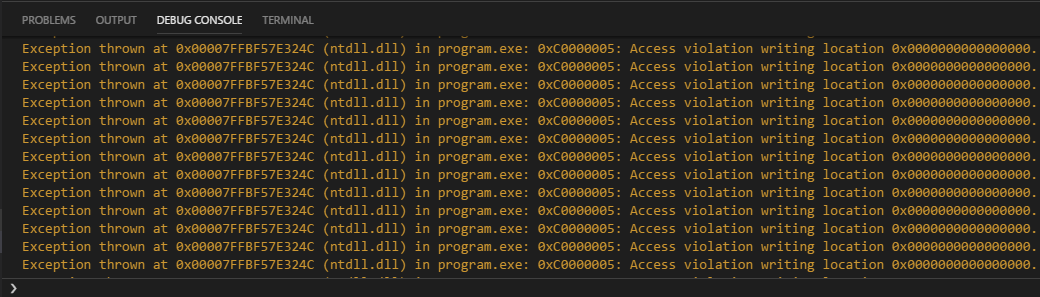
These errors don't seem to cause functional issues with the program, and I can step over them to continue, but there are often 10, 20, or more steps that cause violations per line in the code I write, and it very quickly becomes unreasonable.
This is with the "All Exceptions" box unchecked, when checked the errors are not logged to the debug console, but execution is still paused and so I am presented with the same problem.

Being able to even truly ignore all exceptions and only stop on breakpoints (as mentioned, execution is till paused on thrown exceptions with the "All Exceptions" breakpoint checkbox left clear) would be beneficial, but the ability to specifically ignore types of exceptions would be preferential.
Apologies if this is an existing feature or if an issue was already opened, I spent a good couple of hours digging for a solution and checking to make sure it wasn't already a requested feature and didn't see anything, but I'm new to issue reporting and may have overlooked something.
Contributor guide
First steps
- Read the whole issue, then the project's contributing guide.
- Comment on the issue to say you are picking it up — it saves two people doing the same work.
- Fork the repository and make your change on a branch.
- Open a pull request that references the issue number.
Research direction
The issue names no implementation files or tests. Start by tracing how the C/C++ extension handles the “All Exceptions” breakpoint setting and exception pauses; compare the debug console behavior with execution stopping. Done means users can ignore selected exception types, or truly continue without stopping on exceptions when all exception breaking is disabled.
Written by the indexing model from the issue text.
Assessment
- Tech stack
- cpp, typescript, vscode
- Domain
- devtools
- Issue type
- Feature
- Difficulty
- 4/5
- Estimated time
- 3-5 days
- Activity status
- Stale
- Clarity
- Mostly clear
- Newbie friendliness
- 25/100