microsoft / microsoft/vscode-cpptools
[Windows7 x64][gcc 7.2.0][gdb 8.0.1]Debug adapter process has terminated unexpectedly
Đang mở
Chưa có ai nhận issue này.
debugger
- Ngôn ngữ chính
- TypeScript
- Star
- 6.2k
- Fork
- 1.7k
- Merge trung bình
- 14 giờ 46 phút
- Pull request đã merge (30 ngày)
- 61
Mô tả
helloworld.cpp
#include <iostream>

using namespace std;

int main(int argc, char const *argv[])
{
    cout<<"Hello World"<<endl;
    return 0;
}
gcc version:
C:\Users\Administrator>gcc -v
Using built-in specs.
COLLECT_GCC=gcc
COLLECT_LTO_WRAPPER=C:/LLVM/bin/../libexec/gcc/x86_64-w64-mingw32/7.2.0/lto-wrap
per.exe
Target: x86_64-w64-mingw32
Configured with: ../../../src/gcc-7.2.0/configure --host=x86_64-w64-mingw32 --bu
ild=x86_64-w64-mingw32 --target=x86_64-w64-mingw32 --prefix=/mingw64 --with-sysr
oot=/c/mingw720/x86_64-720-posix-seh-rt_v5-rev0/mingw64 --enable-shared --enable
-static --disable-multilib --enable-languages=c,c++,fortran,lto --enable-libstdc
xx-time=yes --enable-threads=posix --enable-libgomp --enable-libatomic --enable-
lto --enable-graphite --enable-checking=release --enable-fully-dynamic-string --
enable-version-specific-runtime-libs --enable-libstdcxx-filesystem-ts=yes --disa
ble-libstdcxx-pch --disable-libstdcxx-debug --enable-bootstrap --disable-rpath -
-disable-win32-registry --disable-nls --disable-werror --disable-symvers --with-
gnu-as --with-gnu-ld --with-arch=nocona --with-tune=core2 --with-libiconv --with
-system-zlib --with-gmp=/c/mingw720/prerequisites/x86_64-w64-mingw32-static --wi
th-mpfr=/c/mingw720/prerequisites/x86_64-w64-mingw32-static --with-mpc=/c/mingw7
20/prerequisites/x86_64-w64-mingw32-static --with-isl=/c/mingw720/prerequisites/
x86_64-w64-mingw32-static --with-pkgversion='x86_64-posix-seh-rev0, Built by Min
GW-W64 project' --with-bugurl=https://sourceforge.net/projects/mingw-w64 CFLAGS=
'-O2 -pipe -fno-ident -I/c/mingw720/x86_64-720-posix-seh-rt_v5-rev0/mingw64/opt/
include -I/c/mingw720/prerequisites/x86_64-zlib-static/include -I/c/mingw720/pre
requisites/x86_64-w64-mingw32-static/include' CXXFLAGS='-O2 -pipe -fno-ident -I/
c/mingw720/x86_64-720-posix-seh-rt_v5-rev0/mingw64/opt/include -I/c/mingw720/pre
requisites/x86_64-zlib-static/include -I/c/mingw720/prerequisites/x86_64-w64-min
gw32-static/include' CPPFLAGS=' -I/c/mingw720/x86_64-720-posix-seh-rt_v5-rev0/mi
ngw64/opt/include -I/c/mingw720/prerequisites/x86_64-zlib-static/include -I/c/mi
ngw720/prerequisites/x86_64-w64-mingw32-static/include' LDFLAGS='-pipe -fno-iden
t -L/c/mingw720/x86_64-720-posix-seh-rt_v5-rev0/mingw64/opt/lib -L/c/mingw720/pr
erequisites/x86_64-zlib-static/lib -L/c/mingw720/prerequisites/x86_64-w64-mingw3
2-static/lib '
Thread model: posix
gcc version 7.2.0 (x86_64-posix-seh-rev0, Built by MinGW-W64 project)
gdb verson:
GNU gdb (GDB) 8.0.1
Copyright (C) 2017 Free Software Foundation, Inc.
License GPLv3+: GNU GPL version 3 or later <http://gnu.org/licenses/gpl.html>
This is free software: you are free to change and redistribute it.
There is NO WARRANTY, to the extent permitted by law.  Type "show copying"
and "show warranty" for details.
This GDB was configured as "x86_64-w64-mingw32".
Type "show configuration" for configuration details.
For bug reporting instructions, please see:
<http://www.gnu.org/software/gdb/bugs/>.
Find the GDB manual and other documentation resources online at:
<http://www.gnu.org/software/gdb/documentation/>.
For help, type "help".
Type "apropos word" to search for commands related to "word".
launch.json
{
    "version": "0.2.0",
    "configurations": [
        {
            "name": "(gdb) Launch", // 配置名称,将会在启动配置的下拉菜单中显示
            "type": "cppdbg", // 配置类型,这里只能为cppdbg
            "request": "launch", // 请求配置类型,可以为launch(启动)或attach(附加)
            "program": "${fileDirname}\\${fileBasenameNoExtension}.exe", // 将要进行调试的程序的路径
            "args": [], // 程序调试时传递给程序的命令行参数,一般设为空即可
            "stopAtEntry": false, // 设为true时程序将暂停在程序入口处,我一般设置为true
            "cwd": "${workspaceFolder}", // 调试程序时的工作目录workspaceFolder
            "environment": [], // (环境变量?)
            "externalConsole": true, // 调试时是否显示控制台窗口,一般设置为true显示控制台
            "internalConsoleOptions": "neverOpen", // 如果不设为neverOpen,调试时会跳到“调试控制台”选项卡,你应该不需要对gdb手动输命令吧?
            "MIMode": "gdb", // 指定连接的调试器,可以为gdb或lldb。但目前lldb在windows下没有预编译好的版本。
            "miDebuggerPath": "C:\\LLVM\\bin\\gdb.exe", // 调试器路径。
            "setupCommands": [
                {
                    "description": "Enable pretty-printing for gdb",
                    "text": "-enable-pretty-printing",
                    "ignoreFailures": false
                }
            ],
            "preLaunchTask": "Compile" // 调试会话开始前执行的任务,一般为编译程序。与tasks.json的label相对应
        }
    ]
}
tasks.jason
{
    "version": "2.0.0",
    "tasks": [
        {
            "label": "Compile", // 任务名称,与launch.json的preLaunchTask相对应
            "command": "C:/LLVM/bin/clang++", // 要使用的编译器
            "args": [
                "${file}",
                "-o", // 指定输出文件名,不加该参数则默认输出a.exe
                "${fileDirname}\\${fileBasenameNoExtension}.exe",
                "-g", // 生成和调试有关的信息
                "-Wall", // 开启额外警告
                "-static-libgcc", // 静态链接
                "-fcolor-diagnostics",
                "--target=x86_64-w64-mingw", // 默认target为msvc,不加这一条就会找不到头文件
                "-std=c++17" // C语言最新标准为c11,或根据自己的需要进行修改
            ], // 编译命令参数
            "type": "shell",
            "group": {
                "kind": "build",
                "isDefault": true // 设为false可做到一个tasks.json配置多个编译指令,需要自己修改本文件,我这里不多提
            },
            "presentation": {
                "echo": true,
                "reveal": "always", // 在“终端”中显示编译信息的策略,可以为always,silent,never。具体参见VSC的文档
                "focus": false, // 设为true后可以使执行task时焦点聚集在终端,但对编译c和c++来说,设为true没有意义
                "panel": "shared" // 不同的文件的编译信息共享一个终端面板
            }
            // "problemMatcher":"$gcc" // 如果你不使用clang,去掉前面的注释符,并在上一条之后加个逗号。照着我的教程做的不需要改(也可以把这行删去)
        }
    ]
}
terminal output:
> Executing task: C:/LLVM/bin/clang++ c:\2\helloworld.cpp -o c:\2\helloworld.exe -g -Wall -static-libgcc -fcolor-diagnostics --target=x86_64-w64-mingw -std=c++17 <


Terminal will be reused by tasks, press any key to close it.
ouput files:
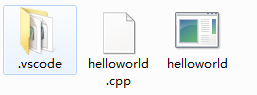
c_cpp_properties.jason:
{
    "configurations": [
        {
            "name": "Win32",
            "browse": {
                "path": [
                    "${workspaceFolder}",
                    "C:\\LLVM\\lib\\gcc\\x86_64-w64-mingw32",
                    "C:\\LLVM\\x86_64-w64-mingw32\\include"
                ],
                "limitSymbolsToIncludedHeaders": true
            },
            "includePath": [
                "${workspaceFolder}",
                "C:/LLVM/lib/gcc/x86_64-w64-mingw32/7.2.0/include/c++",
                "C:/LLVM/lib/gcc/x86_64-w64-mingw32/7.2.0/include/c++/x86_64-w64-mingw32",
                "C:/LLVM/lib/gcc/x86_64-w64-mingw32/7.2.0/include/c++/tr1",
                "C:/LLVM/x86_64-w64-mingw32/include"
            ],
            "defines": [
                "_DEBUG",
                "UNICODE",
                "_UNICODE"
            ],
            "cStandard": "c11",
            "cppStandard": "c++17",
            "intelliSenseMode": "msvc-x64"
        }
    ],
    "version": 4
}
Hướng dẫn đóng góp
Bắt đầu từ đâu
- Đọc hết issue, rồi đọc hướng dẫn đóng góp của dự án.
- Bình luận trên issue rằng bạn sẽ nhận — tránh hai người làm cùng một việc.
- Fork repository và làm thay đổi trên một nhánh.
- Mở pull request có tham chiếu số hiệu của issue.
Hướng nghiên cứu
Bắt đầu bằng cách tái hiện lỗi với helloworld.cpp và các tệp launch.json, tasks.jason cùng c_cpp_properties.jason được cung cấp, trên các phiên bản Windows, GCC và GDB đã được báo cáo. So sánh đầu ra của tác vụ và cấu hình trình gỡ lỗi với thời điểm debug adapter kết thúc; được xem là hoàn tất khi chương trình mẫu bắt đầu một phiên gỡ lỗi mà không bị kết thúc ngoài dự kiến.
Do mô hình lập chỉ mục viết ra từ nội dung của issue.
Đánh giá
- Công nghệ
- cpp, vscode
- Lĩnh vực
- devtools
- Loại issue
- Lỗi
- Độ khó
- 4/5
- Thời gian dự kiến
- 3-5 ngày
- Mức độ hoạt động
- Đình trệ
- Độ rõ ràng
- Cần làm rõ
- Mức phù hợp với người mới
- 25/100