microsoft / microsoft/TypeScript
Using classes in jsdoc comments results in different behaviors depending on how the class was required
Chưa có ai nhận issue này.
- Ngôn ngữ chính
- Go
- Star
- 111k
- Fork
- 14.4k
- Merge trung bình
- 1 ngày 19 giờ
- Pull request đã merge (30 ngày)
- 117
Mô tả
TS Template added by @mjbvz
TypeScript Version: 3.9.1
Search Terms
- javascript
- jsdoc
Issue Type: Bug
I have a class Foo in a file deep in my project.
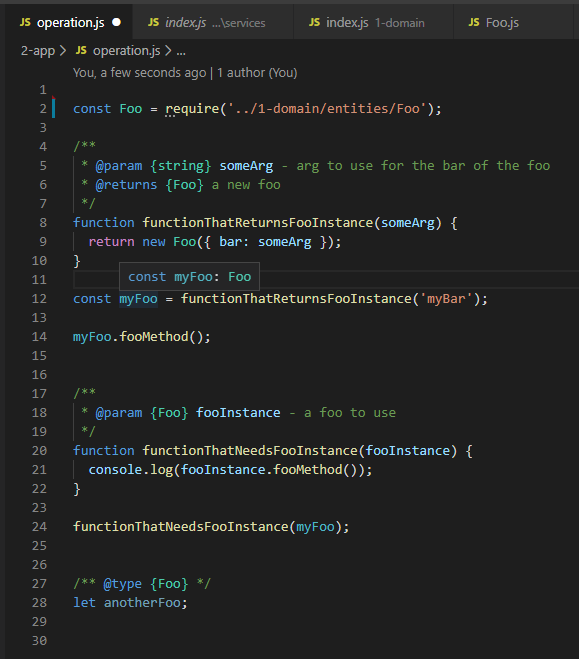
Everything works fine if I require it directly: intellisense understands that when I use Foo in my jsdoc comments, I mean that I want instances of Foo:
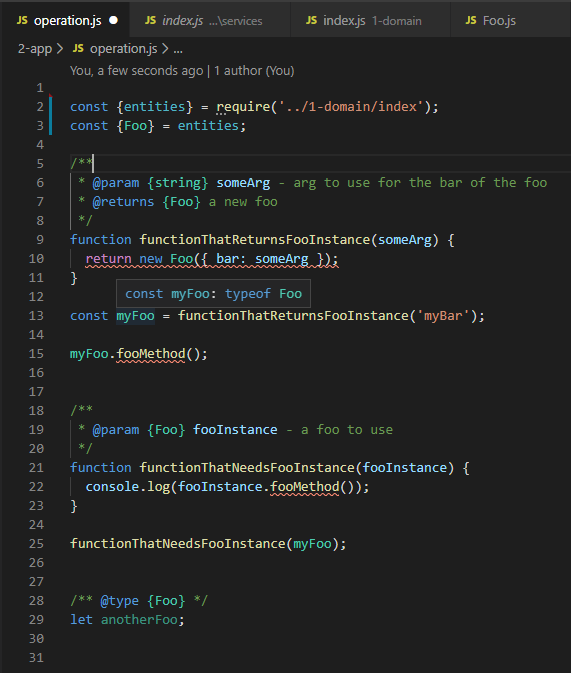
But if I require the same file through other files, intellisense thinks I want the Foo class:
I have created an example repo that reproduces the problem here:
https://github.com/gaelhameon/vscode-intellisense-issue
Is this the expected behavior ?
If it is, is there a way to have the "instance" behavior without having to require the file directly ?
Thanks in advance!
VS Code version: Code 1.45.0 (d69a79b73808559a91206d73d7717ff5f798f23c, 2020-05-07T16:18:48.860Z)
OS version: Windows_NT x64 10.0.18362
System Info
| Item | Value |
|---|---|
| CPUs | Intel(R) Core(TM) i5-8265U CPU @ 1.60GHz (8 x 1800) |
| GPU Status | 2d_canvas: enabled flash_3d: enabled flash_stage3d: enabled flash_stage3d_baseline: enabled gpu_compositing: enabled multiple_raster_threads: enabled_on oop_rasterization: disabled_off protected_video_decode: enabled rasterization: enabled skia_renderer: disabled_off_ok video_decode: enabled viz_display_compositor: enabled_on viz_hit_test_surface_layer: disabled_off_ok webgl: enabled webgl2: enabled |
| Load (avg) | undefined |
| Memory (System) | 7.82GB (1.53GB free) |
| Process Argv | |
| Screen Reader | no |
| VM | 0% |
Extensions (5)
| Extension | Author (truncated) | Version |
|---|---|---|
| javascript-test-runner-reloaded | ale | 2.2.1 |
| vscode-eslint | dba | 2.1.5 |
| gitlens | eam | 10.2.1 |
| vscode-pull-request-github | Git | 0.16.0 |
| vscode-commitizen | Kni | 0.8.4 |
Hướng dẫn đóng góp
Bắt đầu từ đâu
- Đọc hết issue, rồi đọc hướng dẫn đóng góp của dự án.
- Bình luận trên issue rằng bạn sẽ nhận — tránh hai người làm cùng một việc.
- Fork repository và làm thay đổi trên một nhánh.
- Mở pull request có tham chiếu số hiệu của issue.
Hướng nghiên cứu
Bắt đầu với repository tái hiện được liên kết và so sánh hai đường dẫn require được mô tả trong issue dưới TypeScript 3.9.1. Theo dõi cách JSDoc phân giải Foo khi class được required trực tiếp so với khi được required thông qua các file khác, sau đó xác minh hành vi trên thiết lập VS Code được báo cáo. Công việc được xem là hoàn tất khi hai đường dẫn import tạo ra IntelliSense nhất quán theo hướng instance, với một regression test bao quát reproduction.
Do mô hình lập chỉ mục viết ra từ nội dung của issue.
Đánh giá
- Công nghệ
- javascript, typescript
- Lĩnh vực
- devtools
- Loại issue
- Lỗi
- Độ khó
- 4/5
- Thời gian dự kiến
- 3-5 ngày
- Mức độ hoạt động
- Đình trệ
- Độ rõ ràng
- Khá rõ ràng
- Mức phù hợp với người mới
- 25/100