material-components / material-components/material-components-android
[BottomNavigationView] The border or shadow cannot be set after BottomNavigationView sets the top bulge
Nessuno ha ancora preso questa issue.
- Lingua principale
- Java
- Stelle
- 17.4k
- Fork
- 3.2k
- Metriche di merge delle PR
- Nessuna PR unita negli ultimi 30g
Descrizione
Description: Full description of issue here
I set the bulge for BottomNavigationView through the setTopEdge method of materialShapeDrawable, because the color of the page is similar to that of BottomNavigationView, so I need to set a border or shadow on top of the control, but I can't set the border or shadow on top of the control normally.
In addition, bottomNavigationView.invalidateOutline () seems to have some effect, but it seems to be only valid on Android12, and the lower version of Android cannot be used.

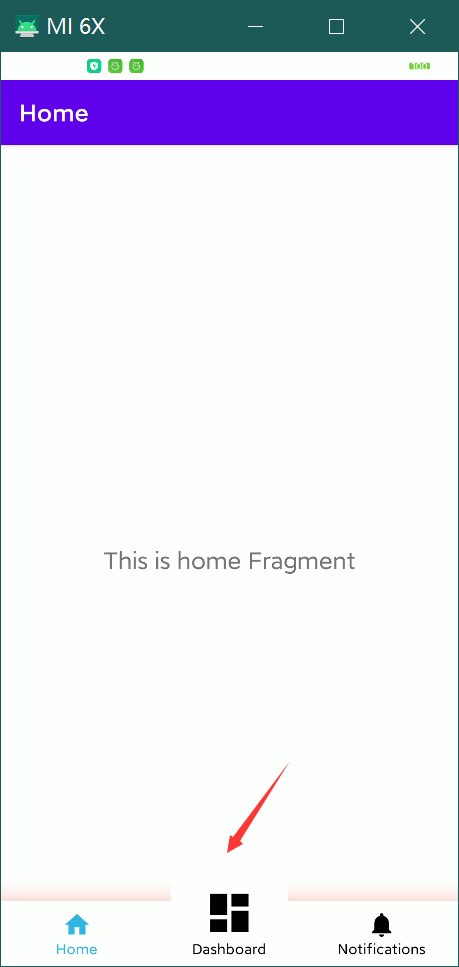
Expected behavior: Screenshots and/or description of expected behavior
I want the controls to be able to individually shape an edge as well as borders and shadows.
I hope api > = 21 can support similar effects.
Source code: The code snippet which is causing this issue
    val materialShapeDrawable = bottomNavigationView.background as MaterialShapeDrawable
    materialShapeDrawable.shapeAppearanceModel =
    materialShapeDrawable.shapeAppearanceModel
        .toBuilder()
        .setTopEdge(CutoutCircleEdgeTreatment(resources, 70.toFloat(), 10.toFloat()))
        .build()
    val backgroundDrawable =
        MaterialShapeDrawable(materialShapeDrawable.shapeAppearanceModel).apply {
            setTint(Color.WHITE)
            paintStyle = Paint.Style.FILL
            shadowCompatibilityMode = MaterialShapeDrawable.SHADOW_COMPAT_MODE_ALWAYS
            initializeElevationOverlay(this@MainActivity)
            setShadowColor(Color.RED)
            elevation = 100F
        }
    (bottomNavigationView.parent as? ViewGroup)?.clipChildren = false
    bottomNavigationView.background = backgroundDrawable
    bottomNavigationView.invalidateOutline()
class CutoutCircleEdgeTreatment(
res: Resources,
circleDiameterDp: Float,
circleLeftRightOffsetDp: Float
) : EdgeTreatment() {
    private val fabDiameter: Float
    private val offset: Float

    init {
        fabDiameter = TypedValue.applyDimension(
            TypedValue.COMPLEX_UNIT_DIP,
            circleDiameterDp,
            res.displayMetrics
        )
        offset = TypedValue.applyDimension(
            TypedValue.COMPLEX_UNIT_DIP,
            circleLeftRightOffsetDp,
            res.displayMetrics
        )
    }

    override fun getEdgePath(
        length: Float,
        center: Float,
        interpolation: Float,
        shapePath: ShapePath
    ) {
        //凸起半径
        val r = length / 10 // == center
        val halfLine = length / 2 - r
        //值越大转角处就越顺滑,但是必须小于等于r,这个大小可以多试试
        val offset = 30f
        //第一部分,直线,画到凹陷开始的地方
        shapePath.lineTo(halfLine - offset, 0f)
        //凸起开始的地方的转角,不处理的话看起来很尖锐
        shapePath.quadToPoint(halfLine, 0f, halfLine + offset, -offset)
        //凸起部分
        shapePath.quadToPoint(center, -r, halfLine + 2 * r - offset, -offset)
        //凸起结束的地方的转角
        shapePath.quadToPoint(halfLine + 2 * r, 0f, halfLine + 2 * r + offset, 0f)
// 最后一部分的直线,画到底
shapePath.lineTo(length, 0f)
}
}
Minimal sample app repro: Please consider attaching a minimal sample app that reproduces the issue. This will help narrow down the conditions required for reproducing the issue, and it will speed up the bug fix process. You may attach a zip file of the sample app or link to a GitHub repo that contains the sample app.
Android API version: Android API version here
28
Material Library version: Material Android Library version you are using here (e.g., 1.1.0-alpha07)
1.6.1
Device: Device on which the bug was encountered here
To help us triage faster, please check to make sure you are using the latest version of the library.
We also happily accept pull requests.
Guida per i contributori
Apri la guida per i contributori
Come iniziare
- Leggi tutta la issue e poi la guida ai contributi del progetto.
- Commenta sulla issue per dire che te ne occupi tu — evita che due persone facciano lo stesso lavoro.
- Fai un fork del repository e lavora su un branch.
- Apri una pull request che faccia riferimento al numero della issue.
Direzione di ricerca
Inizia riproducendo il problema con BottomNavigationView, MaterialShapeDrawable, setTopEdge e l’esempio fornito per API 28 in Material Library 1.6.1. Confronta il comportamento del bordo e dell’ombra con invalidateOutline() e la forma personalizzata. Il lavoro sarà completo quando il controllo potrà mantenere il proprio bordo superiore personalizzato visualizzando al contempo il bordo o l’ombra richiesti su API 21 e successive.
Scritto dal modello di indicizzazione a partire dal testo della issue.
Valutazione
- Stack tecnologico
- kotlin
- Ambito
- design, mobile
- Tipo di issue
- Bug
- Difficoltà
- 4/5
- Tempo stimato
- 3-5 giorni
- Stato di attività
- Ferma
- Chiarezza
- Da chiarire
- Idoneità per principianti
- 25/100